

How D365 F&O’s budget control framework handles appropriation-based spending limits, encumbrance accounting that commits budget at the purchase requisition stage, the budget availability calculation Finance must understand before any transaction posts, and the five budget control configuration failures that allow regulated Finance organizations to overspend appropriated amounts without any system-level warning.
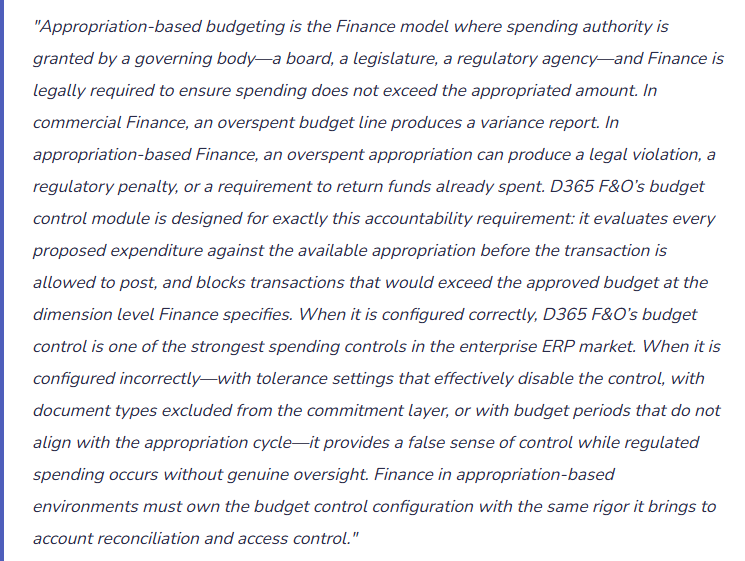
The Budget Control Commitment Hierarchy—How D365 F&O Tracks Spending at Every Stage
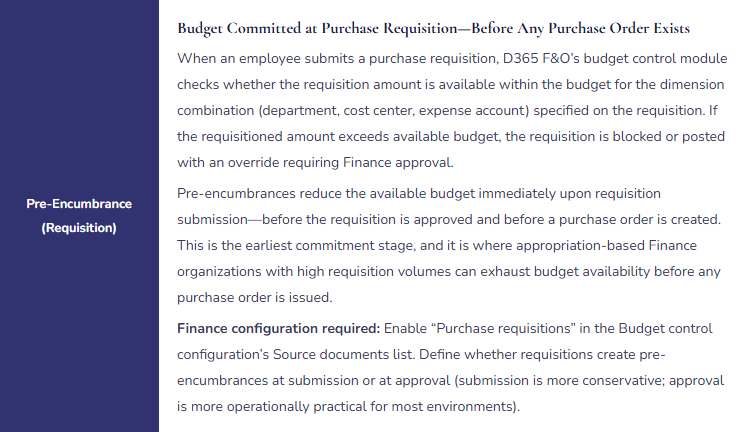
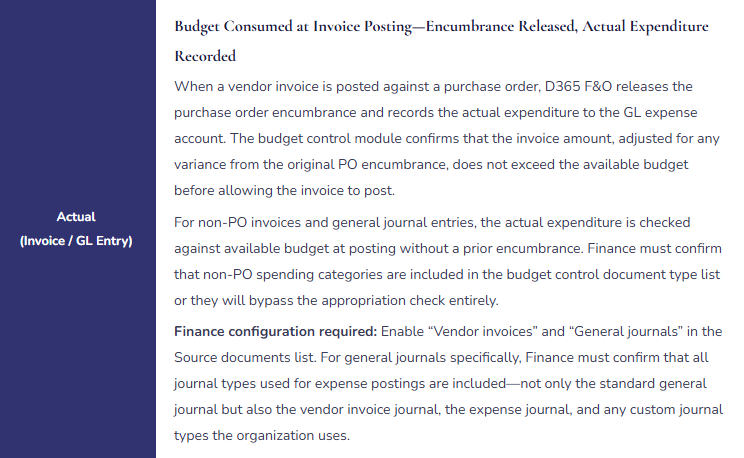
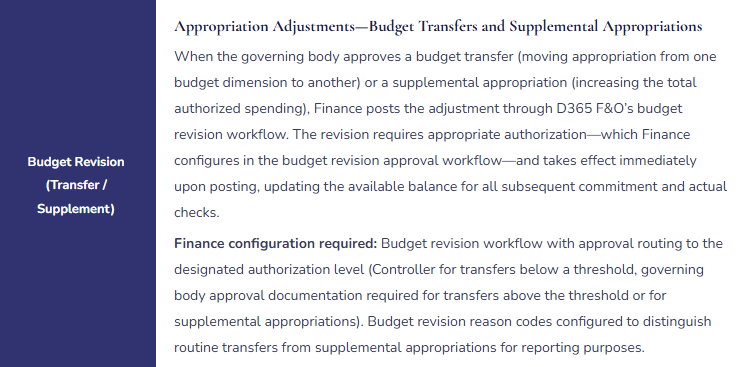
D365 F&O’s budget control module evaluates spending against available appropriation not only at the point of payment but at every stage where a spending commitment is made. Finance must understand the four-level commitment hierarchy and configure budget control to apply at each relevant level for the organization’s specific procurement and spending workflow.
Budget Control Commitment Hierarchy—Four Levels Finance Configures

The Budget Availability Calculation Finance Must Understand
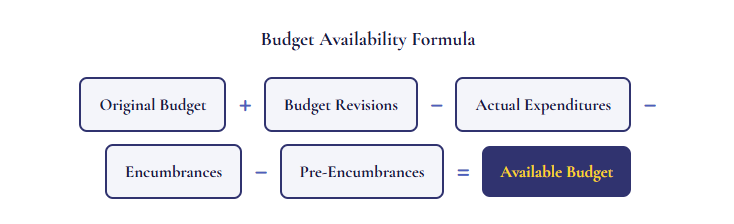
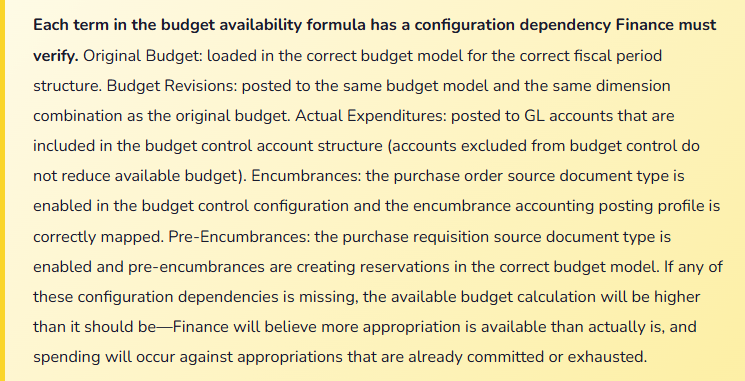
Before Finance can evaluate whether a budget control configuration is correct, Finance must understand how D365 F&O calculates budget availability for any given dimension combination at any point in time. The formula appears simple but has configuration dependencies Finance must confirm are set correctly.
Five Budget Control Configuration Failures in Appropriation-Based Finance
⚠️ Budget Tolerance Set at 100%—Budget Control Is Effectively Disabled
Finance enables D365 F&O’s budget control module. The implementation partner configures the budget tolerance at 100% to prevent go-live disruptions—a 100% tolerance means any transaction that would exceed the budget by any amount up to 100% of the budget itself is allowed to post with a warning rather than being blocked. For an organization with a $500,000 departmental appropriation, a 100% tolerance allows up to $1,000,000 of spending to post before the system blocks any transaction. Finance reviews the quarterly budget report and discovers that two departments have exceeded their appropriations by 40% and 62% respectively. Finance asks why the budget control module did not prevent the overspending. The answer: the 100% tolerance configuration made the module functionally equivalent to having no budget control at all.
Fix: For appropriation-based Finance environments, Finance should configure budget control tolerance at zero percent for all document types that represent legally binding appropriation limits. A zero-percent tolerance means any transaction that would cause the available budget to go negative is blocked from posting without an explicit override authorized by the appropriate level of Finance management. If zero-percent tolerance is operationally disruptive in specific high-volume procurement categories (where PO amounts frequently vary slightly from invoices due to unit pricing), Finance addresses this through PO invoice matching tolerances—not by increasing the budget control tolerance. The budget control tolerance and the invoice matching tolerance serve different purposes and should be configured independently.
⚠️ General Journal Not Included in Budget Control Source Documents—Direct GL Expenditures Bypass Appropriation Check
Finance configures budget control for purchase requisitions, purchase orders, and vendor invoices. General journals are not included in the Source documents list because Finance assumed that all spending goes through the AP procurement cycle. In practice, Finance posts approximately $340,000 per quarter of expenditures through general journals: accruals that become actual expenditures, expense reclassifications, direct GL charges for services that bypass the purchase order process. None of these general journal postings are checked against available appropriation before posting. Over an annual period, $1.36 million of expenditures bypass the appropriation control entirely. The regulatory auditor, reviewing the budget control configuration, identifies that general journals are excluded and tests a sample of general journal postings against the appropriation limits. The auditor finds four journal entries that were posted to accounts that had no remaining appropriation at the time of posting.
Fix: Budget control must apply to every document type that creates an expenditure against appropriated funds, including general journals. Finance reviews every journal type used in D365 F&O for expense-related postings and confirms each is included in the budget control Source documents configuration. For general journals specifically, Finance confirms that the journal type check applies to expense-type account categories (not to balance sheet entries, bank entries, or GL reclassifications that do not represent appropriation consumption). Finance also configures the budget control override workflow so that any general journal entry that exceeds available appropriation routes to the Controller for explicit approval before posting—the override creates an audit trail that the regulatory auditor can review without identifying it as a control failure.
⚠️ Budget Period Does Not Align With Appropriation Period—Carry-Forward Spending Consumes Next-Year Budget
The organization’s governing body approves appropriations on a fiscal year basis (July 1 through June 30). D365 F&O’s budget was configured at implementation with calendar year budget periods (January through December) because the implementation team used the calendar year as the default period structure. The fiscal year appropriation for Department A is $800,000. The D365 F&O budget control module checks spending against the calendar year budget period. In January (which is the second half of the fiscal year for this organization), expenditures from the prior July appropriation are checked against the new January calendar year budget—which has $800,000 available because the new calendar year started fresh. Department A spends $320,000 in January and February that should have been charged against the July fiscal year appropriation’s remaining balance. The budget control module shows $480,000 available because it is checking against the new calendar year budget. The actual remaining fiscal year appropriation is negative.
Fix: The budget period structure in D365 F&O must align with the governing body’s appropriation period. If the appropriation is granted for a fiscal year running July 1 through June 30, the D365 F&O budget period must be configured to match that cycle. Finance reviews the fiscal period structure (General ledger → Ledger setup → Fiscal periods) and confirms the budget periods configured for budget control correspond to the appropriation periods as defined in the organization’s governing documents. For organizations transitioning from a calendar year to a fiscal year budget structure, Finance runs a full budget control validation after the period structure change: test a transaction against the changed period structure and confirm the available budget displayed reflects the fiscal year appropriation balance, not the calendar year budget balance.
⚠️ Encumbrance Accounting Not Configured—Purchase Orders Do Not Reduce Available Appropriation Until Invoice Posts
Finance enables budget control and loads the annual appropriation as the budget. Purchase requisitions and purchase orders are included in the Source documents list. However, the encumbrance accounting posting profile has not been configured—Finance did not include encumbrance accounting setup in the implementation scope because the implementation team noted it was a “public sector feature.” Without encumbrance accounting, purchase orders do not reduce the available appropriation balance until the vendor invoice is posted months later. A department with a $200,000 appropriation issues purchase orders totaling $180,000 in the first quarter. The budget control module shows $200,000 available throughout the quarter because the purchase order commitments are not reducing the balance. Department managers, seeing $200,000 available, submit additional requisitions for $85,000. The additional requisitions are approved by the budget control module. When the $180,000 of vendor invoices post in the second quarter, the available balance goes to $20,000. The $85,000 of additional commitments now exceeds the remaining $20,000 by $65,000.
Fix: Encumbrance accounting is required for any appropriation-based Finance environment where purchase orders represent a binding commitment of appropriated funds before the invoice is received. Finance configures the encumbrance accounting posting profile (Budgeting → Setup → Budget control → Budget control configuration → Documents and journals tab) to post encumbrances at purchase order confirmation and reverse them at invoice posting. Finance tests the encumbrance configuration by creating a test purchase order in the sandbox environment and confirming: (1) the budget available balance decreases by the PO amount upon confirmation; (2) the encumbrance posts to the designated encumbrance GL account; (3) when a test invoice is posted against the PO, the encumbrance reverses and the actual expenditure is recorded; and (4) the budget available balance reflects the actual invoice amount rather than the original PO amount after the invoice posts.
⚠️ Budget Control Account Structure Excludes Material Expense Accounts—Spending on Excluded Accounts Is Unchecked
Finance configures the budget control account structure to include all accounts in the 6000–6999 range (operating expenses). Several expense accounts that were added after go-live—including a new account for contracted IT services (GL 7100) and a capital project expense account (GL 7200)—were added outside the 6000–6999 range and are not included in the budget control account structure. $680,000 of spending on IT services and capital project costs posts to GL 7100 and GL 7200 throughout the year without any budget control check. The appropriation that was granted for these categories ($500,000 combined) is overspent by $180,000 without any system-level notification. The regulatory auditor identifies the overspending during the annual audit and asks Finance to explain why the budget control module allowed spending above the appropriation for these categories.
Fix: The budget control account structure must include every GL account that can receive appropriation-funded expenditures. Finance reviews the budget control account structure annually—as part of the annual health check (Post 53)—and confirms every account used for operating expenditures, capital expenditures, and any other appropriated spending category is included. Finance also adds a review of the budget control account structure to the new GL account creation procedure: whenever a new expense account is added to the COA, Finance confirms whether it falls within an existing budget control account range or whether the range must be extended to include it. Any new expense account added outside the current budget control ranges must be explicitly added to the account structure configuration before any transaction is posted to it.
Do This / Don’t Do This
Do This
- Set budget control tolerance at zero percent for appropriation-based Finance environments—any non-zero tolerance partially defeats the control
- Include general journals in the budget control Source documents list—not only procurement cycle documents
- Configure budget periods to match the governing body’s appropriation period, not the calendar year default
- Configure encumbrance accounting so purchase orders reduce available appropriation at confirmation, not at invoice posting
- Review the budget control account structure annually and when any new expense account is added to the COA
- Test the full budget availability formula in the sandbox environment before go-live: confirm that actual expenditures, encumbrances, and pre-encumbrances all correctly reduce the displayed available balance
Don’t Do This
- Configure budget control tolerance at a high percentage to avoid go-live disruptions—it makes the control functionally meaningless for appropriation compliance
- Exclude general journals from budget control because “all spending goes through procurement”—verify this assumption against actual spending patterns
- Use calendar year budget periods when the appropriation cycle is a non-calendar fiscal year
- Skip encumbrance accounting configuration because it seems like a “public sector” feature—it is required whenever purchase orders represent binding appropriation commitments
- Add new expense accounts to the COA without reviewing whether they are included in the budget control account structure
What’s Next:
Appropriation budgeting addresses Finance’s spending control responsibility. The next post moves to the procurement side of the Finance-procurement relationship: The Vendor Collaboration Portal—What Finance Must Own in the Supplier Self-Service Model—how D365 F&O’s Vendor collaboration portal enables suppliers to view purchase orders, submit invoices, and update their own information without AP team involvement, the Finance controls Finance must configure before any vendor gains portal access, and the five vendor portal failures that create payment fraud risk, compliance gaps, and supplier data integrity issues that Finance discovers too late.
— Bobbi
D365 Functional Architect · Recovering Controller
Thank you for reading!
If this post helped you solve a real problem, share it with a Finance colleague who is in the middle of an ERP implementation or a post-go-live optimization. If you have a topic that I haven’t covered, please reach out. This platform is always evolving, and there is one more subject worth exploring.
If you are interested in learning more, here are some of my latest posts:
Leave a Reply