

The right-of-use asset and lease liability model, how D365’s Asset Leasing module handles lease classification, amortization schedule generation, and automated monthly journal creation, discount rate sourcing, lease modifications, and the ongoing governance that keeps the lease portfolio reconciled without a parallel spreadsheet perpetually running alongside the system.
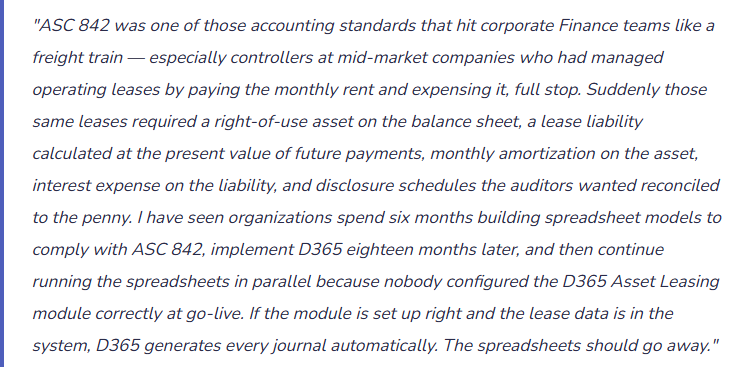
The Accounting Model — What ASC 842 and IFRS 16 Actually Require
Before configuring D365, Finance must understand what the standard requires. The conceptual model is the same under both ASC 842 and IFRS 16, though the classification criteria and income statement presentation differ.
At lease commencement, the lessee recognizes two items on the balance sheet: a right-of-use (ROU) asset representing the lessee’s right to use the underlying asset for the lease term, and a lease liability representing the present value of future lease payments. The ROU asset and lease liability are initially equal (with adjustments for initial direct costs, lease incentives, and prepaid rent). Over the lease term, the liability amortizes as payments are made, with each payment split between interest expense (on the outstanding liability balance) and principal reduction. The ROU asset amortizes separately — the method depends on the lease classification.
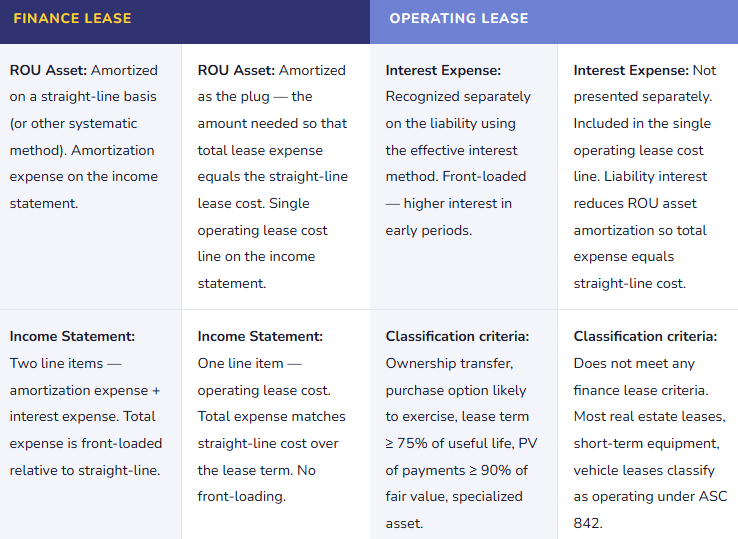
Under ASC 842, leases are classified as either finance leases (formerly called capital leases) or operating leases. Both require balance sheet recognition. The income statement treatment differs:
D365 Asset Leasing Module — The Setup Finance Must Own
Asset Leasing Configuration — Finance-Owned Setup Elements
- Lease Books
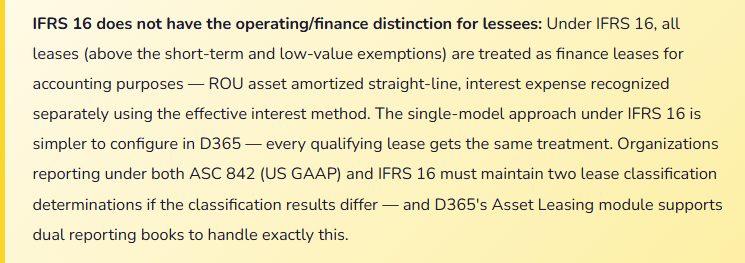
- A lease book in D365 is the accounting policy container — it defines whether the book follows ASC 842 or IFRS 16, the initial recognition method, how the ROU asset and liability are calculated, and which posting accounts receive the journal entries. Organizations reporting under both standards configure two lease books: one for US GAAP (ASC 842), one for IFRS (IFRS 16). Each lease is associated with one or more books, and D365 generates separate amortization schedules and journals for each book. Finance must configure the lease books before any leases are entered — the book drives every subsequent calculation.
- Posting Accounts by Lease Type and Transaction Type
- D365 Asset Leasing requires GL accounts mapped to each combination of lease type (finance, operating) and transaction type (ROU asset recognition, lease liability recognition, amortization expense, interest expense, lease payment, initial direct cost). The minimum account structure: ROU Asset (balance sheet), Accumulated Amortization — ROU Asset (balance sheet contra), Lease Liability (balance sheet, split into current and non-current if needed), Amortization Expense (income statement), Interest Expense on Lease Liability (income statement), Operating Lease Cost (income statement — operating leases only). Finance must define these accounts before the first lease is entered — they cannot be changed retroactively without significant remediation.
- Discount Rate Configuration
- The lease liability is calculated as the present value of future lease payments discounted at the lease’s incremental borrowing rate (IBR) — the rate the lessee would pay to borrow funds to purchase a similar asset over a similar term. Under ASC 842, if the implicit rate in the lease is readily determinable, it is used instead of IBR. D365 Asset Leasing allows the IBR to be set per lease or via a rate index table by currency and lease term. Finance must maintain the IBR documentation — the rate used, the methodology for determining it, and the supporting evidence — because auditors will ask how the discount rate was determined for each lease.
- Short-Term and Low-Value Exemptions
- Both ASC 842 and IFRS 16 allow optional exemptions: leases with a term of 12 months or less (short-term exemption) and, under IFRS 16, leases for which the underlying asset has a low value when new (low-value exemption, typically assets valued below approximately $5,000). Leases that qualify for an exemption are expensed on a straight-line basis and are not recognized on the balance sheet. D365 Asset Leasing allows short-term leases to be tracked without generating ROU asset and liability journal entries. Finance must apply the exemptions consistently and document the policy — selectively applying exemptions is not permitted under either standard.
- Lease Term Determination — Including Renewal Options
- The lease term for accounting purposes is not necessarily the contractual term. ASC 842 and IFRS 16 require inclusion of optional renewal periods that are reasonably certain to be exercised and optional termination periods that are reasonably certain not to be exercised. A 3-year office lease with two 3-year renewal options might have a 9-year accounting lease term if the business has significant leasehold improvements and it is reasonably certain the options will be exercised. Finance must make a documented judgment call on each renewal option — and reassess that judgment when facts and circumstances change. In D365, the lease term entered drives the amortization schedule; an incorrect term produces incorrect balance sheet balances and incorrect disclosure.
The Amortization Schedule and Monthly Journal — What D365 Generates Automatically
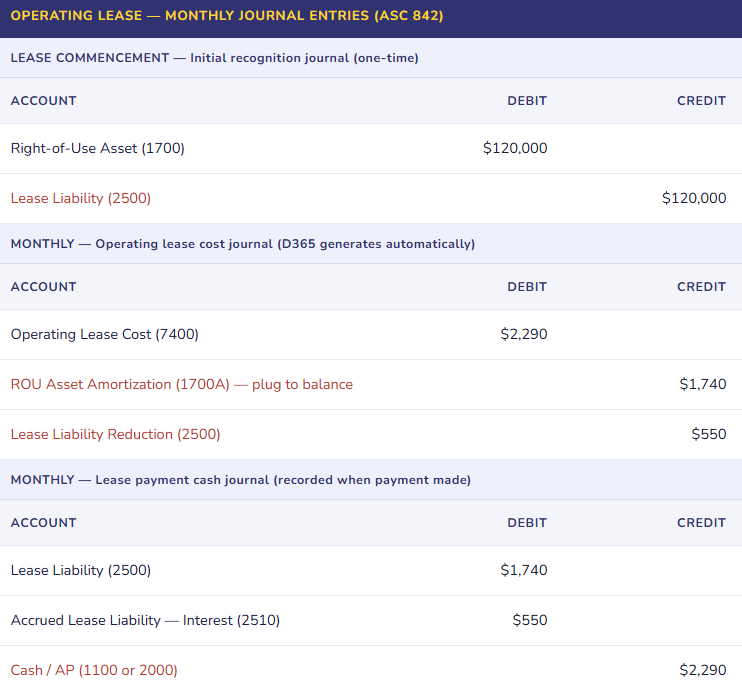
Once a lease is entered and confirmed in D365 Asset Leasing, the module generates a complete payment and amortization schedule for the life of the lease. Finance should verify the schedule before confirming — the calculated amounts are only as accurate as the inputs (payment amounts, lease term, discount rate). After confirmation, D365 can generate the required monthly journals automatically with a single batch process.
| Period | Beginning Liability | Payment | Interest (IBR 5.5%) | Principal | Ending Liability |
|---|---|---|---|---|---|
| Month 1 | $120,000 | $2,290 | $550 | $1,740 | $118,260 |
| Month 2 | $118,260 | $2,290 | $542 | $1,748 | $116,512 |
| Month 3 | $116,512 | $2,290 | $534 | $1,756 | $114,756 |
| … schedule continues for all 60 months … | |||||
| Month 60 | $2,279 | $2,290 | $10 | $2,279 | $0 |
Lease Modifications — The Event Finance Must Handle Correctly
A lease modification is any change to the original lease terms — extending the lease term, adding space, reducing space, changing the payment amount, or terminating early. Under ASC 842 and IFRS 16, a modification generally requires remeasuring the lease liability at the modification date using the revised payment terms and a revised discount rate, and adjusting the ROU asset accordingly. Modifications are one of the most common sources of ASC 842 error in practice — because they happen unpredictably, they require judgment about whether the modification is a separate contract or a modification to the existing lease, and they require recalculation of the amortization schedule from the modification date.
In D365 Asset Leasing, lease modifications are processed through the lease adjustment workflow. The key inputs: the effective date of the modification, the revised payment schedule, and the revised discount rate (if applicable). D365 recalculates the lease liability at the modification date, computes the adjustment to the ROU asset, and generates the required adjustment journal entry. The adjusted amortization schedule then runs from the modification date through the revised lease end date.
Five Mistakes That Keep the Lease Spreadsheet Running Alongside D365
⚠️ Leases Entered in D365 but Not All Leases — The Schedule Is Incomplete and Nobody Knows It
The D365 implementation team configured the Asset Leasing module and entered the major property leases — headquarters, regional offices, manufacturing facility. The equipment leases — copiers, vehicles, forklifts — were not entered because “those are small.” At the end of the first year, the external auditor requests the complete lease population per ASC 842 disclosure requirements. Finance submits the D365 lease schedule. The auditor compares it to the lease obligation disclosure from the prior year under ASC 840. Thirty-two equipment leases that were on the prior-year operating lease disclosure are missing from the D365 schedule. The missing leases represent $1.4M of ROU assets and lease liabilities that aren’t on the balance sheet. The audit is extended while leases are entered, amortization schedules are generated for the full year, and adjustment journals are prepared for every prior period in the fiscal year. “We forgot about the equipment leases” is not a GAAP defense.
Fix: The lease population for ASC 842 / IFRS 16 includes every arrangement that gives the organization the right to control the use of an identified asset for a period of time in exchange for consideration — regardless of whether it is called a “lease.” Before configuring D365 Asset Leasing, conduct a complete lease inventory: review contracts, AP vendor payment history, equipment service agreements, real estate agreements, and any arrangement where a fixed payment is made in exchange for use of an asset. Every qualifying arrangement is a lease. Enter all of them in D365 at go-live. The dollar threshold for the low-value exemption (IFRS 16) or short-term exemption is the only legitimate reason to exclude a qualifying arrangement.
⚠️ Incorrect Lease Term — Renewal Options Excluded When They Are Reasonably Certain to Be Exercised
The organization leases its primary distribution facility under a 5-year term with two 5-year renewal options. The operations team intends to remain in the facility for at least fifteen years — they have invested significantly in tenant improvements and the location is central to the distribution network. At lease entry, Finance uses the 5-year contractual term as the accounting lease term, excluding the renewal options as “not certain.” The initial ROU asset and lease liability are calculated on 5-year payment terms. When the auditor reviews the lease, the facts — significant leasehold improvements, centrality to operations, management’s stated intention — indicate the renewal options are reasonably certain to be exercised. The accounting lease term should be 15 years. The ROU asset and lease liability are significantly understated. A restatement is required to reflect the correct accounting term and the present value of 15 years of payments.
Fix: The lease term determination under ASC 842 and IFRS 16 requires documented judgment analysis for each lease with renewal or termination options. The analysis must consider: economic incentives to renew (leasehold improvements, location criticality, relocation costs), past practice (has the organization historically renewed similar leases?), management’s stated intentions (documented, not assumed), and contractual factors (penalties for not renewing, favorable renewal rates). Document the analysis in writing for each lease with options and retain it as audit support. Where the analysis is close and the option exercise is uncertain, involve the auditor before finalizing the accounting term — a restatement for incorrect term determination is one of the most common ASC 842 audit findings in mid-market implementations.
⚠️ Lease Modifications Processed as New Leases — Amortization History Is Lost and Balances Are Wrong
A lease modification occurs: the organization extends a 3-year office lease for an additional 2 years at a slightly higher monthly payment. The accountant responsible for leases doesn’t know how to process a modification in D365 Asset Leasing, so they close the existing lease and create a new lease for the 2-year extension. The old lease closes with its remaining ROU asset balance written off to expense, and a new ROU asset is recognized for the extension. The income statement takes an unusual ROU asset write-off that can’t be explained. The new lease starts a fresh amortization schedule as if the lease were brand new. The disclosure schedule for the original lease is broken. The auditor cannot reconcile the beginning and ending ROU asset balance in the rollforward because a modification was processed as a termination and new lease.
Fix: Lease modifications in D365 Asset Leasing are processed through the lease adjustment workflow — not by closing and recreating the lease. The modification date, revised payment terms, and revised IBR are entered in the adjustment, and D365 recalculates the liability and adjusts the ROU asset from the modification date forward. The adjustment journal entry posts the difference between the old and new liability as an adjustment to the ROU asset carrying value. The amortization history is preserved; the rollforward disclosure reconciles cleanly. Finance staff responsible for lease accounting must be trained on the modification process before the first modification occurs — which is often within the first year of any lease portfolio.
⚠️ Discount Rates Applied Uniformly Without Documentation — Auditor Cannot Verify IBR Methodology
At implementation, Finance used 4.5% as the IBR for every lease in the D365 lease portfolio. The rate came from “a finance team discussion about what we’d pay to borrow money.” There is no documentation of how 4.5% was determined, no analysis of the organization’s credit profile, no reference to market rates for similar terms, no distinction between a 2-year vehicle lease and a 15-year real estate lease. The auditor asks for IBR documentation for a sample of leases. Finance provides the 4.5% figure. The auditor asks for the methodology. Finance cannot produce it. The auditor runs an IBR reasonableness analysis: current borrowing rates for the organization’s credit profile, adjusted for collateral and term, produce rates ranging from 3.8% to 6.2% by lease term. Several leases used a discount rate that is outside a reasonable range for the lease term — the ROU asset and liability balances are incorrect. Audit findings require restatement of six leases.
Fix: The IBR must be determined and documented for each lease or each lease category — not applied uniformly without analysis. The IBR is the rate the lessee would pay to borrow funds of a similar amount to purchase a similar asset over a similar term, in a similar economic environment, with similar collateral. For most mid-market organizations, the IBR is derived from observable data: the company’s existing borrowing rates for similar terms, adjusted for collateral and term differences, cross-referenced with market rate data from Bloomberg, the Fed’s H.15, or comparable public company disclosures. Different lease terms warrant different IBRs — a 2-year vehicle lease and a 10-year real estate lease should not use the same rate. Retain the IBR analysis as permanent audit support documentation for each lease.
⚠️ D365 Asset Leasing Not Reconciled to the Subledger Balance — The Spreadsheet Is Still Running
Asset Leasing is configured and leases are entered. But Finance never fully trusted the module outputs — the amortization schedule numbers seemed slightly off from the spreadsheet model that was used for the first-year adoption, and nobody had time to investigate the difference. Rather than resolving the discrepancy and retiring the spreadsheet, Finance runs both: D365 generates the monthly journals (which post to the GL), and the spreadsheet produces the disclosure schedules (which go to the auditor). The two sources have a growing divergence — the spreadsheet doesn’t reflect two lease modifications that were processed in D365, and one lease in D365 has an incorrect payment amount that was entered at implementation. The auditor receives disclosure schedules from the spreadsheet that don’t reconcile to the GL balances that came from D365. Reconciling the two takes the lease accountant three weeks during the audit.
Fix: The objective of implementing D365 Asset Leasing is to make it the single source of truth for lease accounting — not to run it alongside the spreadsheet indefinitely. At go-live, or at the point of any significant remediation, resolve every discrepancy between the D365 schedule and the pre-existing spreadsheet model. Discrepancies have two possible resolutions: the D365 calculation is correct and the spreadsheet was wrong (fix the spreadsheet to agree, then retire it), or the D365 configuration has an error (fix the configuration, reprocess the schedule). A discrepancy that “exists but is small” and is left unresolved will grow as modifications occur and new leases are added. The spreadsheet cannot be a permanent parallel system — it is a migration tool that should be retired once D365 is reconciled and validated as the system of record.
Do This / Don’t Do This
✓ Do This
- Conduct a complete lease inventory before configuring D365 Asset Leasing — every qualifying arrangement, not just property leases
- Document the lease term determination analysis for every lease with renewal or termination options
- Configure separate lease books for ASC 842 and IFRS 16 if reporting under both standards
- Determine and document the IBR for each lease or lease category — with supporting market rate analysis retained as audit evidence
- Process lease modifications through the D365 adjustment workflow — not by closing and recreating leases
- Reconcile D365 amortization schedules to GL balances at every period close
- Retire the parallel spreadsheet once D365 is validated as the system of record
- Reassess renewal option conclusions when facts and circumstances change — document the reassessment
- Involve the auditor in lease term and classification determinations that are close calls before the first balance sheet date
✗ Don’t Do This
- Enter only property leases and assume equipment leases are below materiality without calculating — “small” leases aggregated are often material
- Use a single IBR for all leases without documentation — the auditor will ask for the methodology for every lease in the sample
- Process modifications as new leases — you lose amortization history and break the rollforward disclosure
- Exclude renewal options without documented analysis of whether they are reasonably certain to be exercised
- Run D365 and a parallel spreadsheet indefinitely — resolve the discrepancy and retire the spreadsheet
- Configure the posting accounts after leases are entered — accounts drive every historical entry and cannot be changed retroactively without reprocessing
- Assume IFRS 16 and ASC 842 are identical — they differ on lessee classification and income statement presentation
Up Next:
Asset leasing closes the balance sheet standards arc. The next post moves to treasury: Cash Flow Forecasting and Treasury Management in D365 F&O — the cash flow forecast workspace, bank account structure and liquidity management, how D365 aggregates expected cash positions from AR aging, AP due dates, open sales orders, open purchase orders, and payroll cycles, and the Finance controls that turn a system-generated cash projection into a forecast leadership can actually use to make decisions.
— Bobbi
D365 Functional Architect · Recovering Controller
Thank you for reading!
Recent Posts:
- AI and ERP Security: What Copilot Means for Your D365 Security Roles and Internal Controls
- The Natural Language ERP: Stop Running Reports, Start Asking Questions
- AI Adoption in ERP: Why Change Management Is Your Most Critical AI Investment
- Agent 365: Microsoft’s Control Tower for All Your ERP Agents
- AI in D365 Supply Chain: From Demand Planning to Warehouse Intelligence
If this post helped you solve a real problem, please share it with a colleague who is in the middle of an ERP implementation or a post-go-live optimization. If you have a topic that I haven’t covered, please reach out. There is always one more topic worth exploring.
Leave a Reply