

Set It Once · A back-to-basics series · D365 Finance & Operations
Save a journal’s structure as a template once, and every future period becomes a quick review and post instead of data entry from scratch.

If you enter the same journal, or nearly the same journal, every single period, you are doing manual data entry on something the system already knows how to remember. F&O lets you save a journal as a template and reuse it, prefilled, every time the period comes back around.
The idea in one minute: Save the shape, reuse the shape
A recurring or saved journal keeps the structure, the accounts, the dimensions, and in many cases the amounts, so that next period you are reviewing and posting instead of rebuilding from a blank line.
Save a journal for reuse:
- Enter a journal the way you normally would, including all lines and dimensions.
- Before posting, use go to Period Journal -> Save Journal option, or mark it as a recurring journal.
- Next period, retrieve the saved journal from the template list instead of starting from scratch.
- Review the prefilled lines, adjust any amounts that changed, and post.

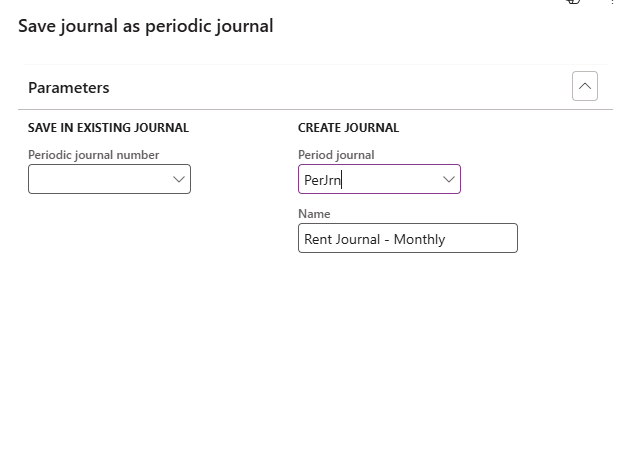
The next period:
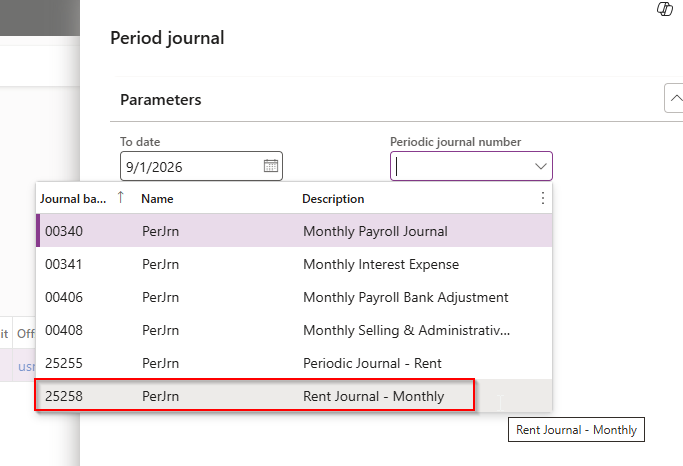
And the lines will auto populate based on the template that was created.
(please note – with this journal, I’m post dating it to show a future month. It didn’t automatically enter 9/1/26, it defaulted to today’s date.)


Next Up: Batch Scheduling – Let The System Run It While You Sleep
Thank you for reading!
Interested in learning more? Here are a few of my latest posts:





Leave a Reply