
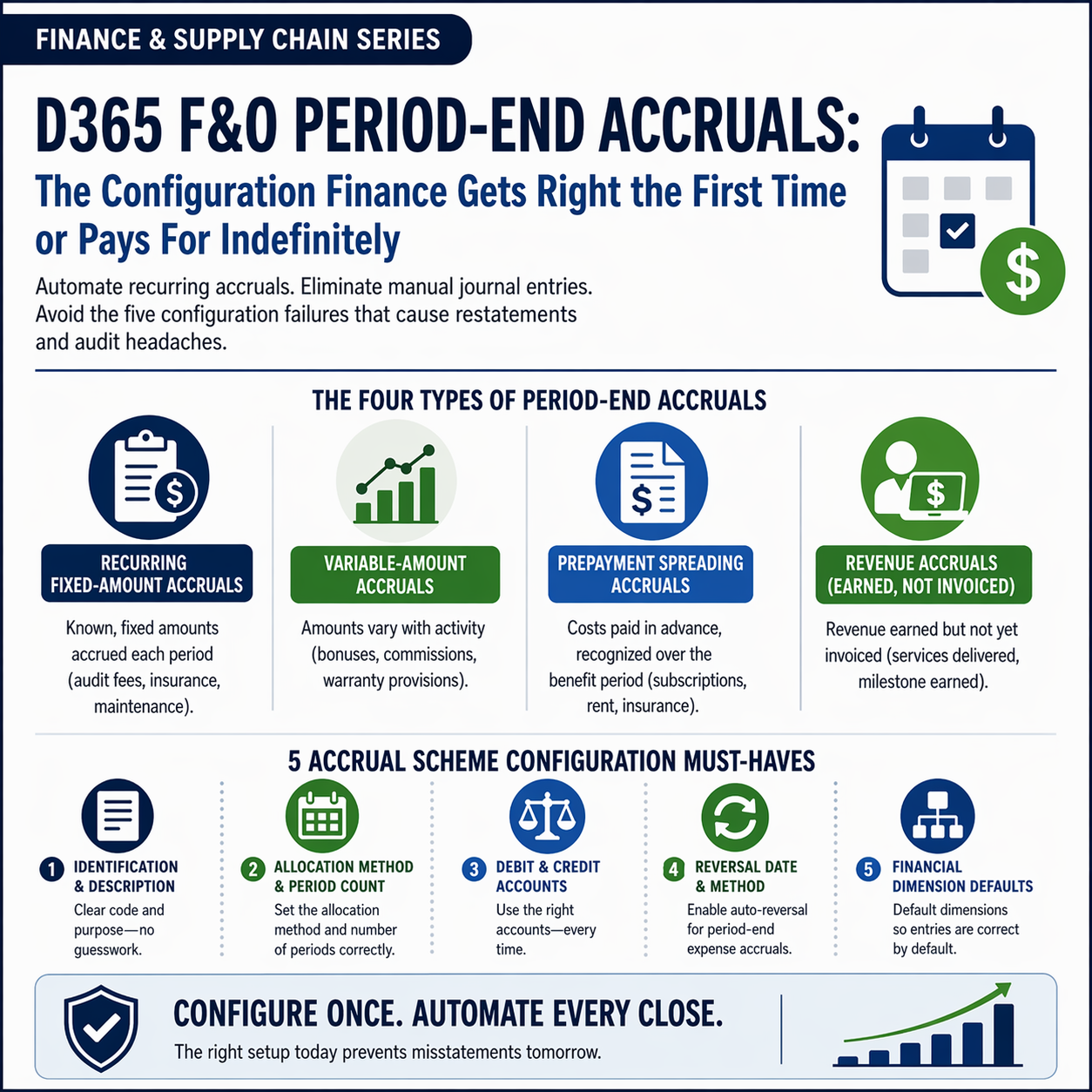
How D365 F&O’s Accrual scheme functionality automates recurring period-end accruals and eliminates the manual journal entry process Finance runs every close, the accrual scheme configuration Finance must build before the first close, the reversal mechanism Finance must understand to avoid double-counting, and the five accrual configuration failures that produce income statement misstatements Finance untangles during audits or the following month’s close.
The Four Types of Period-End Accruals Finance Must Manage in D365 F&O
Recurring Fixed-Amount Accruals
Accruals for expenses incurred continuously but invoiced periodically at a known fixed amount: the quarterly audit fee accrued monthly at one-third of the annual invoice, the annual insurance premium accrued monthly at one-twelfth of the annual premium, the annual maintenance contract accrued monthly at a fixed rate. The accrual amount is the same every month.
D365 F&O configuration: Accrual scheme with a fixed allocation percentage applied to the journal entry amount, configured to post monthly to the expense account and the accrued liability account. Finance enters the journal entry using the accrual scheme template and D365 F&O automatically creates the debit and credit based on the scheme definition.
Finance owns: Reviewing the fixed accrual amount at least quarterly and updating the scheme when the underlying estimate changes. An audit fee accrual still running at last year’s fee estimate after the fee has been renegotiated upward is an accrual that understates the audit fee expense every month until Finance updates the template.
Variable-Amount Accruals
Accruals for expenses whose period amount varies based on activity: the bonus accrual that changes monthly based on performance against target, the sales commission accrual that varies with revenue, the warranty provision that changes with sales volume and the current failure rate estimate. The accrual amount must be calculated by Finance each period before the journal entry is posted.
D365 F&O configuration: Accrual schemes are less useful for truly variable accruals because the amount cannot be pre-configured. Finance uses manual GL journal entries for variable accruals, with the accrual journal template (General ledger → Journal entries → General journals → Lines → Accrual) selected to ensure the reversal is automatically posted at the start of the next period.
Finance owns: The calculation methodology for each variable accrual, documented and reviewed by the Controller before each posting. Finance also confirms the prior period’s reversal has posted before entering the current period’s new accrual amount for the same item.
Prepayment Spreading Accruals
Accruals for costs paid in advance that must be recognized over the benefit period: the annual software subscription paid in January that must be charged as an expense evenly across twelve months, the rent deposit that must be released over the lease term, the insurance premium paid annually that must be spread over the coverage period. These are prepaid expenses recognized systematically rather than true accrued liabilities.
D365 F&O configuration: Accrual schemes with a defined spreading method (straight-line over a specified number of periods) and a start date. When Finance posts the prepayment invoice, the accrual scheme automatically creates the monthly expense recognition entries and the offsetting prepaid asset releases over the defined period. Finance reviews the accrual scheme setup to confirm the period count and the accounts are correct before any prepayment invoice is posted using the scheme.
Finance owns: Confirming the accrual scheme period count matches the actual contract term for each prepayment. A 12-month software contract must have a 12-period scheme; an 18-month maintenance contract must have an 18-period scheme. A scheme with the wrong period count under- or over-recognizes expense for the entire contract duration.
Revenue Accruals (Earned but Not Yet Invoiced)
Accruals for revenue earned in the current period but not yet invoiced to the customer: the professional services hours delivered in March that will be invoiced in April, the project milestone partially completed at period end where revenue recognition has been triggered but the billing milestone has not yet occurred. Revenue accruals record the receivable and the revenue in the correct period without waiting for the invoice.
D365 F&O configuration: Revenue accruals are typically posted as manual GL journal entries or through the Project management module’s revenue recognition functionality (Post 64 of this series). For non-project revenue accruals, Finance uses an accrual journal entry with reversal at the start of the following period—the reversal ensures the entry is cleared when the actual invoice is posted in the next period.
Finance owns: The revenue accrual amount and the accounting policy basis for recognition. Finance must be able to evidence that the accrued revenue represents goods or services actually delivered by period end—not anticipated future delivery. An overly aggressive revenue accrual that Finance cannot substantiate with delivery evidence is a revenue recognition error, not a timing difference.
Configuring D365 F&O Accrual Schemes—What Finance Must Build Before the First Close
Accrual Scheme Configuration—Five Settings Finance Owns for Each Scheme
- Accrual Identification and Description
- Finance assigns a meaningful code and description to each accrual scheme that makes its purpose immediately clear to any Finance user who sees it: “AUDIT-FEE” with description “Quarterly Audit Fee Monthly Accrual” or “BONUS-ACCRUAL” with description “Annual Bonus Provision Monthly Recognition.” Clear identification prevents the error of applying the wrong accrual scheme to a journal entry and prevents confusion when Finance staff change and a new team member encounters an accrual scheme with a cryptic code. Finance maintains a register of all active accrual schemes with their purpose, review frequency, and current accrual basis.
- Allocation Method and Period Count
- Finance selects the allocation method (Equal per period for straight-line spreading, or Beginning/End for full-period recognition in the first or last period) and the number of periods over which the accrual or prepayment is spread. For a monthly accrual of a quarterly expense: 3 periods. For a monthly accrual of an annual expense: 12 periods. For spreading a 24-month software subscription: 24 periods. Finance validates that the period count in the scheme matches the actual contract term or accrual period before the scheme is applied to any live transaction.
- Debit and Credit Account Configuration
- The accrual scheme specifies which GL accounts receive the debit and which receive the credit when the scheme is applied to a journal entry. For an expense accrual: the debit is the expense account (e.g., Audit Fees Expense) and the credit is the accrued liability account (e.g., Accrued Liabilities — Audit). For a prepayment spreading scheme: the debit is the expense account and the credit is the Prepaid Expenses asset account. Finance confirms both accounts are correct and active in the COA before the scheme is used. An accrual scheme pointing to a deprecated or incorrect account routes every entry using that scheme to the wrong GL account for the life of the scheme.
- Reversal Date and Method
- D365 F&O’s accrual functionality allows Finance to specify whether journal entries using the scheme automatically reverse at the start of the next period. For period-end accruals (where Finance is accruing an expense to match it to the current period, intending to reverse in the next period when the actual invoice arrives), auto-reversal must be enabled. Finance configures the reversal date as the first day of the following accounting period. For prepayment spreading accruals (where Finance is not reversing but recognizing a cost over multiple periods), auto-reversal is not appropriate—Finance configures the scheme without auto-reversal and uses the spreading functionality instead.
- Financial Dimension Defaults
- If the accrual scheme represents a cost associated with a specific cost center, department, or project, Finance configures default financial dimensions on the scheme so that entries created using the scheme automatically carry the correct dimension values. A bonus accrual for the Finance department should default to the Finance cost center dimension value—Finance should not have to manually enter the dimension on every journal entry that uses the scheme. Finance reviews the default dimension values on each scheme quarterly and updates them when the organizational structure changes.
Five Accrual Configuration Failures Finance Untangles at Audit or the Following Month
⚠️ Reversal Not Configured—Prior Period Accrual and Current Period Accrual Both on the Income Statement
Finance posts a monthly bonus accrual at period end using a journal entry with the accrual scheme applied. The accrual scheme was configured without auto-reversal because the Finance coordinator who configured it was not certain whether the reversal should be automatic or manual. The accrual posts to the bonus expense account at period end. At the start of the following month, no reversal occurs. Finance posts the next month’s bonus accrual without noticing that the prior month’s accrual is still on the books. Both the prior month’s and the current month’s bonus accruals accumulate on the income statement. By month four, the bonus expense account carries four months of accruals that should have been reversed each month. The income statement overstates bonus expense by three months’ worth of accruals. Finance discovers the accumulation when the CFO asks why bonus expense is running 30% above the annual plan run rate in a month where actual bonuses have not been paid.
Fix: For period-end accruals that Finance intends to reverse at the start of the following period—which is the intended purpose of most expense accruals—Finance configures auto-reversal in the accrual scheme with the reversal date set to the first day of the following accounting period. Finance also adds “Confirm prior period accrual reversals have posted” as a Day +1 close task in the Closing Cockpit: Finance opens the accrual journal entries from the prior period and confirms each entry that should have reversed has a corresponding reversal entry in the current period. If any reversal is missing, Finance investigates and posts the reversal manually before entering the current period’s new accrual for the same item.
⚠️ Prepayment Spreading Scheme Period Count Wrong—Annual Subscription Fully Expensed in Month One
Finance pays a $48,000 annual software subscription in January and posts the invoice using a prepayment spreading accrual scheme. The scheme was configured with a period count of 1 instead of 12 when the Finance analyst set it up during implementation—she intended to enter 12 months but entered 1. D365 F&O recognizes the full $48,000 as an expense in January (one period of 100%). No expense recognition occurs in February through December. The January income statement shows $48,000 of software subscription expense; February through December show $0. The annual budget assumed $4,000 per month. Finance receives budget variance questions from the CFO in January ($44,000 over budget) and February ($4,000 under budget for all remaining months). The investigation reveals the scheme configuration error, which requires correcting the recognition across twelve months retroactively.
Fix: Finance validates the accrual scheme period count in sandbox before using any scheme for a live transaction: create a test transaction using the scheme, view the accrual schedule that D365 F&O generates, and confirm the number of recognition periods and the amount per period matches Finance’s intention. The accrual schedule is visible on the journal line before posting and shows Finance exactly how the amount will be distributed across periods. Finance should review the accrual schedule for every transaction using a prepayment spreading scheme before posting, not only for new schemes. The five-second review of the schedule before posting prevents the multi-period retroactive correction that a wrong period count requires.
⚠️ Accrual Amount Not Updated When the Underlying Estimate Changes—Audit Fee Under-Accrued for Eight Months
Finance configured an audit fee accrual at $12,000 per month (based on the prior year’s audit fee of $144,000 per year) in January. In March, the audit firm notified Finance that the current year’s audit fee would be $192,000—a 33% increase due to additional procedures required for a new reporting requirement. Finance acknowledged the fee increase and instructed AP to update the vendor record. Nobody updated the monthly accrual amount in the accrual scheme. For eight months (March through October), Finance accrued $12,000 per month while the correct amount was $16,000 per month. The cumulative under-accrual at October period-end is $32,000 (8 months x $4,000 per month). When the audit invoice arrives in November at $192,000, Finance posts it against the accrued liability account and discovers the $32,000 shortfall. The November income statement takes a $32,000 catch-up charge in addition to the month’s regular expense recognition.
Fix: Finance reviews all accrual scheme amounts at the same time as any change to the underlying contract, estimate, or rate that drives the accrual. The review is triggered by events: a fee letter from the auditor, a contract renewal with changed terms, a compensation review that changes the bonus accrual rate, an insurance renewal with a new premium. Finance adds “Update accrual scheme amounts” to the change procedures for each accrual type: when the audit fee changes, update the audit fee accrual scheme; when the bonus accrual rate changes, update the bonus accrual scheme. Finance also conducts a quarterly accrual scheme review: pull the list of all active accrual schemes and confirm each scheme’s amount is consistent with the current underlying estimate or contract.
⚠️ Accrual Posted to Wrong Expense Account—Provision Builds in an Account Finance Is Not Monitoring
A Finance analyst creates a new accrual scheme for a new category of regulatory compliance costs. When configuring the scheme, she selects the Legal Fees expense account instead of the new Regulatory Compliance Fees account that Finance created specifically for this category. For six months, the regulatory compliance accrual posts to Legal Fees. The Legal Fees account balance is inflated by the compliance accruals, and the Regulatory Compliance Fees account shows zero activity. Management reviews Legal Fees monthly because it is a significant and variable expense category; they question why Legal Fees has increased but do not investigate deeply enough to identify the compliance accrual as the source. The Regulatory Compliance Fees account is not on any management report because it has never had activity—the new account was created but never added to the income statement Financial Report row definitions (Post 50 of this series). The misrouting is discovered when Finance restructures the management report in month seven and notices the Regulatory Compliance Fees account has no balance despite six months of regulatory activity.
Fix: Finance validates the debit and credit accounts in every accrual scheme before the scheme is used for any live transaction: open the scheme, confirm the accounts exist in the current active COA, confirm each account is the correct account for the type of cost represented, and post a test entry in the sandbox environment tracing the GL entries to the expected accounts. Finance also adds any new expense account to the relevant Management Reporter Financial Report row definitions at the time the account is created—not as a separate post-go-live task. An expense account that is active in the COA but not in any financial report produces spending that is invisible in management reporting, which Finance discovers only when a report is restructured or an account balance review reveals unexpected activity.
⚠️ Revenue Accrual Posted Without Delivery Evidence—Auditor Disallows Revenue for Three Months
Finance posts a revenue accrual at each period end for professional services hours “in progress” based on the project manager’s estimate of hours delivered but not yet invoiced. The project manager’s estimates are forward-looking—they represent what the project team expects to deliver in the month, not what has been confirmed as delivered. For three months, Finance accrues revenue based on estimates that include anticipated future delivery, not confirmed delivery as of the period-end date. When the external auditor reviews the revenue accrual for substantiation, Finance produces the project manager’s estimate sheets—which show anticipated hours, not confirmed delivered hours. The auditor disallows the revenue accruals for all three months as unsubstantiated and requires Finance to reverse and restate three months of income statements. The restatement reduces cumulative revenue by $180,000 for the three-month period.
Fix: Revenue accruals must be supported by delivery evidence as of the period-end date—not by estimates of future delivery. Finance establishes the substantiation requirement for each revenue accrual type: professional services accruals must be supported by timesheets or project completion confirmations showing hours actually delivered by the period-end date, signed off by the project manager based on actual work performed. Finance obtains the substantiation before posting the revenue accrual, not after. The substantiation is archived with the journal entry as audit evidence. Finance trains project managers on the distinction between confirmed delivery (reimbursable and accrualable) and anticipated delivery (not accrualable in the current period). The Finance review of revenue accruals before posting is the control that prevents forward-looking estimates from reaching the income statement as current-period revenue.
Do This / Don’t Do This
Do This
- Configure auto-reversal in the accrual scheme for every period-end expense accrual that Finance intends to reverse at the start of the following period
- Validate the accrual schedule in D365 F&O before posting any transaction using a prepayment spreading scheme
- Review all accrual scheme amounts whenever the underlying contract, estimate, or rate that drives the accrual changes
- Conduct a quarterly accrual scheme review confirming each scheme’s amount is current
- Validate debit and credit accounts in every accrual scheme before live use with a test posting in sandbox
- Require delivery evidence as of the period-end date for all revenue accruals before posting
Don’t Do This
- Configure period-end expense accrual schemes without auto-reversal—the accumulation of unreversed accruals overstates the income statement expense line by every missing reversal
- Post prepayment spreading transactions without reviewing the generated accrual schedule
- Allow the audit fee, bonus, and insurance accrual amounts to run unchanged when the underlying estimates change
- Accept the implementation-era accrual scheme account mappings without quarterly review against the current active COA
- Post revenue accruals based on the project manager’s forward-looking estimates rather than confirmed delivery evidence
What’s Next:
Period-end accruals complete the income statement for the period. The next post addresses the revenue-side Finance process that runs from the first customer invoice through collection—and where D365 F&O gives Finance visibility into customer payment behavior that most Finance teams never fully configure: Credit and Collections in D365 F&O—What Finance Must Configure Before the First Invoice Is Sent—how D365 F&O’s credit management and collections modules work together to give Finance a receivables management capability beyond a static AR aging report, the credit limit and hold configuration Finance must own, the collections workspace capabilities that reduce days sales outstanding, and the five credit and collections configuration failures that leave Finance managing receivables the same way it did before D365 F&O was implemented.
— Bobbi
D365 Functional Architect · Recovering Controller
Thank you for reading!
If a post helped you solve a real problem, share it with a Finance colleague who is in the middle of a D365 Finance and Operations implementation or a post-go-live optimization. If you have a topic the series did not cover, please reach out. There is always one more subject worth exploring.
Interested in learning more? Below are some of my latest posts:





Leave a Reply