

Electronic Reporting for statutory and regulatory output, the Data Management Framework for structured data movement, and how the complete D365 F&O reporting stack fits together — from trial balance to regulatory filing to Power BI dashboard.
The Reporting Landscape — Six Tools, Six Different Jobs
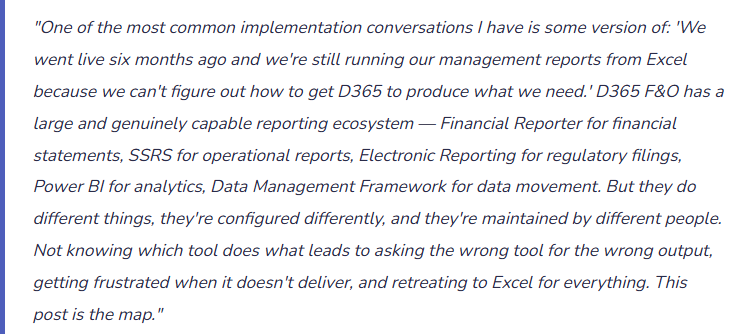
D365 F&O doesn’t have one reporting tool. It has six distinct reporting capabilities, each designed for a specific class of output. The tool selection decision should be driven by what you need to produce — and the wrong tool for the job will produce a frustrating implementation experience even when the tool itself is working correctly.
📊 Financial Reporter (FR) ~ Also referred to as Management REporter, a legagy tool used in Dynamics GP
- The financial statement tool. Row and column definitions, reporting trees for consolidated reporting, the budget vs. actual column, drill-down to GL transactions. This is the tool that produces the income statement, balance sheet, and cash flow statement that management and auditors review.
- Use for: statutory financials, management P&L, board package, period-end reporting package
🖨️ SSRS Reports (SQL Server Reporting Services)
- The operational report layer. Formatted, printable reports embedded in the D365 interface — aged AP/AR, trial balance detail, purchase order status, vendor invoice history. Thousands of standard SSRS reports ship with D365. New ones can be developed in Visual Studio. Layout and parameters configurable by users within the existing report design.
- Use for: operational inquiries, printed documents (invoices, POs), drill-through detail from Financial Reporter
📋 Electronic Reporting (ER)
- The regulatory and statutory filing tool. Generates structured data outputs — XML, JSON, CSV, XBRL, country-specific e-invoicing formats, VAT declarations — in exact formats required by tax authorities and regulatory bodies. Configuration-driven and updatable without code changes when regulatory formats change. Critical for multi-country D365 implementations.
- Use for: VAT/GST filings, e-invoicing mandates, 1099/1096, country-specific statutory reports, audit files (SAF-T, GDPdU)
📈 Power BI Embedded
- The analytics and trend analysis layer. D365 ships with pre-built Power BI content packs for Finance, supply chain, and HR. Embedded directly in the D365 workspace interface. Connects to D365’s analytical store (Azure Data Lake / Entity Store) rather than the live transaction database — so complex analytics don’t impact operational system performance.
- Use for: trend analysis, KPI dashboards, operational analytics, executive scorecards, cross-entity comparisons
🔄 Data Management Framework (DMF)
- The data import/export infrastructure. Structured data entities for importing and exporting master data, transaction data, and configuration data. Used for initial data migration (chart of accounts, vendor/customer master, opening balances), ongoing integration with external systems, and bulk data operations. Not a report — a data pipeline.
- Use for: go-live data migration, periodic data extracts for external systems, integration with non-integrated platforms, bulk update of master data
🔗 OData / Data Entities API
- The programmatic data access layer. D365 exposes data entities as OData REST APIs — allowing external applications (Power Apps, Power Automate, third-party BI tools, custom integrations) to query and write D365 data in real time. The mechanism behind Excel Add-in data pulls, Power Automate flows reading D365 data, and external dashboard tools connecting to live D365 data without DMF batch exports.
- Use for: real-time integration with external tools, Power Automate workflows, custom application development, Excel connected to live D365 data
Electronic Reporting — What Finance Needs to Understand About It
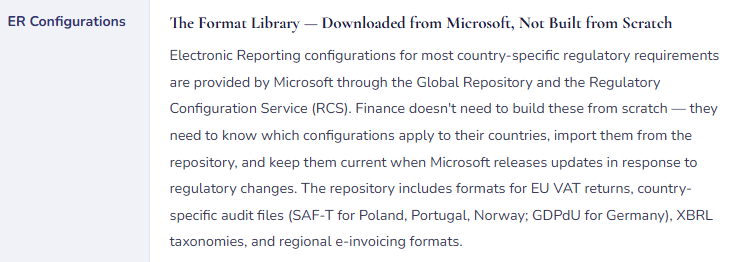
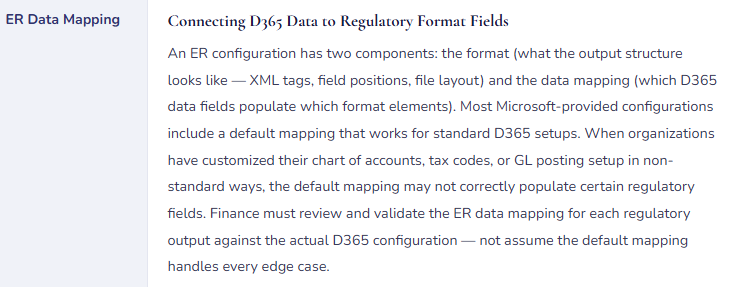
Electronic Reporting is the D365 F&O tool Finance teams most frequently underestimate at implementation time. It feels like a technical feature — format configurations, ER designers, XML schemas — so it ends up in the IT workstream during implementation rather than the Finance workstream. And then the organization operates for six months, the first quarterly VAT filing comes due, and Finance discovers that the ER format configuration for their country hasn’t been imported, isn’t current, or isn’t mapped to the right GL accounts. The regulatory filing is due in two weeks. The implementation partner is off the engagement. The urgency is real.
Electronic Reporting Architecture — What Finance Must Know
The Data Management Framework — Finance’s Responsibility at Migration and Beyond
The Data Management Framework (DMF) is D365 F&O’s structured mechanism for moving data in bulk — importing master data, migrating opening balances, exporting transaction data, and integrating with external systems. Finance is a primary DMF stakeholder at go-live (opening balance migration) and throughout the system’s life (ongoing integrations, data corrections, period-end extracts).
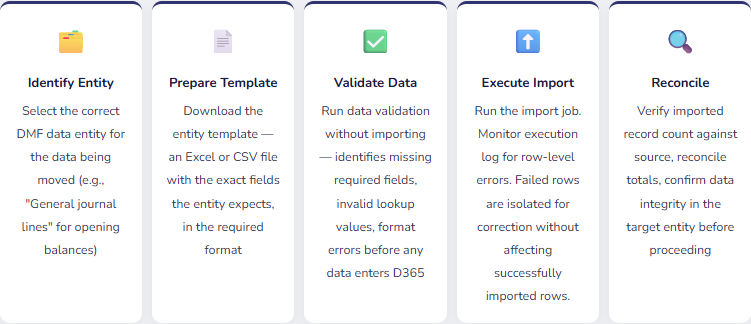
Finance’s DMF responsibilities at go-live: The data that Finance owns — chart of accounts, financial dimensions, customer master, vendor master, opening trial balances, aged AP and AR balances — must be migrated through DMF with Finance accountable for accuracy. Implementation teams can provide the technical mechanism, but Finance must own the data validation: confirming that the accounts are right, the balances are correct by legal entity and period, and the aged subledger balances reconcile to the opening trial balance. Delegating go-live data validation entirely to IT or the implementation partner is how organizations discover opening balance errors at the first audit.
The opening balance migration Finance must own: The go-live opening trial balance is the financial foundation that all future reporting builds on. Any error in opening balances — a debit/credit reversal, a wrong legal entity, an account mapped incorrectly — propagates forward into every subsequent financial statement until it’s corrected. Finance must reconcile the imported opening balance in D365 to the final closing balance from the prior system, account by account, legal entity by legal entity, before go-live is declared complete. This reconciliation is not optional. An opening balance that “looks about right” is not acceptable. An opening balance that ties to the penny, with documented support for every line, is the standard.
Financial Reporter — What Finance Controls and What IT Doesn’t
Financial Reporter (FR) in D365 F&O is the primary financial statement tool — the place where the income statement, balance sheet, and management reporting package get configured and produced. FR is a Finance-owned tool: while IT maintains the FR infrastructure, the report definitions (row definitions, column definitions, reporting trees) are built and maintained by Finance. Finance should be the ones creating and maintaining these definitions, not waiting for IT to update a report whenever a GL account changes.
| FR Component | What It Does | Who Maintains It | Finance Implication |
|---|---|---|---|
| Row Definition | Defines what appears on each row of the financial statement — which GL accounts, what descriptions, which subtotals and totals | Finance | When new GL accounts are added, they must be added to the relevant row definition or they silently disappear from financial statements. Finance needs a process for updating row definitions when COA changes occur. |
| Column Definition | Defines what appears in each column — current period actual, YTD actual, prior year, budget, variance, variance % | Finance | The budget column requires a budget model to be populated in D365. The column definition specifies which model. If the budget model changes (e.g., switching to a revised forecast), the column definition must be updated to reference the new model. |
| Reporting Tree | Defines the hierarchy for consolidated reporting — which legal entities roll up to which reporting unit, what dimensional consolidations apply | Finance | Multi-entity reporting requires a reporting tree. Adding a legal entity means adding it to the reporting tree. Failing to update the tree when a new entity goes live means the new entity’s data silently doesn’t appear in consolidated reports. |
| Report Definition | Combines row + column + reporting tree into a runnable report, with output settings (PDF, Excel, web viewer) and scheduling | Finance with IT support for scheduling | Scheduled reports run automatically at defined intervals — end of day, period close. Finance should define the schedule and confirm report recipients. IT maintains the scheduling infrastructure but Finance owns what gets produced and distributed. |
Four Mistakes in the Reporting Ecosystem That Cost Finance Time Every Period
⚠️ New GL Accounts Not Added to Financial Reporter Row Definitions — They Vanish From Financial Statements
The chart of accounts team adds three new expense accounts to accommodate a new business initiative. The accounts are active, transactions post correctly, the trial balance shows balances in those accounts. But nobody adds them to the Financial Reporter row definitions for the income statement. Management reviews the income statement — the new accounts don’t appear. The total operating expense line doesn’t include those amounts. The income statement understates actual expense by whatever posted to those accounts. Nobody notices until the trial balance total is compared to the FR total and a difference appears. Depending on the materiality and how long it goes undetected, this produces a meaningful financial statement error.
Fix: Establish a change control process that links COA additions to Financial Reporter maintenance. When a new GL account is added, the process must include: which FR row definitions need to be updated to include this account, who is responsible for making the update, and a review step confirming the account appears in the relevant financial statement before the next reporting cycle. This is a process discipline, not a system feature — D365 won’t automatically add new accounts to FR row definitions.
⚠️ Electronic Reporting Configurations Not Updated After Regulatory Changes — Filing Errors Discovered at Submission
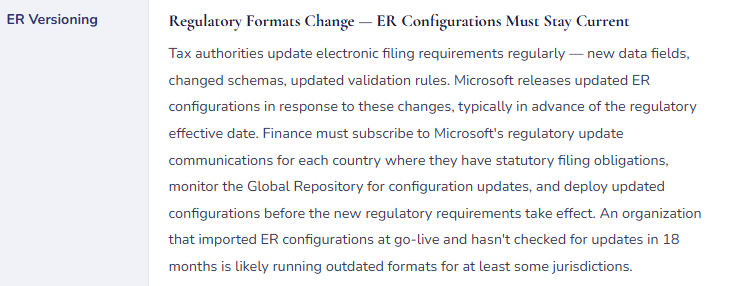
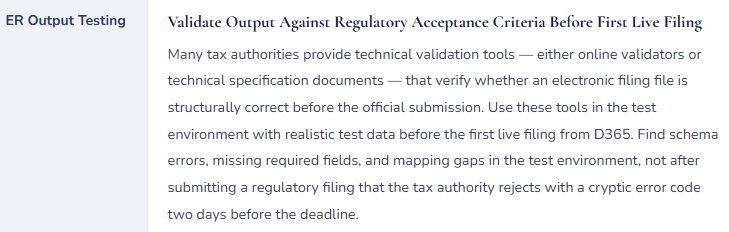
A country’s VAT authority updates its electronic filing schema — adds two new required fields effective next quarter, changes the XML namespace, modifies the validation rules for existing fields. Microsoft releases an updated ER configuration three weeks before the effective date. The D365 Finance team doesn’t have a monitoring process for ER configuration updates — they’re not subscribed to regulatory update notifications, they don’t periodically check the Global Repository for new configuration versions. The effective date passes. The first filing under the new rules is submitted using the old ER configuration. The filing is rejected. The organization has days to identify the problem, import the updated configuration, test it, and resubmit before facing penalties for late filing.
Fix: Assign ownership of ER configuration currency to a specific person or team. That owner monitors Microsoft’s Regulatory Configuration Service for updates in each country where the organization has statutory filing obligations, evaluates update content against effective dates, imports and tests updated configurations in a non-production environment before deploying to production, and deploys updates in advance of the regulatory effective date. This is an ongoing maintenance responsibility, not a one-time go-live activity.
⚠️ Opening Balance Migration Not Reconciled by Finance — Errors Discovered at First External Audit
The implementation team migrated opening balances using DMF. The import ran successfully — the execution log showed no errors, the record count matched. Finance reviewed the total assets and total liabilities at a high level and they looked reasonable. Go-live was declared. The first external audit happens eight months later. The auditor selects a sample of balance sheet accounts and asks for support. Finance pulls the opening balance support — and discovers that one account’s opening balance is $180K different from what the prior system showed, because a debit/credit reversal in the migration template flipped the sign on a batch of legacy journal lines. The difference has been sitting in the GL for eight months, accumulating forward as every subsequent transaction flows through the affected accounts.
Fix: Opening balance validation is Finance’s responsibility, not the implementation team’s. After the DMF import runs and before go-live is declared: pull the D365 trial balance by legal entity and by account, compare it to the final closing trial balance from the prior system account by account, and document the tie-out. Every account should match. Any account that doesn’t match requires investigation before going live with that legal entity’s data. The implementation team can help investigate discrepancies, but Finance owns the sign-off that says “our opening balances are correct.”
⚠️ Power BI Content Deployed Without Understanding What It Pulls — Actuals Different From FR Totals
The organization deploys the D365 Finance Power BI content packs — pre-built dashboards showing CFO overview, cash position, aged receivables. The dashboards look great in the quarterly business review. A perceptive finance analyst notices that the total revenue figure on the Power BI CFO dashboard is different from the total revenue in the Financial Reporter income statement for the same period. Leadership asks which number is right. The answer requires understanding that Power BI connected to D365’s Entity Store pulls data from a replicated analytical database that is updated on a schedule — not in real time — and may be delayed by 24-48 hours relative to the live GL. The FR runs against live data. The difference is a timing gap, not an error. But nobody explained this to the Power BI users during deployment.
Fix: When deploying Power BI connected to D365 data, document clearly what data source each dashboard connects to (Entity Store, Azure Data Lake, live OData), what the refresh schedule is, and what the resulting latency is relative to the live GL. Put a data freshness indicator on every Power BI dashboard that shows when the underlying data was last refreshed. Train users on the distinction between “live GL data” (Financial Reporter, SSRS) and “analytics-layer data” (Power BI) so that a timing difference is understood as a known characteristic, not an unexplained discrepancy.
Do This / Don’t Do This
✓ Do This
- Select the right reporting tool for each output type — FR for financials, ER for regulatory, Power BI for analytics
- Assign an owner for ER configuration currency in each country with statutory filing obligations
- Monitor the Global Repository for ER configuration updates before regulatory effective dates
- Test ER outputs against regulatory validators in the test environment before first live filing
- Reconcile opening balance migration account by account before go-live — Finance owns this sign-off
- Establish a change control process linking COA additions to FR row definition updates
- Document Power BI data source, refresh schedule, and latency for all Finance-facing dashboards
- Own Financial Reporter row definitions, column definitions, and reporting trees in Finance — not in IT
- Validate DMF imports with the validate step before executing — find errors before data enters D365
✗ Don’t Do This
- Add GL accounts without updating Financial Reporter row definitions for affected statements
- Assume ER configurations imported at go-live remain current without monitoring for updates
- Delegate opening balance reconciliation entirely to the implementation team
- Deploy Power BI without explaining data freshness and source to Finance users
- Use Power BI to replace Financial Reporter for period-end financial statements — they serve different purposes
- Use SSRS reports to replace Financial Reporter for formal financial statements — SSRS is for operational output
- Skip ER output testing before the first live regulatory filing
- Allow IT to maintain FR report definitions — Finance must own the financial statement tool
Closing the Arc
Nineteen posts in and we’ve now covered the complete D365 F&O financial and reporting ecosystem — from the foundational chart of accounts structure through every major financial module, the multi-entity intercompany layer, cost accounting, budget control, and the reporting infrastructure that makes all of it visible to the people who need to see it.
The thread connecting all nineteen posts is the same one that connects every ERP implementation I’ve worked on: the system is only as good as the decisions made about how to configure it, and those decisions are accounting and business decisions first — system configuration decisions second. Every tool in the reporting ecosystem produces output that reflects the quality of the underlying configuration. Financial Reporter can only report correctly on a chart of accounts that was designed thoughtfully. Electronic Reporting can only file correctly for tax codes that were set up with the right regulatory mapping. Power BI can only show accurate analytics when the underlying Entity Store is fed by transactions posted with disciplined dimension tagging.
The implementation consultant can configure the tool. Only Finance can define what the tool should produce and validate that it’s producing it correctly. That’s been the whole series. The accountability for financial data accuracy in D365 F&O starts with Finance — not in the close process, not at audit time, but in the design workshop where chart of accounts structure gets decided and posting profiles get mapped. Own the design, and the system works for you. Accept the defaults, and you spend the next three years explaining why the system doesn’t produce what you need.
Up Next:
The financial module stack and reporting ecosystem are complete. The next arc broadens the scope: Copilot and AI Features in D365 F&O Finance — what AI-assisted features are live in the Finance modules today, where they genuinely reduce work, where they’re still maturing, and how Finance teams should think about adopting AI features in a controlled and auditable way. For Finance teams navigating the difference between real capability and vendor enthusiasm.
Until then — update your ER configurations, reconcile your opening balances account by account, and make sure every new GL account makes it into your Financial Reporter row definitions before the period closes.
— Bobbi
D365 Functional Architect · Recovering Controller
Leave a Reply