
Picture this. It’s month end, and your external auditor pulls a sample of purchase orders for testing. One of them shows a delivery date that changed three weeks ago. The auditor asks the obvious question: who changed it, and why?
If an AI agent was involved anywhere in that change, this question gets a little more interesting. But here’s the good news: it doesn’t have to be scary. Dynamics 365 already has an answer, and it’s the same answer it’s always had.
The idea in one minute
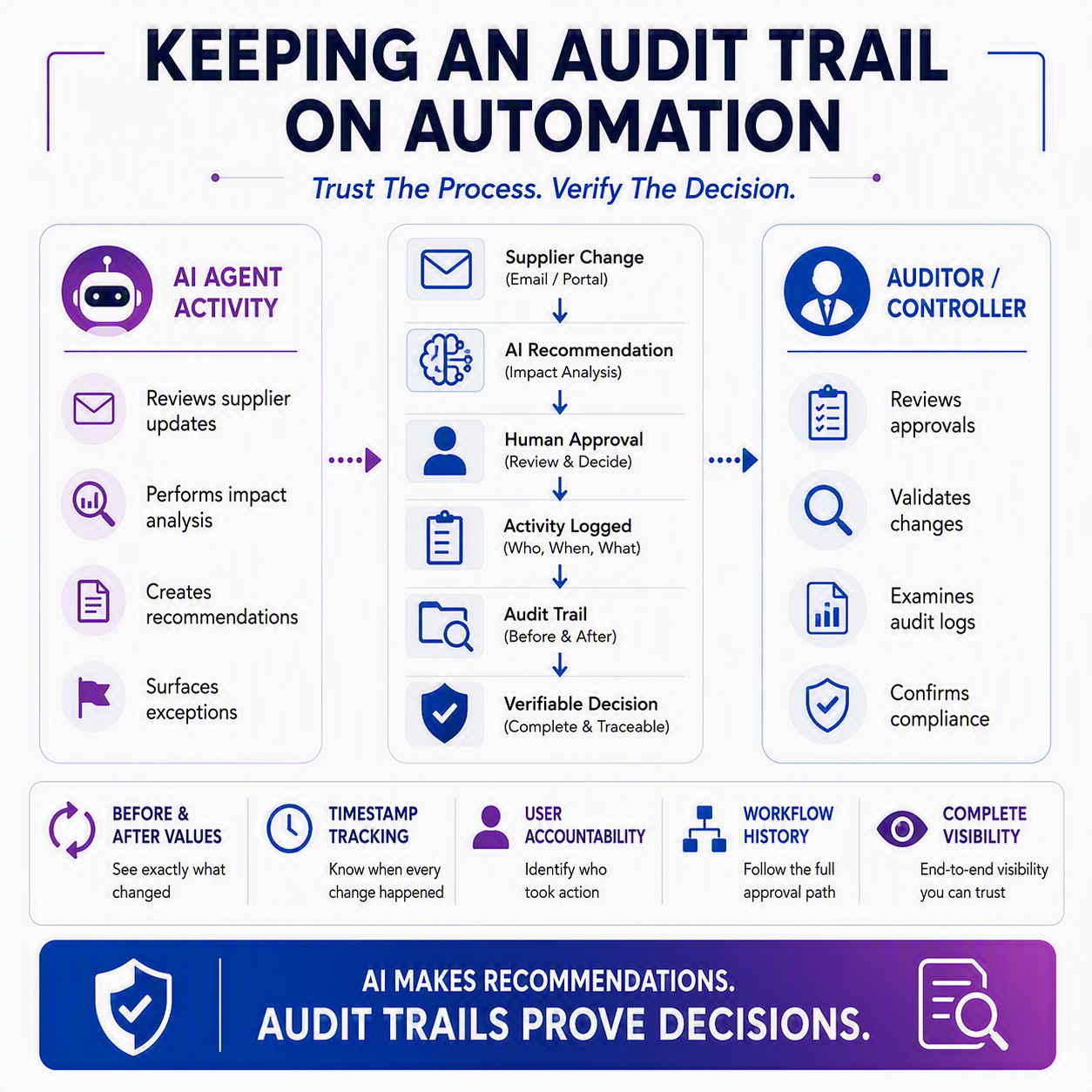
Every meaningful change in Dynamics 365 Finance and Operations gets recorded somewhere: who made it, when, and often what it looked like before. That’s true whether a person typed the change in manually or accepted a change an AI agent surfaced. When a purchaser reviews a recommendation from the Procurement Agent and clicks accept, that acceptance is logged as a normal transaction performed by that user’s account. Nothing about it is invisible or untraceable. Segregation of duties, which we covered in post #3, “Segregation of Duties in the Age of AI,” governs who is allowed to act. Audit trails record who actually did.
What actually gets logged 📒
Dynamics 365 has a built-in feature called database logging that you can turn on for specific tables and fields. Once it’s configured, the system tracks inserts, updates, deletes, and even key renames on the records you’ve flagged. Behind the scenes, these entries land in a system table and show up in an inquiry screen your admin team can pull up any time. According to a walkthrough from Dynamics Tips, a logged change shows the user who made it, the timestamp, and the value before and after. That’s exactly the kind of detail an auditor wants to see.
You get to choose what’s worth watching. Vendor bank account numbers, payment terms, purchase order delivery dates: these are the fields most finance teams flag first, since they’re the ones someone might try to quietly slip past you.

Approvals are a control too ✅
Database logging tells you what changed. Workflow approvals tell you what was allowed to change, and by whom. When you configure an approval step in a workflow, you decide who can approve, and you can require that the person approving isn’t the same person who submitted it in the first place, using the “Disallow approval by submitter” setting. Approvers can approve, reject, request a change, or delegate, and each of those actions gets tied to a specific person’s login.
That matters here because, as Rand Group puts it, workflow acts as a compensating control when full structural separation of duties isn’t realistic for your team size. Not every company has enough people to split every function three ways. Workflow approvals fill that gap by making sure a second set of eyes is required before something risky goes through, and by leaving a record that those eyes were there.
Where the Procurement Agent fits in 💡
This is where the AI piece connects back to everything above. The Procurement Agent watches for supplier updates, sorts through vendor emails, and flags which purchase orders are affected. When a supplier pushes back a delivery date, for instance, the agent runs an impact analysis and tells the purchaser whether it affects downstream inventory or production. Then it’s the purchaser’s move. They review it and choose to “accept the change and update the purchase order,” or they follow up with the supplier instead.
That acceptance click isn’t some special AI event that lives outside your normal system records. It’s the purchaser’s own transaction, tied to their own login, flowing through the exact same database logging and workflow mechanisms as if they’d typed the new date in by hand. The agent did the legwork. The person is still the one who acted, and the system knows it.
Why this matters when someone asks
So back to that auditor. You’re not stuck trying to get an AI agent to explain its reasoning after the fact, and you don’t need to hope someone remembers a conversation from three weeks ago. You pull up the log. It shows the purchaser’s name, the date, the old delivery date, and the new one. If a workflow approval was involved, that trail shows up too.
Segregation of duties and audit trails are really two halves of the same trust equation. One decides who’s allowed near a given change. The other proves who was actually there when it happened. As AI agents take on more of the busywork, that second half only gets more important, because the questions people ask about a change don’t go away just because a machine helped make it faster.
Thank you for reading!
Next time, we’ll wrap up this series by looking at the skills that matter more once agents take over the busywork, and what that means for your career in D365.
Sources
- Configure database logging – Finance & Operations | Dynamics 365 | Microsoft Learn
- Configure approval processes in a workflow – Finance & Operations | Dynamics 365 | Microsoft Learn
- Procurement Agent overview – Supply Chain Management | Dynamics 365 | Microsoft Learn
- Database Logging: D365 Finance and Operations – Dynamics Tips
- Dynamics 365 Finance and Operations security and segregation of duties – Rand Group
Interested in learning more? Below are some of my latest posts:





Leave a Reply