

What Finance Must Own When Operations Runs the Projects
What the Jobs Module Actually Does
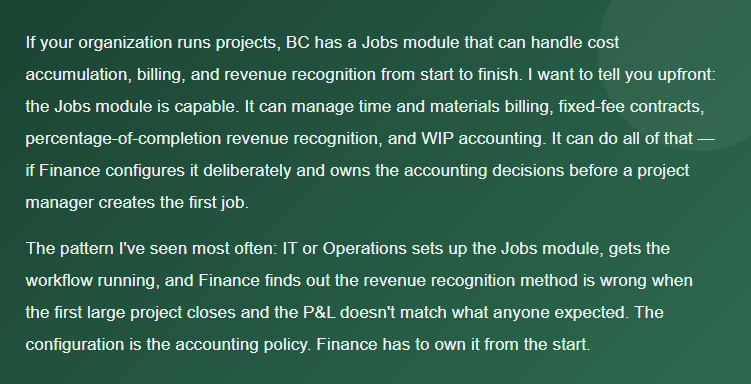
The Jobs module in Business Central is BC’s project accounting ledger. A Job is a container — it holds the budget, tracks actual costs as they’re posted, and produces the billing documents that generate AR. The accounting engine underneath it is more sophisticated than most BC users realize: it supports multiple WIP methods, project-level revenue recognition, and multi-resource pricing structures.
The key entities Finance needs to understand: Jobs, Job Tasks, Job Planning Lines, and Job Ledger Entries. A Job is the top-level record. Job Tasks are the breakdown structure — phases, deliverables, or whatever granularity makes sense for your business. Job Planning Lines hold the budget and the billing schedule. Job Ledger Entries are the actual cost postings that flow from purchase invoices, time journals, and item usage.
Finance-Owned Configuration Decisions
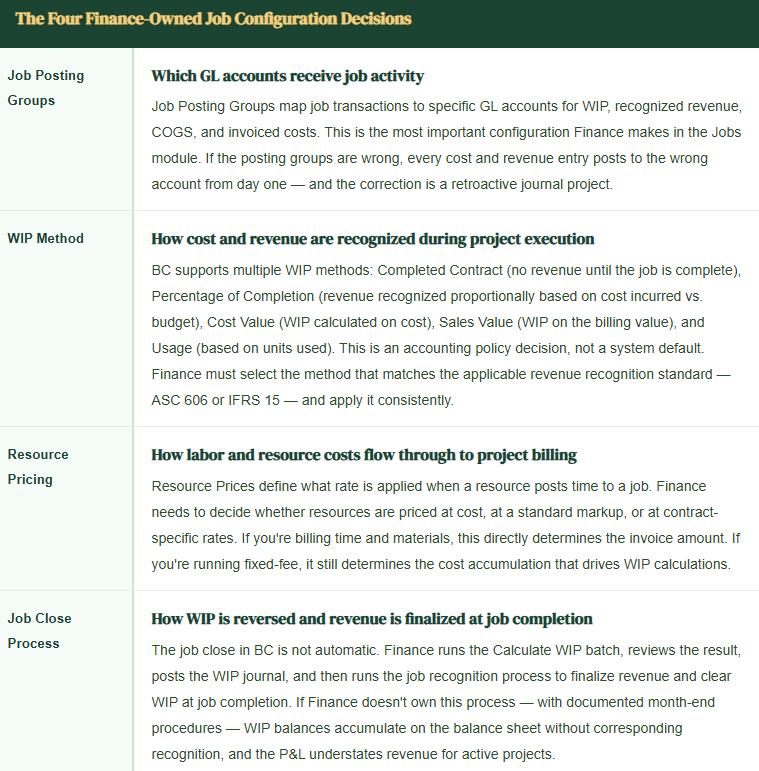
Before any project manager creates a job, Finance needs four configuration decisions made and documented.
Revenue Recognition in Practice
This is where project accounting in BC either works beautifully or produces reconciliation problems Finance spends hours on every month. The Calculate WIP function computes what should be on the balance sheet as WIP based on the method you’ve chosen. The Post WIP to GL function moves those amounts to the ledger. The Calculate and Post Job Recognition function reverses WIP and records revenue when a job is complete.
Percentage of Completion
Revenue recognized = (Actual Cost / Budget Cost) × Contract Value. Works well for long-running projects with relatively predictable cost profiles. Requires accurate budget maintenance — a 20% cost overrun that isn’t reflected in an updated budget produces overstated revenue recognition.
Finance task: Monitor actual-to-budget variance monthly and update job budgets when scope changes occur.
Completed Contract
Revenue recognized only at job completion. WIP accumulates on the balance sheet throughout the project. Simple and conservative — appropriate for short-duration projects or when the completion criteria are well-defined. The risk: large WIP balances on the balance sheet that auditors will want to see aging and completion estimates for.
Finance task: Review WIP aging quarterly and document completion estimates for open jobs.
Fixed-Fee with Milestone Billing
Billing schedule defined in Job Planning Lines at specific milestones. Revenue recognition still driven by WIP method — the billing schedule determines when invoices go out, not when revenue is earned. A common mistake: treating milestone billing as revenue recognition and skipping the WIP calculation entirely. The invoice and the revenue entry are two separate things in BC.
Finance task: Run WIP calculation monthly regardless of billing schedule.
Time & Materials
Revenue recognized as costs are incurred and billed. Billable planning lines tie directly to invoice creation. Finance needs to confirm that unbilled costs — time posted but not yet invoiced — are captured in the WIP calculation so the balance sheet reflects work performed but not yet billed.
Finance task: Review Unbilled Receivables balance monthly and tie to open job planning lines.
The Month-End Process Finance Must Own
Project accounting has a specific month-end sequence that doesn’t happen automatically. Finance must run it every period — not IT, not project managers, Finance. Here’s the sequence:
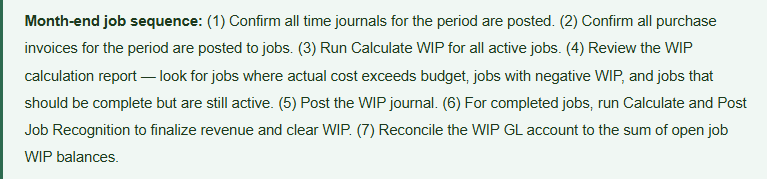
The WIP GL account should agree to the sum of job-level WIP balances. If it doesn’t, there are unrecognized entries, manually posted adjustments, or posting group errors somewhere in the history. The reconciliation catches those before they become audit findings.
Five Project Accounting Mistakes BC Finance Teams Make
Five Mistakes That Produce Margin Surprises When the Job Closes
- Revenue recognition method selected by default, not by accounting policy
- BC has a default WIP method. Most organizations take it without evaluating whether it matches their revenue recognition standard. This produces financial statements that are technically generated by BC but not compliant with the applicable accounting standard. Finance must select the WIP method, document the rationale, and apply it consistently across job types.
- Job Posting Groups not mapped to distinct GL accounts
- I’ve seen implementations where every job posting group maps to the same revenue and COGS accounts. The system posts correctly, but you lose all job-level P&L visibility in the GL and the account schedule. The whole point of project accounting is cost isolation. Map posting groups to accounts that give Finance visibility into project-type revenue and cost without requiring a job-level report every time someone asks how professional services is performing.
- Job budgets not maintained after scope changes
- Percentage-of-completion revenue recognition is only as accurate as the budget it’s calculated against. When scope changes add cost to a project but the budget isn’t updated, the WIP calculation recognizes revenue as if the original contract value is being earned at the original cost structure. The job closes and the final revenue recognition adjustment is a surprise. Job budget maintenance is a Finance responsibility, not a project manager responsibility — because the budget drives the accounting.
- WIP calculation not run at month-end
- The WIP calculation is a manual batch. If Finance doesn’t run it, the month-end financials don’t reflect work in progress. I’ve seen organizations go six months without running the WIP calculation because no one knew it was a Finance responsibility. The WIP account was stale, revenue was understated, and the correction required retroactive period entries with auditor notification. Make it a named step on the period-close checklist with a documented owner.
- Job close treated as a project manager task, not a Finance task
- When a project manager marks a job as complete, the accounting is not finished. Finance still needs to run the final WIP calculation, post the recognition entry, and confirm the job’s P&L before the job is closed in the system. The complete flag on a job should trigger a Finance close workflow — a documented handoff from Operations to Finance for the final accounting close of the job.
Up Next:
Project accounting is one of the areas where Finance configuration most directly determines whether the system tells a financially accurate story. We’ll keep the operational Finance theme going with a topic that affects every BC organization regardless of industry: Vendor Management in BC—Payment Terms, Purchase Price Variance, and the Configuration Finance Must Own Before Procurement Runs—how vendor setup in BC drives payment behavior, cash flow forecasting accuracy, and COGS integrity, and the five vendor configuration decisions Finance gets wrong that purchasing feels immediately and Finance discovers at month-end.
— Bobbi
D365 Functional Architect · Recovering Controller
If a post helped you solve a real problem, share it with a Finance colleague who is in the middle of an implementation or a post-go-live optimization. If you have a topic the blog series did not cover, reach out. There is always one more post worth exploring.
Interested in learning more? Below are some of my latest posts:
- AI and ERP Security: What Copilot Means for Your D365 Security Roles and Internal Controls

- The Natural Language ERP: Stop Running Reports, Start Asking Questions

- AI Adoption in ERP: Why Change Management Is Your Most Critical AI Investment

- Agent 365: Microsoft’s Control Tower for All Your ERP Agents

- AI in D365 Supply Chain: From Demand Planning to Warehouse Intelligence

Leave a Reply