

Service agreements, service orders, service subscriptions, technician and resource dispatch, service object tracking, the complete GL flow from work order through invoice, and the Finance configuration decisions that determine whether your service business measures margin by agreement, by technician, and by customer — or by none of the above.
The Four Components of D365 F&O Service Management
Service Agreements vs. Service Orders — The Distinction Finance Must Own
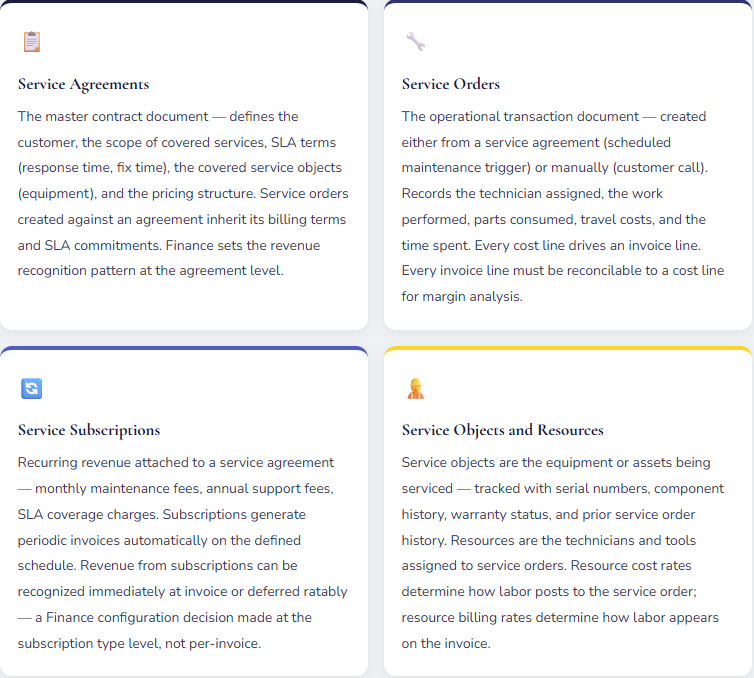
The most common source of confusion in D365 Service Management implementations is the relationship between service agreements and service orders. They are related but distinct — and the financial setup of each has different implications for how revenue recognizes and how costs flow.
A service agreement is the contract. It defines what the customer is entitled to, at what price, and on what terms. It does not generate GL postings directly. A service agreement can contain subscription fee lines (recurring revenue) and coverage terms (what services are covered) without producing any accounting entry until those terms are exercised.
A service order is the event. It records that work was performed against a service agreement (or as a standalone service call). The service order is where labor hours, parts, and other costs are recorded — and where the invoice is generated. The service order is the source of all financial transactions in the Service Management module.
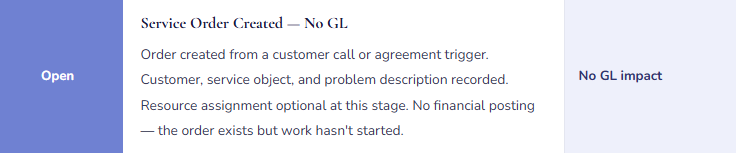
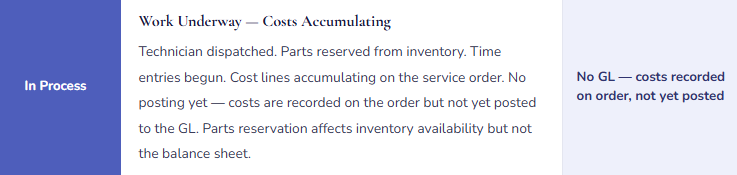
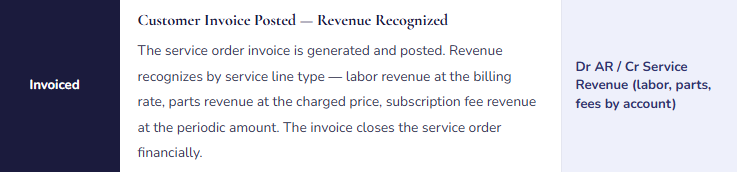
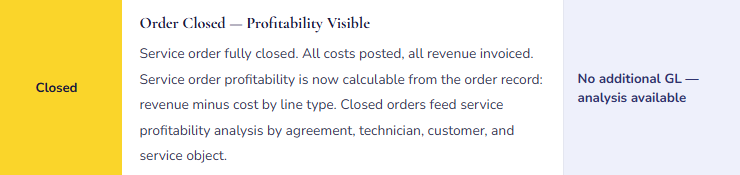
The Service Order Lifecycle — Status by Status with GL Events
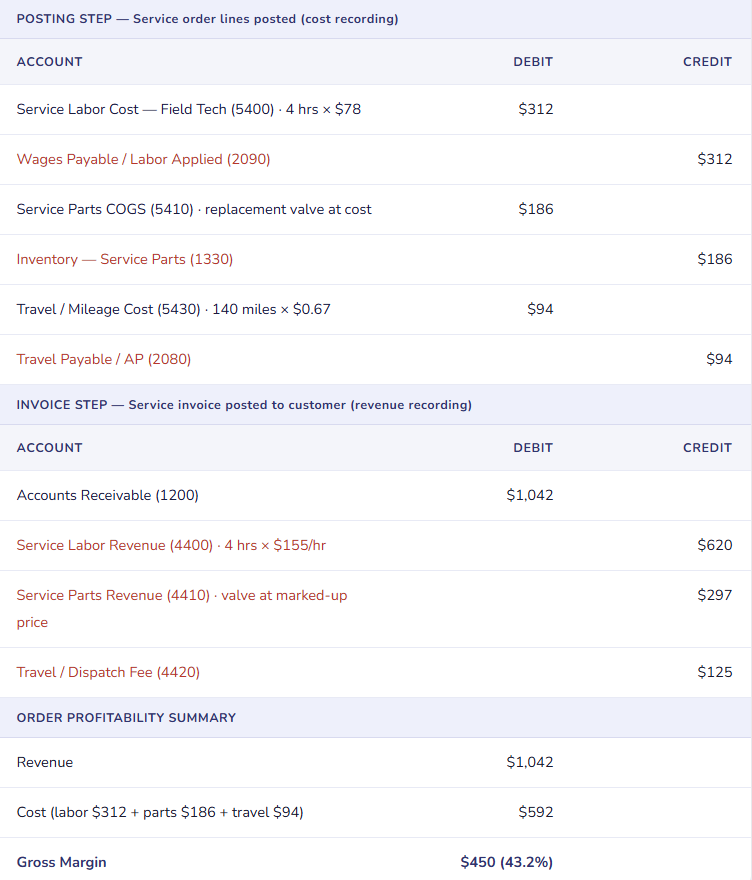
The Complete GL Flow — Service Order with Labor, Parts, and Travel
Service Order — Industrial Equipment Repair, Mixed Cost Types
Service Subscriptions — The Revenue Recognition Finance Must Configure
Service subscriptions in D365 F&O are the recurring fee component of service agreements — monthly maintenance fees, annual support contracts, SLA availability charges. From an accounting perspective, subscriptions present the same revenue recognition question as any prepaid service obligation: does the revenue recognize when the invoice is generated, or is it deferred and recognized ratably over the coverage period?
| Subscription Billing Type | When Revenue Posts | Balance Sheet Treatment | ASC 606 / IFRS 15 Applicability |
|---|---|---|---|
| Earned (at invoice) | Revenue posts when the periodic subscription invoice is generated — typically monthly or quarterly. | No deferred revenue. Revenue recognized immediately at invoice date. | Appropriate when the billing period matches the service period — monthly invoice for monthly coverage. Simpler accounting; acceptable when there is no material timing difference between invoicing and service delivery. |
| Accrued (prepaid) | Customer billed annually upfront. Payment posts to Deferred Revenue. Revenue recognized monthly over the contract term via accrual entries. | Deferred Revenue liability on the balance sheet declining monthly as revenue is recognized. Current vs. non-current classification required. | Required under ASC 606 / IFRS 15 when the customer pays in advance for services to be delivered over time. The performance obligation is satisfied over the contract period; revenue must follow the delivery pattern. |
| On account (milestone) | Invoice generated at defined milestones (e.g., contract signing, 6-month renewal). Revenue recognized at the billing milestone. | Depends on whether milestone billing aligns with service delivery timing. May create contract asset or contract liability positions. | Requires analysis of whether the milestone billing aligns with satisfaction of performance obligations. Involves Finance and auditor judgment — not a default configuration choice. |
Finance Setup — The Four Configuration Decisions That Determine Service Profitability Visibility
Finance-Owned Service Management Setup Decisions
- Service Posting Groups — The GL Account Mapping
- Service posting groups map each service transaction type (labor cost, labor revenue, parts cost, parts revenue, travel cost, travel revenue, subscription revenue) to specific GL accounts. The granularity of posting group setup determines the granularity of GL-based service profitability analysis. If all service revenue posts to a single “Service Revenue” account, you can see total service revenue but not labor vs. parts vs. subscription by component. If each service type has a dedicated revenue account and a matching cost account, the income statement supports contribution analysis by service line without exporting a single transaction. Finance should design the posting group structure before go-live based on what management reporting questions the service P&L must answer.
- Resource Cost and Billing Rate.
- Each resource (technician, engineer, specialist) in D365 Service Management carries a cost rate and a billing rate. The cost rate is the fully loaded cost per hour — wages, benefits, employer taxes, vehicle or equipment allocation. The billing rate is what the customer is charged per hour. The difference is the labor margin per technician, per job, and per agreement. If resource cost rates are set at the wage rate rather than the fully loaded rate, service order profitability is systematically overstated. If billing rates are not set or default to a flat rate regardless of technician type, the invoice doesn’t reflect the differentiated pricing that the service agreement may require. Both rates must be reviewed at implementation and updated annually when labor costs change.
- Invoice Timing Policy — When Service Orders Must Be Invoiced
- Service orders that are posted but not invoiced create a period-matching problem: costs hit the GL when the order is posted, revenue doesn’t hit until the invoice is generated. If service order invoicing is batched weekly or monthly, the financial statements for any interim period show costs without matching revenue. Finance must define an invoice timing policy — maximum days from service order posting to invoice generation — and enforce it. The policy should align with the billing terms in the service agreement. A 30-day payment terms agreement doesn’t require same-day invoicing, but a 5-day service order backlog is manageable; a 45-day backlog means Finance’s income statement for any given month is missing 45 days of service revenue.
- Dimension Assignments — Enabling Profitability by Segment
- Service orders should carry financial dimensions that enable profitability analysis at the level management requires: department (which service team), customer group (enterprise vs. SMB), service type (preventive maintenance vs. corrective repair vs. installation), and geography. Dimensions set at the service agreement level inherit to service orders automatically — Finance must confirm that dimension defaulting rules are configured before the first service order posts. After the fact, retroactive dimension assignment on service order transactions is a project. Designed correctly at go-live, service profitability by any combination of those dimensions is a Financial Report query away.
Five Mistakes That Turn Service Management Into a Financial Black Box
⚠️ Resource Cost Rates Set at Wage Rate — Service Profitability Is Systematically Overstated
Service Management goes live with technician resource cost rates set equal to the hourly wage — $42/hour for a field technician. Benefits, payroll taxes, vehicle expenses, and tool maintenance add approximately 38% to the fully loaded cost — the actual cost of deploying that technician is closer to $58/hour. Service orders invoiced at $135/hour show a labor margin of $93/hour. The actual margin is $77/hour. Two years of service profitability reporting, pricing decisions, and technician capacity planning have been based on margins 17% higher than actual. When Finance eventually reconciles total labor cost from payroll to service order cost postings, the $16/hour gap across thousands of service hours produces a significant unexplained variance that requires investigation to reconstruct.
Fix: Resource cost rates in D365 Service Management must reflect fully loaded hourly cost — not wage cost. Work with HR and Operations to build the loaded rate for each technician tier: wages + employer benefits + payroll taxes + proportional vehicle and equipment costs + any other directly attributable overhead. Review and update these rates annually when labor costs change. The fully loaded rate is what the business actually spends to put a technician on site — using the wage rate understates that cost in every service order and produces margin analysis that optimistic pricing decisions are built on.
⚠️ All Service Revenue Mapped to One GL Account — Profitability Analysis Requires Manual Reconstruction Every Month
Service posting groups were configured quickly during implementation — all service revenue (labor, parts, subscription, travel recovery) posts to account 4300 “Service Revenue.” The income statement shows total service revenue clearly. When the service director asks for labor revenue vs. parts revenue vs. subscription revenue broken down by service agreement type, Finance exports service order transaction detail, builds a pivot table, and produces the analysis in Excel. This takes four hours. It happens every month. The total hours spent annually on a four-hour monthly analysis that should be a Financial Report query is 48 hours of Finance staff time spent moving data that the GL should already hold.
Fix: Service posting groups should match the analytical structure management reporting requires. Design minimum accounts: labor cost, labor revenue, parts cost, parts revenue, subscription revenue, travel cost, travel recovery revenue. If the business has distinct service lines (preventive maintenance vs. corrective repair vs. installation), a second tier of accounts by service line enables contribution analysis at that level too. The additional accounts take twenty minutes to configure at go-live. The time savings over the reporting life of the implementation — eliminating the monthly export-and-pivot workflow — justify the upfront configuration investment many times over. Configure for the analysis you need, not for the minimum that works technically.
⚠️ Service Subscriptions Recognized at Invoice for Annual Prepaid Contracts — Quarterly Revenue Pattern Is Misleading
A company with 180 annual service contracts, each renewing on January 1, invoices all subscription fees in January. Revenue recognition is configured as “Earned” — revenue posts when the invoice generates. January revenue includes $2.1M of subscription revenue. February through December each show zero subscription revenue. The quarterly P&L for Q1 is strong; Q2–Q4 look service-revenue-light. Management compares Q1 to Q2 and asks Finance why subscription revenue dropped. Finance has to explain that subscription revenue didn’t drop — all of it was recognized in January because of how the module is configured. “We recognized twelve months of revenue in one month” is not a satisfying answer for analysts or auditors reviewing quarterly financial statements.
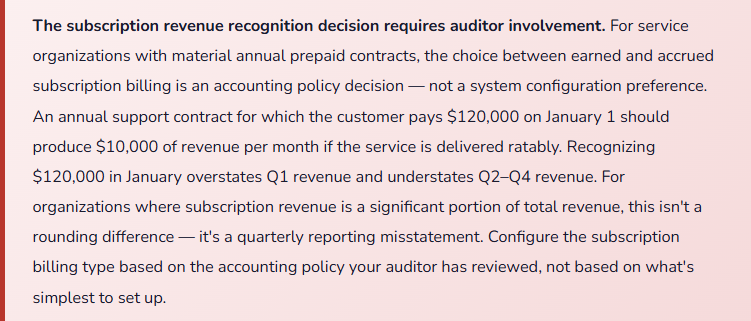
Fix: Annual prepaid service subscription contracts should use the accrued (ratable) billing type in D365 Service Management. The subscription invoice posts to Deferred Service Revenue (a liability) when the annual invoice is generated. A monthly journal or D365 revenue recognition schedule releases 1/12 of the annual amount to Service Subscription Revenue each month over the contract term. At any month end, the balance sheet shows the remaining deferred obligation; the income statement shows only the earned portion. This matches ASC 606 / IFRS 15 treatment for performance obligations satisfied over time. Discuss the subscription billing type configuration with your auditor before the first annual renewal invoice posts.
⚠️ Service Orders Not Invoiced Until Month-End Batch — Costs and Revenue Hit Different Periods
The service operations team posts service order lines daily as work is completed — technician time, parts consumed, travel logged. Finance generates service invoices in a batch on the last business day of the month. For orders completed in the first week of the month, costs post in week one; revenue posts on the last business day of the same month — still the same period. For orders completed in the last few days of the month, costs post in the final days of the period; the invoice batch runs on the last business day before period close, but processing delays push some invoices to the first business day of the next period. Five to ten service orders each month have their costs in period N and their revenue in period N+1. The income statement for any month understates service margin by the unbilled-but-posted amount, and the following month overstates it by the same amount.
Fix: Define a maximum service order invoicing lag — expressed in business days from order posting to invoice generation — and enforce it as a billing operational standard. Three to five business days is achievable for most service organizations and eliminates the period-end timing problem for all but the last few days of the period. For orders posted in the final three days of a period, implement a period-end check: run the open service orders report, identify any posted-but-uninvoiced orders, and either process the invoice before period close or accrue the unbilled revenue if the invoice will post in the next period. The accrual entry is simple; the revenue recognition is accurate; the income statement matches economic reality.
⚠️ Service Objects Not Linked to Service Agreements — Covered Equipment Is Invisible at Order Creation
The company has 320 active service agreements covering customer equipment. Service objects (equipment records) are maintained in D365 for all covered units. But the service objects are not linked to the service agreements in the agreement setup — the relationship between “this customer has an active agreement” and “this specific piece of equipment is covered under it” doesn’t exist in the system. A technician creates a service order for a customer call on equipment that is covered under an active agreement. Nothing in D365 alerts the dispatcher. The customer is invoiced for a billable call-out at standard rates. The customer disputes the invoice — the equipment is under agreement, the call should be covered. Finance issues a credit memo, re-invoices at the correct agreement rate, and investigates how many other calls in the past six months were billed incorrectly. The answer is eleven.
Fix: Every service object that is covered under a service agreement must be linked to that agreement in the D365 service agreement setup — specifically in the service agreement lines, which reference both the service task and the service object. When a service order is created for a service object that has an active agreement, D365 will surface the agreement information and apply the agreement’s billing terms automatically. This requires that service object registration is complete and current — every covered piece of equipment needs a service object record with the customer, serial number, and equipment type. The linking process is a go-live data migration task; it is straightforward if done once at go-live and maintained as agreements are renewed. Doing it retroactively after eleven billing disputes is significantly less pleasant.
Do This / Don’t Do This
✓ Do This
- Set resource cost rates at fully loaded cost — wages plus benefits, taxes, vehicle, and direct overhead
- Configure service posting groups with separate accounts for each cost and revenue type: labor, parts, subscription, travel
- Link all service objects to their covering service agreements at go-live
- Define and enforce a maximum service order invoicing lag — five business days or fewer
- Configure subscription billing type based on auditor-reviewed accounting policy for prepaid contracts
- Set financial dimensions on service agreements so all service orders inherit dimension values automatically
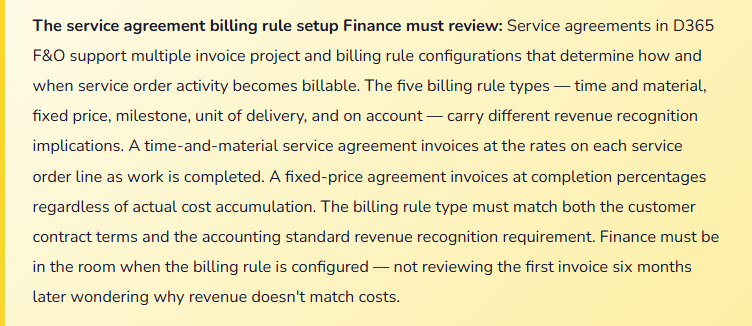
- Build the billing rule type selection into the service agreement configuration review — involve Finance in that decision
- Run an open service orders report in the final week of each period to identify posted-but-uninvoiced orders
- Update resource cost and billing rates annually when labor costs change
✗ Don’t Do This
- Set resource cost rates at wage rate only — every service order profitability report will overstate margin
- Map all service revenue to a single GL account — profitability analysis will require monthly manual reconstruction
- Leave service objects unlinked to service agreements — billing errors compound and credit memo remediation is more painful than go-live data migration
- Allow month-end invoicing batches with no period-end exception review — costs and revenue will routinely hit different periods
- Configure annual prepaid subscriptions as “Earned” without auditor review of the revenue recognition implication
- Treat the billing rule type as an implementation default rather than an accounting policy decision
- Let resource rates go more than one year without an annual review — stale rates produce stale margin analysis
Up Next:
Service Management closes the customer-facing operational coverage. The next post turns to the compliance layer that international operations add: Global Trade Management and Customs Compliance in D365 F&O — import and export controls, Intrastat reporting for EU entities, country of origin and dual-use item tracking, landed cost calculation and duty accruals, and the Finance setup that ensures trade compliance costs are captured in inventory cost rather than discovered as surprises in period close.
— Bobbi
D365 Functional Architect · Recovering Controller
Thank you for reading!
Recent posts:
- AI and ERP Security: What Copilot Means for Your D365 Security Roles and Internal Controls
- The Natural Language ERP: Stop Running Reports, Start Asking Questions
- AI Adoption in ERP: Why Change Management Is Your Most Critical AI Investment
- Agent 365: Microsoft’s Control Tower for All Your ERP Agents
- AI in D365 Supply Chain: From Demand Planning to Warehouse Intelligence
If this post helped you solve a real problem, share it with a Finance colleague who is in the middle of an ERP implementation or a post-go-live optimization. If you have a topic that I haven’t covered, please reach out. There is always one more topic worth exploring.
Leave a Reply