
Picture this. A vendor emails to say a shipment is running two weeks late. Your purchasing team reads it, shrugs, and moves on because that part isn’t due for another month anyway. No big deal.
Now picture the same email, but the part in question feeds a production line that starts next Tuesday. Same email, completely different consequences. The words on the screen don’t tell you which situation you’re in. Someone has to actually check.
That’s the whole argument for keeping a human in the loop as D365 (Dynamics 365) rolls out more AI agents, and it’s the topic of this new series. My earlier series, “The Future of D365 Finance & Supply Chain,” walked through what these agents actually do. This one is about why they still need you standing next to them, and how Microsoft built that oversight into the product on purpose instead of tacking it on after the fact.
The idea in one minute
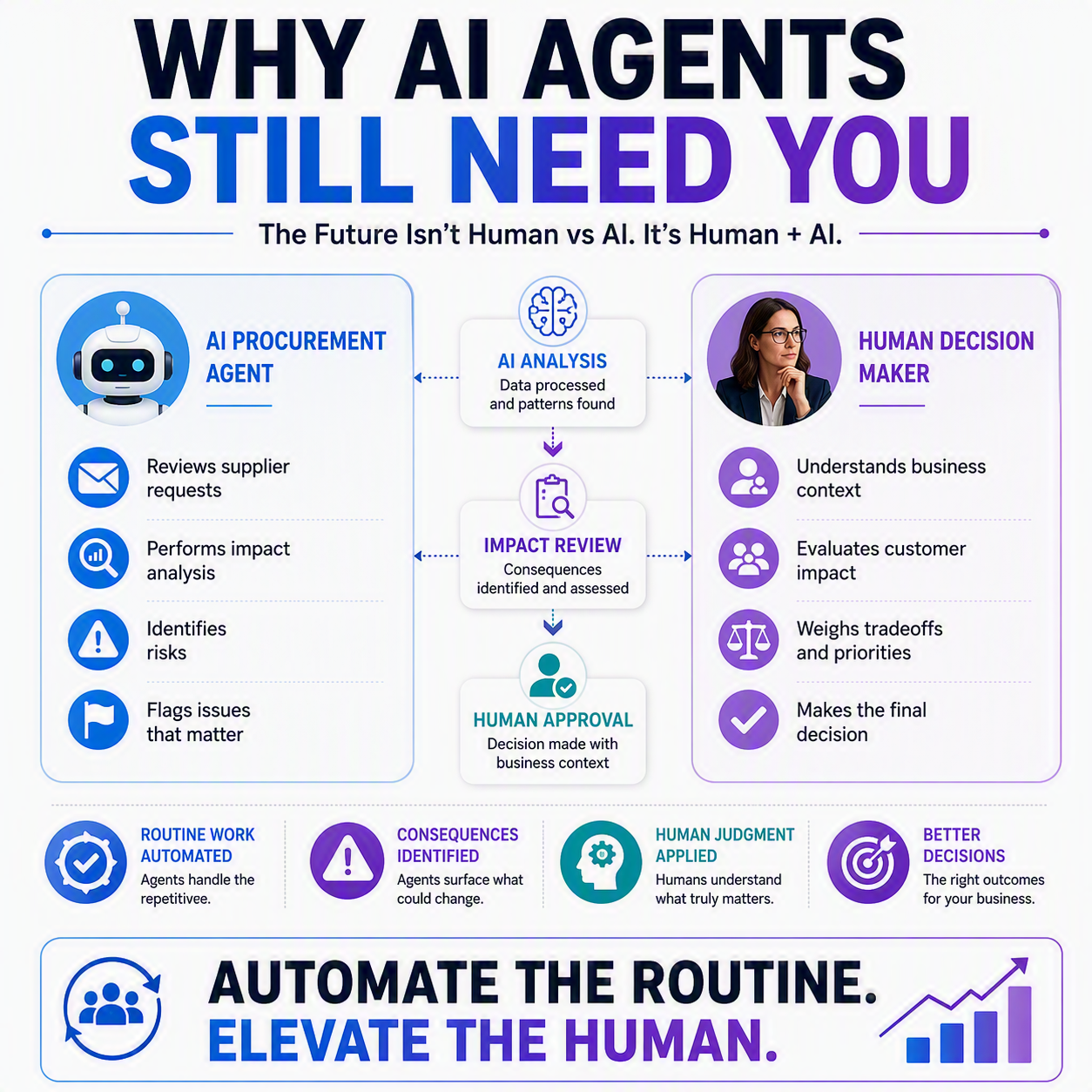
The Procurement Agent in Dynamics 365 Supply Chain Management reads supplier-requested changes to purchase orders (POs) and figures out whether they matter. If a change has no effect on inventory, production, or customer deliveries, the agent flags it “No impact” and a purchaser can accept it without ever opening the PO. If the change does ripple downstream, it’s flagged “Has impact,” and the agent hands the purchaser a full breakdown so they can decide what to do next. The agent never applies an impactful change on its own. It recommends. A person still decides. That single design choice is the pattern this whole series is built around.
What the Procurement Agent actually does
Suppliers change their minds constantly. A ship date slips, a quantity gets cut, a price moves. Someone in your organization has always had to catch those changes, figure out if they matter, and respond. That’s tedious, repetitive work, and it’s exactly the kind of thing AI is good at taking off your plate.
The Procurement Agent watches for these change requests, whether they arrive by email or through the vendor collaboration portal, and runs them through Impact analysis. That analysis checks what the change would do to inventory levels, dependent production orders, and customer-facing sales orders before anyone accepts anything.

No impact means no interruption
If the analysis comes back clean, meaning inventory stays healthy and nothing downstream gets touched, the purchaser gets a quick “No impact” flag and can accept the change right there. No digging through the purchase order, no cross-checking against production schedules. That’s the automation doing its job: clearing the easy stuff off your desk so you can spend your attention where it’s actually needed.
Has impact means you get the full picture, not just a warning
Here’s where the design gets interesting. When a change is flagged “Has impact,” the agent doesn’t just say “heads up, this matters” and leave you to figure out why. It opens an Impact analysis page that lays out exactly what’s affected: which sales, production, or transfer orders are tied to that line, and a graph comparing projected inventory before and after the change against your safety stock threshold. You can see at a glance whether you’re headed for a shortfall and when.
From there, the purchaser has real choices. Follow up with the supplier and push back. Accept the change and update the PO if there’s no better option. Cancel the order entirely. Loop in the people downstream who need to know. Those are judgment calls that depend on context the agent doesn’t have, like which customer relationship you can’t afford to strain or which production line has zero slack this quarter.
The design choice that matters most
The agent does not auto-apply changes that carry impact. Full stop. It doesn’t matter how confident the analysis is. A purchaser has to look at it and decide. That’s not Microsoft playing it safe out of caution. It’s a recognition that some decisions genuinely need a person who understands the business, not just the data.
This isn’t a one-off pattern, either. Across Dynamics 365, Microsoft has built similar checkpoints into its AI agents, giving people visibility into what agents are doing and the ability to step in through what Microsoft calls the Agent Feed. The philosophy is consistent: automate the repetitive, surface the consequential, and leave the final call with a human.
That’s good design. It respects that you know things about your business that a system never will, and it puts your judgment exactly where it counts instead of burying it under a pile of routine approvals.
Thank you for reading!
Next up in this series: “Trust But Verify: What the Procurement Agent Flags for You,” where we’ll dig deeper into what actually shows up in that impact review and how to read it quickly.
Sources
- Procurement agent overview
- Review impact analysis and apply changes with the procurement agent
- Get started with Copilot and AI capabilities across Dynamics 365
Interested in learning more? Here are some of my latest posts:





Leave a Reply