

How D365 F&O’s posting layers, parallel ledger configuration, and additional reporting currency support organizations that must produce audited financial statements under two accounting standards simultaneously—the permanent and temporary differences Finance must track between the two presentations, and the five dual-reporting configuration failures that produce financial statements that cannot be reconciled to each other.
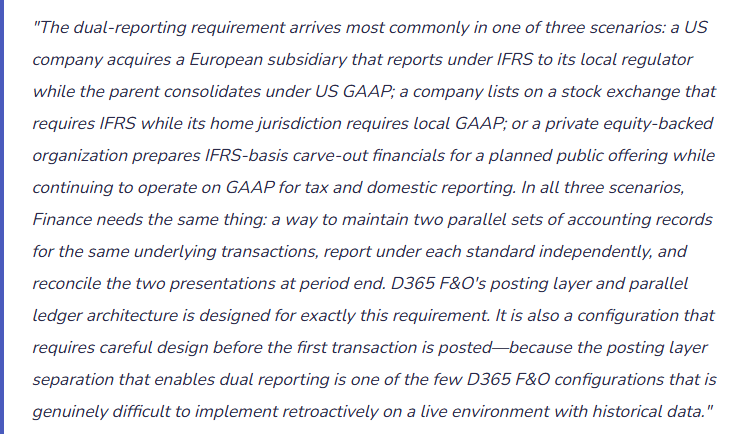
D365 F&O’s Three Posting Layers—The Foundation of Parallel Accounting
Every GL entry in D365 F&O is posted to a posting layer. The posting layer is a tag on the journal entry that determines which set of financial records the entry belongs to. D365 F&O provides three posting layers that Finance uses to maintain parallel accounting records:
- Current Layer
- The primary accounting layer for operational transactions. Every AP invoice, customer payment, payroll entry, fixed asset acquisition, and routine journal entry posts to the Current layer by default. The Current layer is the basis for the organization’s primary set of financial statements.
- For a US GAAP primary reporter: all US GAAP entries post to the Current layer. The Current layer is the basis for the tax return, the domestic statutory filings, and the management accounts.
- Financial reports filtered to the Current layer produce the primary GAAP financial statements.
- Operations Layer
- The secondary accounting layer used for adjustment entries that represent differences between two accounting standards. IFRS-to-GAAP or GAAP-to-IFRS adjustments that convert the Current layer treatment to the alternative standard post to the Operations layer.
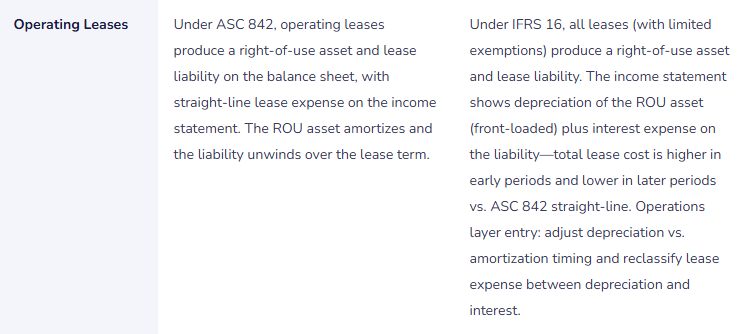
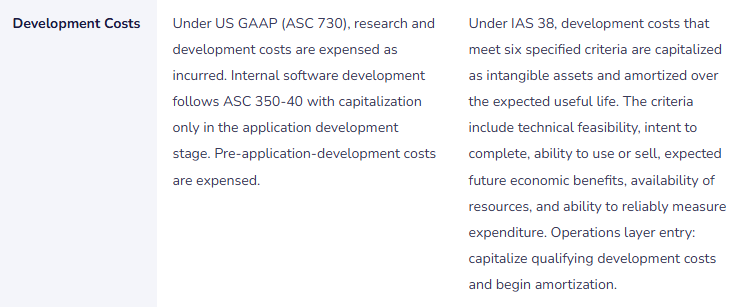
- For an organization maintaining parallel IFRS records: IFRS adjusting entries (lease liability recognition under IFRS 16, development cost capitalization under IAS 38, revenue timing differences between ASC 606 and IFRS 15) post to the Operations layer as the incremental adjustment to the Current layer treatment.
- Financial reports including both Current and Operations layers produce the alternative-standard financial statements.
- Tax Layer
- The tertiary accounting layer for tax-basis adjustments. MACRS depreciation adjustments (the difference between book depreciation in the Current layer and tax depreciation), deferred tax adjustments, and other book-to-tax differences post to the Tax layer.
- The Tax layer is used in addition to the multi-book fixed asset configuration (Post 43) for organizations that need GL-level tax basis tracking rather than only subledger-level tax book maintenance.
- Financial reports filtered to Current + Tax layers produce the tax-basis financial statements used for certain regulatory filings and deferred tax calculation.
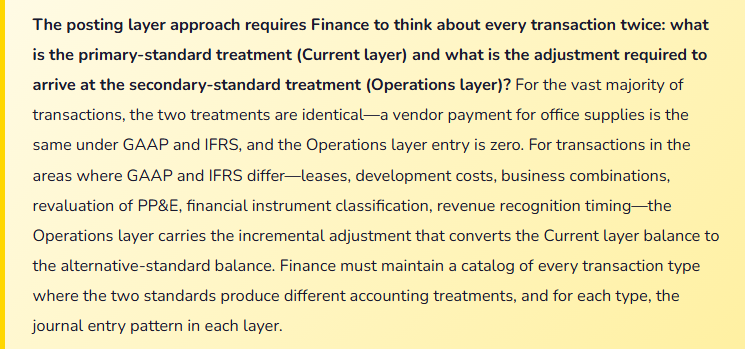
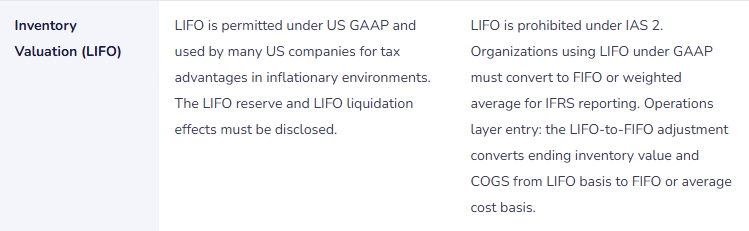
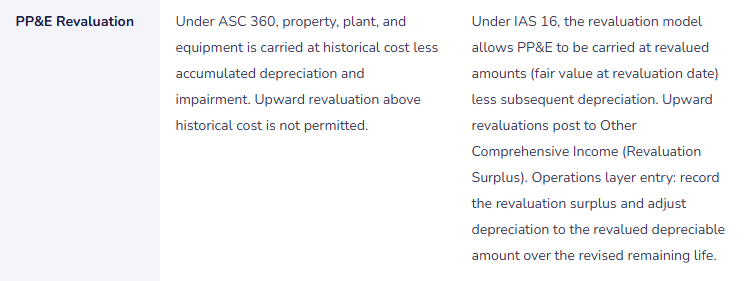
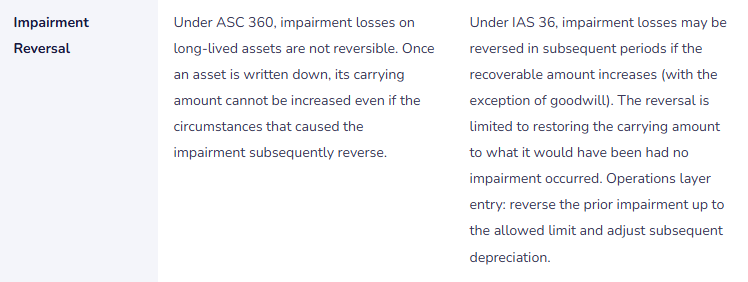
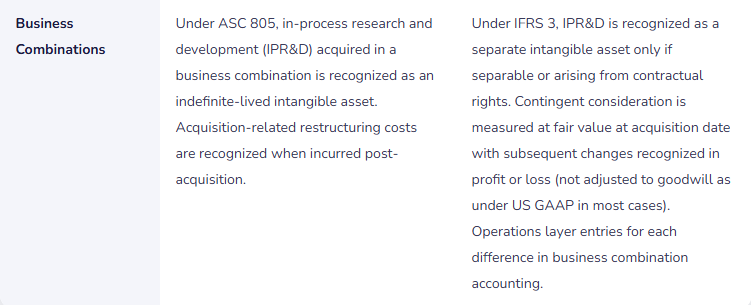
Where GAAP and IFRS Differ—The Adjustments Finance Posts to the Operations Layer

The Additional Reporting Currency—When the Two Standards Use Different Presentation Currencies
Organizations that report under IFRS to an exchange and under US GAAP to domestic regulators often face not only the accounting standard differences described above but also a presentation currency difference: the IFRS report may be presented in EUR while the GAAP report is presented in USD. D365 F&O’s Additional Reporting Currency (General ledger → Ledger setup → Ledger → Accounting currency / Reporting currency) allows Finance to configure a second currency in which all transactions are simultaneously recorded alongside the functional currency.
Five Dual-Reporting Configuration Failures That Produce Irreconcilable Financial Statements
⚠️ Operations Layer Entries Not Reversed at Period End—Adjustments Accumulate Incorrectly
Finance posts IFRS adjusting entries to the Operations layer at each period end. Some adjustments are period-specific (the current period’s IFRS 16 depreciation vs. lease expense difference), and some are cumulative (the running IFRS revaluation surplus). Finance treats all Operations layer entries as permanent—none are reversed at the start of the next period. Over six periods, the Operations layer accumulates 24 individual journal entries, some of which represent the same underlying timing adjustment posted repeatedly. The IFRS income statement, produced by including both Current and Operations layers, is systematically overstated in revenue and understated in expense because the period-specific timing adjustments are being compounded each period rather than replaced. The IFRS-to-GAAP reconciliation in the annual report shows differences that Finance cannot explain because the Operations layer history no longer represents a clean set of incremental GAAP-to-IFRS adjustments.
Fix: Finance maintains a dual-reporting adjustment catalog that classifies each Operations layer entry type as either cumulative (posted once and adjusted as the underlying fact changes) or period-specific (posted each period and reversed at the start of the following period). Period-specific adjustments—the monthly difference between IFRS 16 income statement presentation and ASC 842 presentation, the IFRS development cost capitalization for the current period—must be reversed at the start of the following period using a reversing journal configuration in D365 F&O. Cumulative adjustments—the total IFRS revaluation surplus, the cumulative development cost asset balance—are adjusted as the underlying balances change rather than posted and reversed. The adjustment catalog is documented, reviewed at each period end, and signed off by the Controller before the Operations layer entries are posted. The GAAP-to-IFRS reconciliation is prepared monthly and compared to the catalog—any unexplained difference requires investigation before the IFRS financials are issued.
⚠️ Additional Reporting Currency Initialized Mid-Year—Translation History Is a Single Rate
The organization has been operating for 11 months on D365 F&O with no additional reporting currency configured. In December, Finance realizes they need to produce EUR-basis financial statements for the IFRS report. IT uses the Initialize additional reporting currency process to add EUR as the reporting currency. The process translates all 11 months of historical USD transactions to EUR using the current December spot rate. The EUR balance sheet at December 31 reflects 11 months of USD transactions translated at the December rate—not at the transaction-date rates that IAS 21 (Foreign currency transactions) requires for income statement translation and closing rates for balance sheet items. The EUR income statement is materially different from what it would have been had transaction-date rates been applied month by month. The IFRS auditors identify the translation methodology as non-compliant with IAS 21 and require either a restatement using transaction-date rates or a disclosure of the materiality of the methodology difference.
Fix: The additional reporting currency must be configured in D365 F&O before the first transaction is posted in the legal entity. Finance raises this requirement during the implementation design phase—not at the 11-month mark. If the organization discovers a reporting currency requirement post-go-live, the options are: (1) re-implement the entity from a clean state with the reporting currency configured (only practical early in the entity’s D365 F&O history); (2) use the Initialize process and document the translation methodology in a disclosure note explaining the departure from transaction-date rates and quantifying the materiality; (3) produce the EUR-basis financial statements outside D365 F&O using transaction-date rates applied to D365 F&O USD data (the manual alternative that defeats the purpose of the additional reporting currency). None of these options is as good as configuring the reporting currency from day one.
⚠️ Operations Layer Not Included in the IFRS Financial Reporting Tree—IFRS Reports Show GAAP Figures
Finance configures Management Reporter to produce the IFRS income statement and balance sheet by adding a Reporting Tree that includes the Operations layer alongside the Current layer. During an update to the Management Reporter report definitions—a routine configuration task by an IT analyst supporting the Finance team—the Operations layer inclusion is inadvertently removed from two reports. For three periods, the “IFRS Income Statement” and “IFRS Balance Sheet” reports in the management package show Current layer figures only—effectively presenting GAAP figures labeled as IFRS. Finance does not notice because the reports look reasonable and no one is performing a reconciliation between the IFRS management report and the independently calculated IFRS adjustment schedules. The external auditors, reviewing the IFRS financial statements at year-end, identify that three quarters of IFRS financials in the management package are actually GAAP financials. The Q1 through Q3 management presentations to the board used incorrect IFRS figures.
Fix: The Management Reporter report definitions for dual-reporting environments must specify the posting layer inclusion explicitly, and Finance must validate that the correct layers are included after every change to the report definition. For IFRS reports: Current + Operations layers. For GAAP reports: Current layer only. For tax-basis reports: Current + Tax layers. Finance maintains a report definition validation checklist: after any change to a Management Reporter report definition, Finance runs the report for the most recent closed period and compares the total net income to the independently calculated IFRS net income from the adjustment schedule. Any difference requires investigation. This validation takes five minutes and prevents the three-quarter error scenario. The report definition validation is also run after every D365 F&O and Management Reporter release wave update.
⚠️ IFRS Lease Adjustments Posted to Current Layer—GAAP Financials Include IFRS Entries
Finance is posting the monthly IFRS 16 vs. ASC 842 adjustments that convert the current-layer ASC 842 lease treatment to the IFRS 16 income statement presentation. The adjustments are posted via a recurring journal. During a journal template update, the posting layer field in the journal template is changed from Operations to Current. For four months, the IFRS adjustments post to the Current layer rather than the Operations layer. The GAAP income statement now includes IFRS-specific adjusting entries. The GAAP balance sheet is contaminated with IFRS adjustments. When Finance runs the monthly GAAP-to-IFRS reconciliation, both the GAAP baseline and the IFRS-inclusive figures contain the same adjustments—the adjustment amount shows as zero, which Finance initially interprets as the adjustment not being needed rather than as a signal that the entries went to the wrong layer. The error is discovered when the external auditors review the Current layer journal detail and find lease adjustment entries that do not belong in the GAAP presentation.
Fix: Journal templates used for Operations layer entries must have the posting layer field locked to Operations—it should not be possible for a user or template update to change the layer to Current without an explicit Finance approval. D365 F&O allows the posting layer to be set on the journal template; Finance should confirm after every template update that the layer setting is correct. Additionally, Finance should run a monthly posting layer audit: pull the General journal entries by posting layer for the period and confirm that no entries appear in the Operations layer that belong in Current, and no entries appear in the Current layer that belong in Operations. The posting layer audit takes 15 minutes and is the control that catches the wrong-layer posting before it contaminates a financial statement. Add it to the close checklist as a prerequisite for financial statement production.
⚠️ No GAAP-to-IFRS Reconciliation Maintained—The Two Financial Statements Cannot Be Reconciled at Audit
Finance produces GAAP financial statements from the Current layer and IFRS financial statements from Current + Operations layers every quarter. The two sets of statements are distributed to their respective audiences (domestic management and auditors for GAAP; IFRS auditors and exchange regulators for IFRS). Nobody maintains a formal GAAP-to-IFRS reconciliation—a schedule that starts with GAAP net income and balance sheet figures and reconciles each material difference to arrive at IFRS net income and balance sheet figures. When the IFRS auditors ask for the reconciliation at year-end, Finance attempts to reconstruct it from the Operations layer journal entries. The reconstruction takes three days and reveals that two immaterial-but-nonzero differences between the two presentations are not explained by any Operations layer entry. Finance cannot determine whether the unexplained differences represent errors in the Operations layer, errors in the GAAP Current layer, or rounding from currency translation. The auditors issue a qualified opinion pending resolution of the unexplained differences.
Fix: The GAAP-to-IFRS reconciliation is a monthly Finance deliverable produced simultaneously with the financial statements, not a year-end reconstruction. Finance maintains the reconciliation in a standard format: GAAP net income, add/deduct each IFRS adjustment by category (lease adjustment, development cost capitalization, LIFO-to-FIFO conversion, revaluation, impairment reversal, other), equals IFRS net income. The same reconciliation format is applied to the balance sheet. Each adjustment line in the reconciliation is traced to the Operations layer journal entry that supports it. The reconciliation is reviewed by the Controller each period before the financial statements are distributed. If the GAAP-to-IFRS reconciliation cannot be produced from Operations layer entries at any period, Finance investigates immediately—not at year-end when the auditors ask for it.
Do This / Don’t Do This
Do This
- Configure the additional reporting currency before the first transaction is posted—retroactive initialization produces a non-IAS-21-compliant translation
- Maintain a dual-reporting adjustment catalog classifying each Operations layer entry as period-specific (requires reversal) or cumulative (adjusted as facts change)
- Validate Management Reporter report definitions include the correct posting layers after every report definition change and every release wave update
- Run a monthly posting layer audit confirming entries are in the correct layer before financial statements are produced
- Produce the GAAP-to-IFRS reconciliation every period alongside the financial statements—not as an annual year-end exercise
- Lock the posting layer field on journal templates for Operations layer recurring journals to prevent accidental Current layer posting
Don’t Do This
- Defer additional reporting currency configuration to post-go-live when the need becomes urgent
- Post period-specific IFRS adjustments without configuring them as reversing journals in D365 F&O
- Accept Management Reporter IFRS report output without verifying the Operations layer is included in the column definition
- Allow journal template updates to change the posting layer field without Finance review and approval
- Treat the GAAP-to-IFRS reconciliation as an audit deliverable rather than a monthly Finance control
- Assume that because both GAAP and IFRS reports look reasonable, the posting layer separation is working correctly—validate explicitly
What’s Next:
Dual reporting addresses the most structurally complex Finance configuration in a multinational D365 F&O environment. The next post turns to one of Finance’s core revenue-protection responsibilities: Credit and Collections Management at Enterprise Scale in D365 F&O—the collections workspace and how to configure it for maximum collections effectiveness, the credit scoring and credit limit framework, collection letter sequences and interest calculation, write-off procedures and bad debt reserve management, and the five credit and collections failures that allow collectible receivables to become uncollectible ones.
— Bobbi
D365 Functional Architect · Recovering Controller
Thank you for reading!
If this post helped you solve a real problem, share it with a Finance colleague who is in the middle of an ERP implementation or a post-go-live optimization. If you have a topic that I haven’t covered, please reach out. There is always one more post worth writing.
If you are interested in reading more, below are some of my recent posts:
Leave a Reply