

How D365 F&O’s role-based security model works for Finance functions, which segregation of duties conflicts Finance must prevent in the AP, AR, and GL workflows, the user access review cadence Finance must document for audit evidence, and the five security configuration failures that produce audit findings Finance did not anticipate.
How D365 F&O’s Security Model Works—The Three Layers Finance Must Understand
D365 F&O’s security is organized in three layers that Finance must understand before designing role assignments for the Finance function. The layers are hierarchical: privileges aggregate into duties, duties aggregate into roles, and roles are assigned to users.
- Privileges
- The most granular security unit. A privilege grants access to a specific action on a specific object: the right to read the vendor invoice header table, the right to post a general journal, the right to run the aged balance report. Privileges are defined by Microsoft and cannot be directly assigned to users—they are the building blocks of duties.
- Duties
- Groups of related privileges that together allow a user to perform a job function: the “Maintain vendor invoices” duty groups privileges for creating, editing, and viewing vendor invoices. Duties are where Finance-relevant SOD conflicts are most visible—two duties that should never be assigned to the same user (vendor invoice creation and vendor payment posting) can be identified and enforced at the duty level.
- Roles
- Collections of duties that together describe a job role: the Accounts Payable Clerk role includes duties for creating invoices, viewing vendors, and processing payments but should not include duties for creating vendor records or approving payments. Microsoft provides standard roles; Finance customizes them by removing duties that create SOD conflicts for the organization’s specific control environment.
- Security Policies and Contextual Security
- D365 F&O supports data-level security through security policies that restrict which records a user can see based on organizational hierarchy, legal entity, or other data attributes. Finance can configure a security policy that prevents an AP coordinator from viewing invoices in legal entities other than their own—a control that prevents unauthorized access to related-entity financial data without restricting the AP coordinator’s functional access within their entity.
The SOD Conflicts Finance Must Prevent—The AP, AR, and GL Critical Pairs
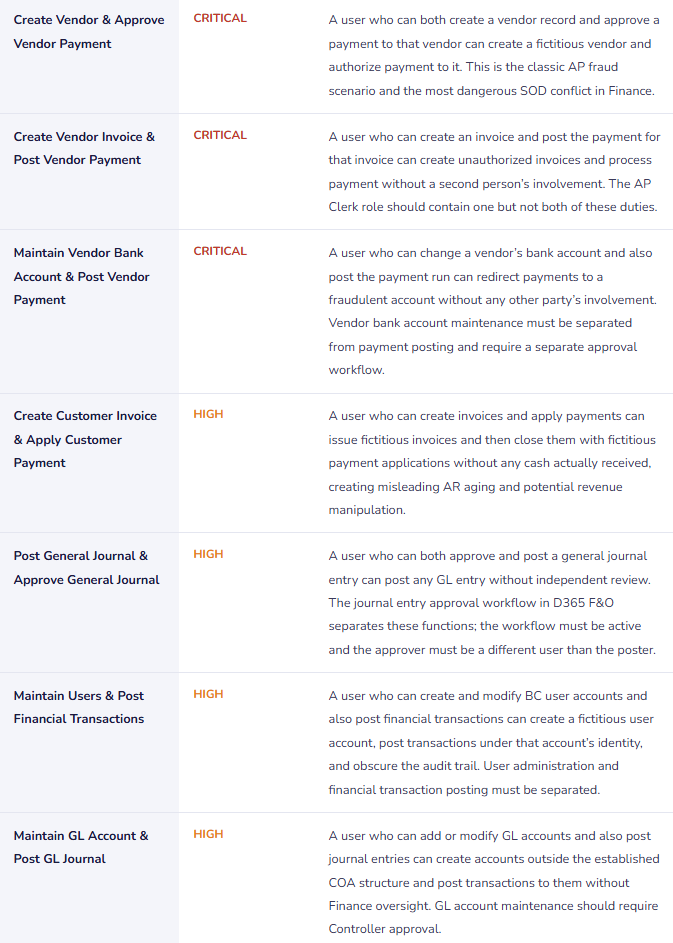
Segregation of duties in Finance requires that no single user can initiate and authorize the same transaction. The following table presents the most critical SOD conflict pairs for Finance functions in D365 F&O. Finance must confirm that no active user has both duties in any conflict pair.
Finance SOD Conflict Pairs—D365 F&O Critical Segregations

The User Access Review Finance Must Document for Audit Evidence
The external auditor testing access controls over financial reporting will ask Finance for evidence that user access was reviewed during the audit year. Finance must be able to produce: the date of each review, the scope of the review, the findings, and the remediation actions taken. This evidence cannot be assembled retroactively after the audit request arrives—it must be created during the review and archived at the time.
Quarterly User Access Review Procedure—Finance Documentation Standard
- Export the Active User Role Assignment Report
- Run the User role assignments report from D365 F&O (System Administration → Security → User role assignments). The report shows every active user and the roles assigned to each. Export to Excel. This is the starting point for every quarterly access review. Date-stamp the export with the review date—this timestamp becomes part of the audit evidence.
- Cross-Reference Against the Current Employee Roster
- Compare every active D365 F&O user to the current active employee list from HR. Any D365 F&O user not on the current employee roster is a former employee whose access was not deactivated at departure. Immediate action: deactivate the account. Document: the user’s name, their departure date, the date their D365 F&O access was deactivated, and the date the access was identified as active after departure. Former employee accounts with financial posting access represent the highest-priority remediation in any access review.
- Review Role Assignments Against Current Job Responsibilities
- For each current employee with D365 F&O access, confirm their assigned roles are consistent with their current job responsibilities. A Finance analyst who has moved from AP to FP&A should not retain the AP Clerk role—the prior role should have been removed and replaced with the FP&A-appropriate role when the job change occurred. Any user whose role assignments do not match their current responsibilities is a remediation item: remove the excess roles and document the change.
- Run the SOD Conflict Report and Investigate All Findings
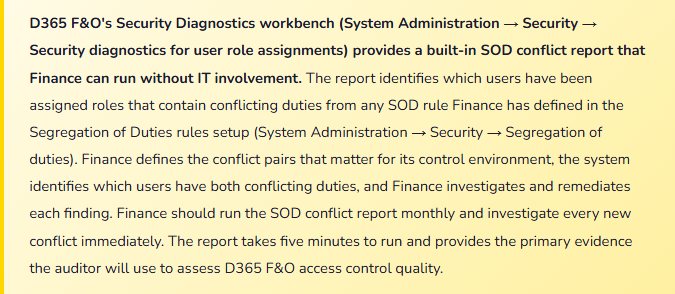
- Run the Security diagnostics report filtered to SOD conflicts. For each conflict identified, Finance determines: is this conflict a design error (the role should be split), a temporary authorization (documented and time-limited), or a false positive (the conflict is flagged by the rule definition but does not represent a genuine control gap for this user’s actual job function)? Each finding requires a documented disposition and a remediation action where the finding represents a genuine control gap.
- Document and Sign Off
- Prepare a one-page access review summary: date of review, number of active users reviewed, number of former employee accounts found and deactivated, number of role assignment corrections made, number of SOD conflicts identified and the disposition of each. The Controller signs the summary. The summary and the underlying exports (user role assignment report, employee roster comparison, SOD conflict report) are archived in the access review folder alongside the prior quarterly reviews. This package is the controls evidence the auditor will request.
Five Security Configuration Failures That Produce Audit Findings
⚠️ System Administrator Role Assigned to Finance Users Who Only Need Financial Posting Access
During implementation, the Controller and three Finance managers were assigned the System Administrator role to simplify the go-live process—the System Administrator role was the fastest way to confirm Finance users could access everything they needed. Post-go-live, the System Administrator assignment was never rationalized to appropriate Finance roles. Two years later, the Controller, the Finance Manager, and two Finance analysts retain System Administrator access. The external auditor asks Finance to produce the D365 F&O user role assignment report. The auditor observes that four Finance users have unrestricted system access including user administration, security configuration, and every financial function in the system. The auditor classifies this as a significant deficiency: Finance users with System Administrator access can create other users, assign roles, and perform any transaction without any compensating control. The finding requires a management response and a remediation plan.
Fix: System Administrator access in D365 F&O should be restricted to the system administrator responsible for user management and security configuration—typically an IT role, not a Finance role. Finance users require Finance-appropriate roles: the Controller typically needs the Comptroller or Accounting Manager standard role, which includes financial reporting, period close, and GL management access. AP and AR coordinators need the appropriate functional roles. Finance works with IT to remove System Administrator from all Finance users and replace it with the minimum set of standard or custom roles required for each Finance user’s job function. The remediation should be completed within 30 days of go-live, not allowed to persist for two years.
⚠️ AP Coordinator Can Both Create Vendors and Process Payments—SOD Conflict Undetected for 18 Months
The AP Coordinator role was configured at implementation by assigning the Accounts Payable Clerk standard role plus the Accounts Payable Manager role because the AP team was small and the AP coordinator needed to perform some manager-level functions. The combination of the two standard roles creates an SOD conflict: the AP Clerk role includes vendor invoice creation and the AP Manager role includes vendor payment processing and vendor master maintenance. A single AP coordinator has all three capabilities. The SOD conflict exists for 18 months before Finance enables the Segregation of Duties rules and runs the Security diagnostics report for the first time. The report flags the AP coordinator’s role combination as a critical SOD conflict. Finance investigates and confirms the conflict has existed since go-live.
Fix: Finance defines the SOD conflict rules in D365 F&O before the user role assignments are finalized at implementation. The SOD rules table (System Administration → Security → Segregation of duties) should include at minimum the seven critical conflict pairs listed in the table above. The Security diagnostics report should be run against the proposed role assignments during UAT—before any users go live—to confirm the role design does not create conflicts. If the organization has a small Finance team and some conflicts are operationally unavoidable, Finance documents the compensating control: a mitigating control that provides independent oversight of the conflicting function (the Controller reviews all vendor master changes weekly; the CFO approves all payment runs above a threshold). The SOD conflict and the compensating control are documented before go-live, not discovered by the auditor 18 months later.
⚠️ No User Access Review Ever Conducted—Seven Former Employees Have Active Accounts at Year-End
Finance has never conducted a formal user access review. The D365 F&O user list has 62 active user accounts. The external auditor requests the user list and asks Finance to confirm all active users are current employees with appropriate access. Finance cross-references the user list with the HR employee roster and finds seven users who left the organization during the year without their D365 F&O accounts being deactivated. One of the seven is a former Finance manager who left in April and whose account retained the Accounting Manager role through the end of the audit year—eight months of active financial posting access after departure. The auditor classifies the seven active former-employee accounts as access control findings, with the Finance manager’s account classified as a significant deficiency due to the level of financial access and the duration. Finance cannot demonstrate that no transactions were posted under the former employees’ accounts after their departure without reviewing eight months of journal entry and payment history for unauthorized entries.
Fix: User account deactivation on the day of departure is the primary control; the quarterly access review is the backup that catches failures in the primary control. Finance establishes a formal offboarding checklist item: HR notifies Finance and IT on the employee’s last day, Finance deactivates the D365 F&O account by end of business on the same day, and the deactivation is documented. The quarterly access review confirms no former-employee accounts slipped through the primary control. The review is documented with the Controller’s sign-off and archived. Finance presents the four quarterly access review documents for the audit year as the access control evidence: each document shows the review date, the roster comparison, and the disposition of any findings.
⚠️ Journal Entry Approval Workflow Configured but Bypassed for “Urgent” Entries
D365 F&O’s general journal approval workflow was configured at implementation for all journal entries above £10,000. The workflow routes the journal to the Controller for approval before posting. In practice, the AP and Finance coordinators have learned that they can bypass the workflow by posting journal entries to a journal batch that the Controller has pre-authorized as a “recurring” batch—the recurring batch configuration allows posting without re-approval. Finance coordinators use the recurring batch for urgent entries that they want to post immediately without waiting for the Controller’s approval. Over 12 months, 34 general journal entries totaling £840,000 were posted through the recurring batch bypass, including 11 entries above £10,000 that should have required Controller approval. The auditor identifies the bypass pattern when reviewing the journal entry population and noting that a significant portion of material journal entries have no approval entry in the workflow history.
Fix: The journal entry approval workflow must apply to all journals above the threshold regardless of the journal batch type. Finance reviews the journal batch configuration and confirms that no batch is configured in a way that allows posting without approval for amounts that exceed the defined threshold. The recurring journal batch capability in D365 F&O is appropriate for genuinely recurring entries of a fixed amount that Finance has pre-approved as part of the recurring journal template review—it is not a mechanism for bypassing the approval threshold for ad hoc urgent entries. Finance communicates to all Finance users: there are no exceptions to the journal entry approval workflow for entries above the threshold. If an entry is genuinely urgent, the Controller approves it urgently—which in D365 F&O takes less than two minutes from anywhere with internet access.
⚠️ Security Roles Not Updated After Organizational Restructure—Finance Users Have Access to Entities They No Longer Support
The organization restructured its legal entity structure 14 months ago, moving three subsidiaries from being supported by the parent Finance team to having their own Finance function. The D365 F&O security roles for the parent Finance team were never updated to remove access to the three subsidiaries’ data. The parent AP coordinator still has AP posting access in all three subsidiaries, even though she has had no operational responsibility for those entities for 14 months. The parent AR manager can view and post to all three subsidiaries’ AR accounts. The auditor, reviewing the access control environment for the subsidiaries, finds that several parent company Finance users retain full financial posting access to subsidiary entities they do not support. The finding raises questions about unauthorized transactions in the subsidiaries and requires a review of all parent-company-user-generated transactions in each subsidiary for the 14-month period.
Fix: Organizational changes that affect Finance team responsibilities must trigger an immediate D365 F&O security role review. When Finance team coverage for a legal entity changes, Finance reviews the role assignments of all users affected by the change: users who no longer support an entity have their access to that entity’s security policies removed; users who newly support an entity receive the appropriate roles. This review is not a quarterly task—it is an event-triggered task that must occur within the same week as the organizational change. Finance adds “Update D365 F&O security roles” to the organizational change management checklist alongside “Update Finance team assignments” and “Update approvals matrix.”
Do This / Don’t Do This
Do This
- Define SOD conflict rules in D365 F&O before user role assignments are finalized at implementation
- Run the Security diagnostics SOD conflict report during UAT against proposed role assignments before any user goes live
- Remove System Administrator from all Finance users and replace with appropriate Finance functional roles
- Conduct and document the quarterly user access review with Controller sign-off and archive the evidence package
- Deactivate departing employee D365 F&O accounts on the day of departure as a formal offboarding step
- Confirm the journal entry approval workflow applies to all journal batches above the threshold—no batch type bypasses the control
- Update security role assignments when organizational structure changes affect Finance team responsibilities
Don’t Do This
- Assign System Administrator to Finance users at go-live for convenience and never rationalize it
- Combine the AP Clerk and AP Manager standard roles for a single user without SOD conflict analysis
- Allow recurring journal batch configurations to bypass the approval workflow threshold
- Conduct user access reviews only at year-end rather than quarterly with documented evidence
- Wait for the auditor to identify former-employee active accounts—deactivate on departure day
- Delegate security design entirely to IT without Finance specifying the SOD requirements and role boundaries
What’s Next:
Security controls govern who can do what in D365 F&O. The next post addresses a Finance workflow that high-volume AP environments should be automating but most are handling manually: AP Automation at Enterprise Scale—Invoice Capture and Three-Way Match in D365 F&O—how D365 F&O’s Invoice Capture uses AI document recognition to accelerate vendor invoice processing, the three-way match configuration Finance must own, the tolerance settings that determine when matches are automatic versus requiring Finance review, and the five AP automation failures that introduce errors at scale faster than the manual process they replaced.
— Bobbi
D365 Functional Architect · Recovering Controller
Thank you for reading!
If this post helped you solve a real problem, share it with a Finance colleague who is in the middle of an ERP implementation or a post-go-live optimization. If you have a topic that I haven’t covered, please reach out. There is always one more post worth writing.
If you are interested in learning more, below are some of my latest posts:
- AI and ERP Security: What Copilot Means for Your D365 Security Roles and Internal Controls
- The Natural Language ERP: Stop Running Reports, Start Asking Questions
- AI Adoption in ERP: Why Change Management Is Your Most Critical AI Investment
- Agent 365: Microsoft’s Control Tower for All Your ERP Agents
- AI in D365 Supply Chain: From Demand Planning to Warehouse Intelligence
Leave a Reply