

How BC’s fixed asset module handles the asset lifecycle from acquisition through disposal, the depreciation book configuration Finance must own for every asset category, the fixed asset register-to-GL reconciliation Finance must run at every period close, and the five fixed asset configuration failures that produce depreciation misstatements Finance discovers months or years after go-live.

The Fixed Asset Lifecycle in BC—Finance-Owned Actions at Each Stage
Asset Acquisition
Assets enter BC’s fixed asset register through two primary paths: acquisition through a purchase invoice (Finance codes a purchase invoice line to a fixed asset number, and BC creates the acquisition entry automatically when the invoice is posted) or direct acquisition journal (Finance posts an FA journal with the acquisition amount directly to the fixed asset).
Finance owns the capitalization decision at acquisition: is the expenditure a capital asset subject to depreciation, or an operating expense to charge immediately? The capitalization threshold (the minimum cost that qualifies an item as a capital asset) is a Finance accounting policy decision that Finance enforces through the purchase invoice coding process.
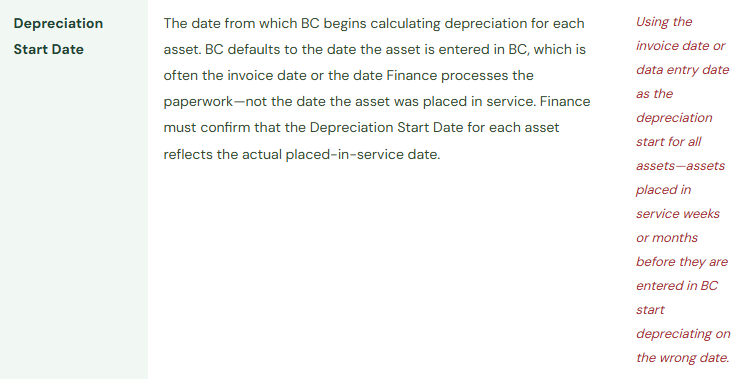
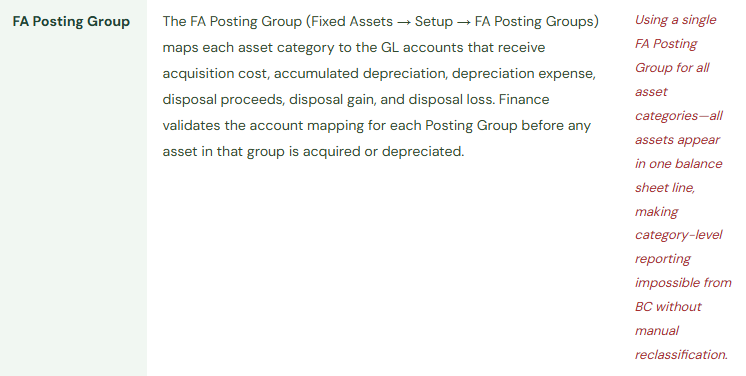
Finance validates at acquisition: The asset is assigned to the correct FA Posting Group (which determines the acquisition, depreciation expense, and accumulated depreciation GL accounts), the correct Depreciation Book, the correct depreciation method, the correct useful life in years, and the service life start date—the date the asset was placed in service, which determines when depreciation begins.
Depreciation Calculation and Posting
BC calculates depreciation through the Calculate Depreciation batch (Fixed Assets → Periodic Activities → Calculate Depreciation). The batch calculates the depreciation amount for each asset based on the method and useful life in the asset’s Depreciation Book and creates a journal. Finance reviews the depreciation journal before posting—the Calculate Depreciation batch creates a draft journal, not a posted entry.
Finance validates before posting: Total depreciation for the period is directionally consistent with the prior period. Any asset whose depreciation has changed significantly from the prior period without a known cause (addition, reclassification, useful life change) is investigated before posting. Finance must run the depreciation batch before posting any accruals that depend on the depreciation figure—this is a close sequence dependency that belongs in BC’s Closing Tasks before the first live close.
Asset Revaluation and Impairment
For assets carried at revalued amounts under IFRS, Finance posts revaluation entries through the FA Revaluation journal to adjust the asset’s carrying value to fair value. The revaluation entry debits the asset account and credits the revaluation surplus in equity (or the revaluation loss to the income statement if the carrying value is below the historical cost net of depreciation).
For assets that have suffered impairment—where the recoverable amount has fallen below the carrying value—Finance posts an impairment through the FA journal using a Write-Down posting type. Finance must document the impairment assessment and recoverable amount determination as supporting evidence before posting any impairment entry.
Asset Disposal and Write-Off
When an asset is sold or scrapped, Finance posts a disposal through BC’s FA journal using the Disposal posting type. BC automatically calculates the gain or loss on disposal: proceeds minus net book value at the disposal date. The disposal reverses the acquisition amount and the accumulated depreciation and routes the gain or loss to the FA Posting Group’s designated disposal gain/loss accounts.
Finance owns: The annual physical fixed asset inventory. Finance confirms every asset in BC still physically exists and is in service, and that every asset in service is in BC. Assets in BC that are no longer in service must be disposed. Assets physically in service but not in BC represent either unrecorded acquisitions or incorrectly expensed capital purchases.
The Depreciation Book Configuration Finance Must Own
BC’s Depreciation Book (Fixed Assets → Setup → Depreciation Books) is the core configuration object that determines how depreciation is calculated and which GL accounts receive the entries. Finance must configure and validate a Depreciation Book for every asset category the organization uses. The table below maps the key settings Finance must own.




The Fixed Asset Register-to-GL Reconciliation Finance Must Run Monthly
At every period close, Finance runs the Fixed Asset projected value report (or the Fixed Asset Detailed Trial Balance) and compares the net book value by asset category to the GL account balances in BC’s Chart of Accounts. The two should agree. Any difference is a reconciling item requiring investigation before the period closes. The reconciliation takes 20 minutes for a standard asset register. Discrepancies found monthly are traced in hours. Discrepancies found at year-end audit are traced over days.

Five Fixed Asset Configuration Failures Finance Discovers Late
⚠️ Depreciation Proposal Posted Without Review—A Transposition Error Compounds for 14 Months
Finance configures the Calculate Depreciation batch to run automatically at month-end and post the resulting journal without requiring Finance review. An asset is entered with an acquisition cost of £3,640,000 instead of £364,000 (a transposition). The depreciation batch calculates depreciation at ten times the correct amount every month. Monthly depreciation is £60,667 instead of £6,067—a £54,600 per month overstatement. The error posts for 14 months before the fixed asset register-to-GL reconciliation reveals that the accumulated depreciation on one asset is disproportionately large. Finance investigates and finds the transposition. Cumulative overstatement: £764,400. The correction requires reversing 14 months of incorrect depreciation and reposting at the correct amounts—a project that also requires restating 14 months of financial statements.
Fix: The Calculate Depreciation batch should run as a proposal step, not an auto-post step. The batch creates a journal that Finance reviews before posting. Finance’s review: the period’s total depreciation expense should be within a defined reasonableness band of the prior period; any individual asset whose depreciation has changed by more than 10% from the prior period without a known explanation is flagged for investigation. The review takes 10–15 minutes and is documented as a close task in BC’s Closing Tasks. Finance posts the journal after the review, not before it.
⚠️ Single FA Posting Group for All Assets—Category-Level Balance Sheet Is Impossible
To simplify go-live, all fixed assets are assigned to one FA Posting Group. All acquisitions post to one balance sheet account, all accumulated depreciation credits one contra account, and all depreciation expense charges one income statement account. The balance sheet shows one line for all net fixed assets; the income statement shows one line for all depreciation. Management has requested a fixed asset breakdown by category for three quarterly board presentations. Finance cannot produce it from BC without manually re-categorizing the entire asset register. The auditor asks for the fixed asset roll-forward schedule by asset class. Finance produces it from a manually maintained spreadsheet outside BC—a process that takes four hours per quarter.
Fix: Finance designs the FA Posting Group structure to match the balance sheet and management reporting presentation Finance needs from BC before any asset is created. One posting group per asset category the organization uses: Leasehold Improvements, Machinery and Equipment, Motor Vehicles, Office Equipment, IT Hardware, IT Software. Each posting group has its own acquisition account, accumulated depreciation account, and depreciation expense account. The design is a 2-hour exercise. Redesigning it after 300 assets have been created in a single default group requires changing the posting group on every asset record and reposting historical entries to the correct accounts—a 40-hour remediation project.
⚠️ GL Integration Not Enabled for Depreciation—FA Register and GL Diverge Immediately
The Depreciation Book is configured with GL integration disabled for the Depreciation transaction type—a setting left at default because nobody reviewed it during implementation. Every month, the Calculate Depreciation batch creates and posts a journal that updates the FA register (reducing the asset’s net book value) but does not create any GL entries. The GL depreciation expense account receives no postings. The income statement shows zero depreciation expense for all months after go-live. The balance sheet shows the full acquisition cost of every asset with no accumulated depreciation offset. Finance discovers the discrepancy at the end of the first quarter when the CFO asks why the income statement shows no depreciation on the company’s recently acquired production equipment.
Fix: Finance opens the Depreciation Book and confirms GL integration is enabled for all transaction types that should create GL entries: Acquisition, Acquisition Cost, Depreciation, Write-Down, Appreciation, Disposal, and any other types the organization uses. Finance then posts a test acquisition and a test depreciation run in the sandbox environment and confirms each transaction type creates the expected GL entries with the correct accounts from the FA Posting Group. This test takes 30 minutes and confirms the GL integration is working before any live FA transactions are processed.
⚠️ Fixed Asset Register Not Reconciled to GL—£420,000 Discrepancy Found at Year-End Audit
Finance does not include the fixed asset register-to-GL reconciliation in the monthly close procedure. Over 18 months, four sources of discrepancy accumulate: two assets acquired through purchase invoices where the FA number was omitted (acquisition cost sits in the GL expense account, not in the FA acquisition account); one asset’s depreciation journal was calculated, reviewed, and saved but never posted (FA register shows reduced NBV; GL shows no depreciation); and a disposal was processed in the FA journal but the GL integration for disposal was not enabled (FA register shows zero; GL still carries the full cost). At year-end, the auditor asks Finance for the register-to-GL reconciliation. Finance runs it for the first time and finds a £420,000 discrepancy across all four items. Tracing 18 months of accumulated differences takes four days of Finance time during the highest-pressure period of the Finance calendar.
Fix: The fixed asset register-to-GL reconciliation is a monthly close procedure with the same standing as the AP-to-GL and AR-to-GL reconciliations. Finance runs the Fixed Asset Projected Value report or Fixed Asset Detailed Trial Balance and compares net book value by asset category to the GL asset account balances. Any difference above a de minimis threshold requires investigation and resolution before the period closes. Monthly discrepancies traced at month-end are typically one or two root causes resolved in hours. Annual discrepancies traced at audit are months of accumulated complexity resolved over days.
⚠️ Disposed Assets Still in BC—Depreciation Continues After the Asset Is Gone
Three pieces of office equipment were removed from service and disposed of by the operations team ten months ago. Finance was not notified. The FA records for the three items remain active in BC. The depreciation batch has been calculating and posting depreciation for the three items every month for ten months after they were physically removed. The accumulated post-disposal depreciation overstatement is £8,400. The balance sheet shows the three assets with non-zero NBV when they no longer exist. Finance discovers the error when a new Finance analyst is reconciling the asset register to a physical inventory list as part of the annual audit preparation and finds three items on the BC list that are not on the physical inventory.
Fix: Finance establishes a fixed asset disposal notification procedure: any time operations, IT, or facilities removes a capital asset from service for any reason (scrapping, sale, theft, transfer), Finance receives notification within five business days. Finance adds this requirement to the internal controls documentation and communicates it to the relevant teams at least annually. Finance also runs the annual physical fixed asset inventory and compares the results to BC’s active FA register. Any asset on the physical inventory not in BC represents an unrecorded acquisition; any asset in BC not on the physical inventory represents a disposal that was never processed. Both types of discrepancy are investigated and corrected before the annual close.
Do This / Don’t Do This
Do This
- Review the depreciation journal before posting every month—never configure the Calculate Depreciation batch as an auto-post step
- Design the FA Posting Group structure by asset category before creating the first asset
- Confirm GL integration is enabled for all FA transaction types before any live FA transactions are processed
- Run the fixed asset register-to-GL reconciliation monthly as a required period-close procedure
- Establish a disposal notification procedure requiring operations to notify Finance within five business days of any asset removal
- Conduct an annual physical fixed asset inventory and reconcile results to BC’s active FA register
Don’t Do This
- Auto-post the depreciation journal without Finance review—acquisition errors compound for the life of the affected asset
- Use a single FA Posting Group for all asset categories because it simplifies go-live
- Accept the default GL integration settings without verifying each transaction type creates GL entries
- Skip the FA register-to-GL reconciliation during busy closes—discrepancies found monthly are hours; found at year-end audit they are days
- Allow the operations team to remove assets from service without a Finance notification procedure
Up Next:
Fixed assets addresses the capital expenditure lifecycle. The next post addresses the operational layer that makes everything else sustainable: BC Process Documentation—Why Configuration Without Procedures Creates Operational Risk—the four types of Finance process documentation every BC environment requires, the technical debt that missing documentation creates, and the five process documentation failures that convert a well-configured BC environment into a fragile Finance operation that breaks whenever a key person is absent.
— Bobbi
D365 Functional Architect · Recovering Controller
Thank you for reading!
If a post helped you solve a real problem, share it with a Finance colleague who is in the middle of an F&O implementation or a post-go-live optimization. If you have a topic the blog series did not cover, reach out. There is always one more post worth exploring.
If you are interested in learning more, please check out some of my latest posts:





Leave a Reply