

Set It Once · A back-to-basics series · D365 Finance & Operations
Schedule heavy reports and processes to run automatically overnight, so the output is waiting instead of the process running while you wait.

Some processes in F&O, like a large report or a heavy calculation, take real time to run. Batch processing lets you queue that work to happen in the background, or on a schedule, instead of sitting and staring at a progress bar.
The idea in one minute: Queue it, walk away
Any process with a Batch processing option on its dialog can be sent to run now in the background, or scheduled to run automatically on a recurrence you set, daily, weekly, or at a specific time overnight.
Schedule a report to run automatically
1.Open the report or process dialog and go to the Run in the background tab.
- For this example, I’m using the Vendor Transactions Report
- Accounts payable > Inquiries and Reports > Vendor Transaction Report
2. Expand the Run in the background fasttab, and optionally Recurrence to set a schedule.

3. If you would like this to recur on a regular basis, choose the recurrence pattern, such as every Monday at 6am, and confirm.

4. Check progress any time from System administration > Inquiries > Batch jobs.
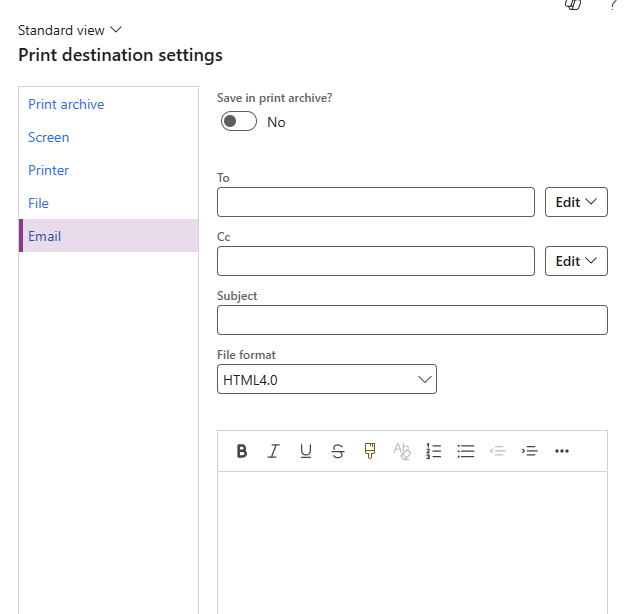
- Optionally, when setting it up, you can have the report directly emailed to yourself and anyone else that would have interest in receiving it automatically each time it is run
- For that, in the set up of the report, in the Destination fasttab, select “change” (standard prints reports to screen) and you can build out the email that sends the report each Monday
This is especially valuable for anything you currently run manually first thing every morning or on a regular basis, like an aging report or an inventory valuation. Scheduled overnight, it is simply sitting in your inbox or workspace by the time you sit down.
Next Up: Personal Alerts – Let F&O Be Your Assistant
Thank you for reading!
If you are interested in learning more, here are some of my latest posts:





Leave a Reply