

What Finance must own in the migration, the reconciliation requirements before go-live is declared complete, opening balance entry for GL accounts and every subledger, and the mistakes in opening balance setup that propagate forward into every financial statement for the life of the system.
Who Owns What in a BC Data Migration
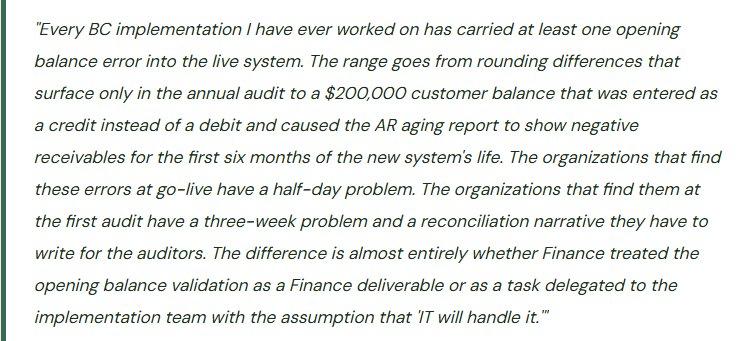
One of the most reliable sources of opening balance errors is a migration where the division of responsibility was never clearly established. The implementation partner extracts data from the legacy system, transforms it, and loads it into BC. Finance reviews and approves. In practice, “Finance reviews and approves” often means Finance signs off on whatever the implementation team presents without running an independent reconciliation—because the timelines are tight and Finance trusts the technical team to get the numbers right. The technical team is very good at extracting and transforming data. They are not accountants. The combination of technical skill without accounting knowledge and accounting knowledge without data validation skill is the root cause of most opening balance errors.
Finance Owns These—Non-Negotiable
- The go/no-go decision on opening balance accuracy before go-live is declared
- The reconciliation of every subledger opening balance to the legacy system aging report
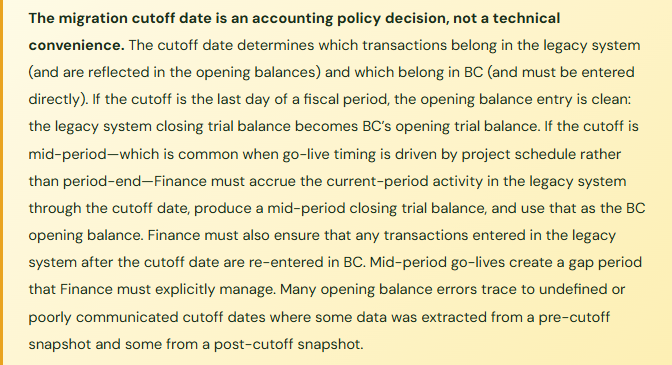
- The cutoff date decision: which transactions belong in the legacy system and which belong in BC
- The validation that every customer balance, vendor balance, and open invoice matches the legacy system to the penny before go-live
- The GL account balance sign validation: assets are debits, liabilities are credits, no exceptions
- The opening retained earnings calculation including the current-year net income through the cutoff date
- The sign-off on the opening trial balance that goes into the auditor’s permanent file
- The documentation of any intentional adjustments made at migration (write-offs, reclassifications, rounding treatments)
The Implementation Team Owns These
- Extracting opening balance data from the legacy system in the agreed format
- Mapping legacy accounts to the BC chart of accounts per Finance’s mapping document
- Configuring the BC posting groups and dimensions to receive the opening entries correctly
- Executing the data load via BC’s import tools, configuration packages, or journal entry
- Documenting the technical migration process and resolving import errors
- Providing Finance with a record count and total-amount reconciliation for every data set loaded
What BC Actually Has to Receive—The Full Opening Balance Scope
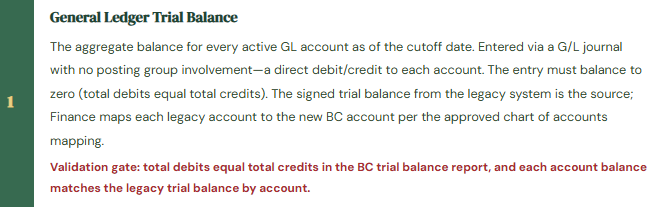
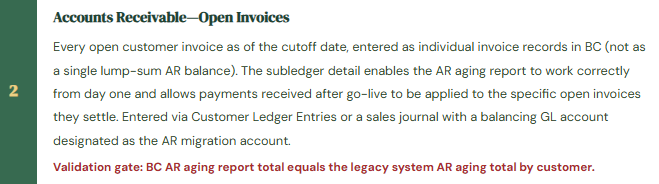
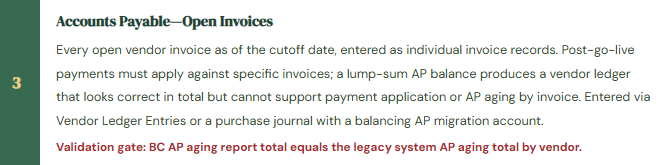
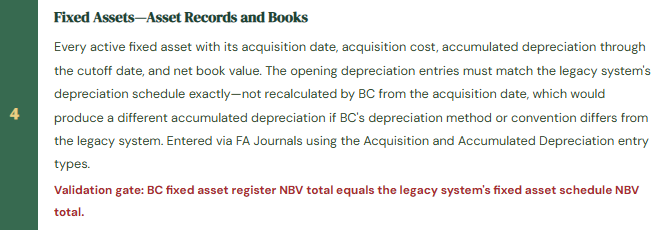
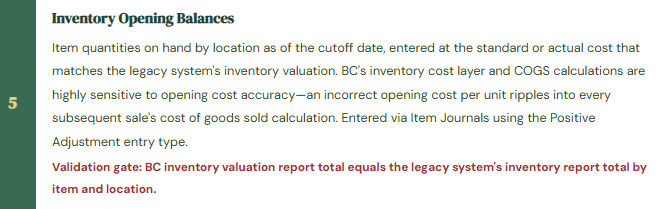
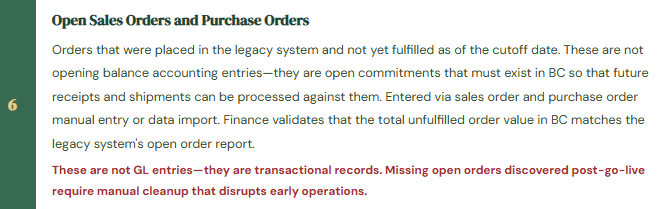
Finance teams underestimate the scope of opening balance setup when they think only about the trial balance. The GL trial balance is the smallest piece. The full opening balance scope for a typical BC implementation includes six distinct data categories, each with its own entry method and reconciliation requirement.
Opening Balance Scope—All Six Categories Finance Must Validate
The Reconciliation Framework Finance Must Run Before Sign-Off
The opening balance reconciliation is not a one-step comparison. It has four levels, and Finance must pass all four before authorizing go-live.
Level 1 — GL balance totals: Total trial balance debits equal total trial balance credits in BC. This is the most basic check and the only one that BC itself will enforce—you cannot post a journal that doesn’t balance. Passing Level 1 means the journal entries were mechanically correct. It does not mean the account balances are correct.
Level 2 — Account-by-account GL comparison: Every account in the BC trial balance is compared to the corresponding account in the legacy system trial balance, signed correctly (debits positive for assets and expenses, credits positive for liabilities, equity, and revenue). Each account that doesn’t match to the defined tolerance requires investigation and resolution before go-live authorization. Finance prepares a reconciliation workbook: legacy account code, legacy balance, BC account code, BC balance, difference, explanation of any intentional difference. This workbook is a go-live artifact—it goes into the implementation documentation and the auditor’s files.
Level 3 — Subledger-to-GL agreement: The AR subledger total (sum of all open customer invoice balances in BC) must equal the GL AR account balance in BC. The AP subledger total must equal the GL AP account balance. The fixed asset subledger NBV total must equal the GL net fixed assets balance. The inventory subledger value must equal the GL inventory account balance. Subledger-to-GL agreement is a BC system integrity requirement—if it doesn’t hold on day one, it will not hold going forward, and the subledger reconciliation process will be fighting opening balance errors forever.
Level 4 — Legacy system aging agreement: The BC AR aging by customer must equal the legacy system AR aging by customer. The BC AP aging by vendor must equal the legacy system AP aging by vendor. This level validates that the subledger detail is correct at the individual customer and vendor level, not just in aggregate. A $500,000 aggregate AR balance that is composed of different customer balances than the legacy system will produce incorrect collection actions from day one—customers will be called for balances they don’t owe and balances that are genuinely past due will be missed.
The BC Configuration Package—The Recommended Migration Tool
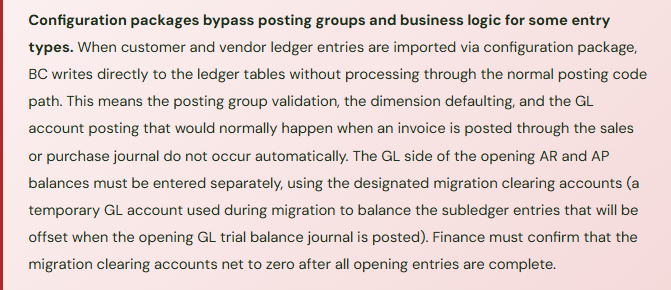
BC includes a built-in data migration tool called Configuration Packages (accessed via the Configuration Packages page or the RapidStart setup). Configuration packages allow Finance and the implementation team to define which BC tables will receive imported data, export Excel templates for each table, populate the templates in Excel, and import the completed templates back into BC with validation against BC’s business rules.
For opening balance migrations, the most commonly used configuration packages are: G/L Account (for chart of accounts setup), Customer (for customer master data), Vendor (for vendor master data), Customer Ledger Entry (for open AR invoices), Vendor Ledger Entry (for open AP invoices), and Fixed Asset (for asset records). The package import validates required fields and data types but does not perform accounting validation—it will not catch a customer balance loaded with the wrong sign or a fixed asset loaded with accumulated depreciation that exceeds the acquisition cost. Those validations are Finance’s responsibility, performed in the reconciliation framework above.
Five Opening Balance Mistakes That Follow You for the Life of the System
⚠️ AR Loaded as a Single Lump Sum—The Aging Report Is Useless on Day One
Under time pressure, the AR opening balance is loaded as a single journal entry to the AR GL account and a single customer ledger entry for the total amount rather than individual open invoices. The BC trial balance balances. The AR GL total is correct. The AR aging report, however, shows a single entry for every customer with a lump-sum balance and no invoice date, invoice number, or due date. The collections team cannot use the aging report for collection activity. Post-go-live payments cannot be applied to specific invoices because there are no invoices in the system—only a balance. Within 60 days, the customer subledger is a mix of opening lump-sum balances and new individual invoices, making the aging report uninterpretable for any customer who has both a legacy balance and new activity. The implementation team spends three months cleaning up the subledger while Finance operates AR collections from the legacy system’s spreadsheets.
Fix: AR and AP opening balances must always be loaded at the individual invoice level, regardless of the additional time required. Each open invoice gets its own customer ledger entry with the original invoice number, original invoice date, payment due date, and amount. This enables post-go-live payment application by invoice, a functional AR aging report from day one, and a clean audit trail connecting the opening balance to the specific invoices that compose it. The investment in entering individual invoices at go-live is always less than the cost of reconstructing the subledger after go-live while running a live business.
⚠️ Fixed Asset Opening Depreciation Recalculated by BC—NBV Differs from Legacy System
The implementation team enters fixed assets in BC with the original acquisition date and acquisition cost, then lets BC calculate accumulated depreciation from the acquisition date using the BC depreciation method. The legacy system used a different depreciation convention (mid-quarter vs. half-year, for example) or was on a calendar year while BC is on a fiscal year. BC calculates accumulated depreciation of $142,000 for an asset that had $156,000 of accumulated depreciation in the legacy system. The NBV in BC is $14,000 higher than the legacy system for that asset. Across 200 assets, the total NBV discrepancy is $94,000. The BC balance sheet shows fixed assets that are $94,000 higher than they should be. The discrepancy is discovered at the first-year-end audit when the auditor reconciles the fixed asset roll-forward.
Fix: Fixed asset opening balances must be entered using the Acquisition Cost and Accumulated Depreciation entry types in the FA Journal, with the accumulated depreciation amount matching the legacy system exactly—not recalculated by BC. After the opening entries are posted, the BC fixed asset register NBV by asset must be compared to the legacy system’s fixed asset schedule NBV by asset, and any difference greater than a defined tolerance must be resolved before go-live. The depreciation method and convention in BC should be set to match the legacy system’s treatment for existing assets; new assets acquired after go-live can use BC’s native depreciation rules.
⚠️ Retained Earnings Entry Is Wrong—Equity Is Misstated from Day One
The trial balance loaded into BC comes from the legacy system’s balance sheet at the end of the prior fiscal year. The go-live date is seven months into the current fiscal year. The implementation team loads the prior-year closing trial balance. They include retained earnings as the prior-year ending balance but do not include the current-year net income (seven months of revenue less seven months of expenses) anywhere in the equity section. The income statement accounts are loaded correctly for the current year in BC starting from zero. But the balance sheet equity section is understated by seven months of net income—$380,000 in this case. The balance sheet doesn’t balance. The implementation team adds a suspense entry to force balance. The suspense entry sits in the trial balance for two months until a senior consultant traces it back to the missing current-year retained earnings.
Fix: When go-live is mid-year, the opening retained earnings entry in BC must include: the prior-year ending retained earnings balance plus the current-year net income through the cutoff date. The current-year net income is calculated from the legacy system’s year-to-date income statement as of the cutoff date. This number represents all earnings since the last fiscal year-end that have not yet been closed to retained earnings. If BC’s income statement accounts start from zero on go-live date (which is the standard approach), the opening retained earnings must absorb all of the pre-cutoff current-year activity. Finance must calculate and validate this number independently before signing off on the opening balance entry.
⚠️ Inventory Opening Cost Is Wrong—COGS Is Incorrect for Every Sale in the First Year
Inventory is loaded into BC at standard cost, but the standard cost loaded is last year’s standard cost because the current year standard cost update had not yet been processed in the legacy system at migration time. The difference between last year’s standard cost and the current year’s standard cost is $2.40 per unit for the primary product. With 45,000 units of that product sold in the first year on BC, the COGS understatement is $108,000. Gross margin is overstated by $108,000 for the entire first year. The variance surfaces when Finance reconciles the physical inventory at year-end and the inventory value per the physical count doesn’t agree to BC’s inventory valuation report.
Fix: Inventory opening costs must match the cost basis that Finance intends to use going forward—the current standard cost if BC will operate on standard costing, or the actual purchase cost per unit if BC will operate on FIFO or average cost. Before loading inventory, Finance confirms which costing method BC is configured for (set on the Item Card under Costing Method) and ensures that the opening unit cost loaded matches that method’s basis. After the inventory journal is posted, run the Inventory Valuation report in BC and reconcile the total to the legacy system’s inventory report signed to match BC’s costing method. Any difference requires investigation and correction before go-live.
⚠️ No Reconciliation Performed Before Go-Live—Errors Discovered in the First-Month Close
The implementation timeline is tight. The go-live date is fixed. The migration data is loaded on the weekend before go-live Monday. Finance is asked to “review and confirm” the opening balances but is given four hours on Sunday evening to do so. Finance spots-checks three customer balances, confirms the total AR looks approximately right, and signs off. Go-live proceeds. At the first-month close, Finance discovers: two customers whose balances are swapped (a payment was applied to the wrong customer in the legacy system extraction), a vendor whose balance is loaded twice (an extraction error), and four fixed assets with a negative NBV because the accumulated depreciation exceeded the acquisition cost in the legacy data and BC accepted the entries without flagging the logical impossibility. Correcting these errors while operating a live system and closing the first period takes three weeks and produces a messy audit trail.
Fix: The opening balance reconciliation is a project gate that does not open until Finance has completed all four levels of reconciliation described earlier in this post. The timeline must be built backward from the go-live date to allow adequate Finance reconciliation time—typically a minimum of two full business days for a mid-market company. “The go-live date is fixed and we ran out of time for reconciliation” is not a justification for skipping the reconciliation—it is a project risk that should have been escalated to the project sponsor weeks earlier. An opening balance that Finance hasn’t reconciled is an opening balance Finance hasn’t accepted. Finance must hold the line on this gate regardless of schedule pressure.
Do This / Don’t Do This
Do This
- Load AR and AP at the individual invoice level—never as a lump-sum balance
- Enter fixed asset accumulated depreciation as the legacy system amount, not recalculated by BC
- Run all four levels of the reconciliation framework before authorizing go-live
- Document the cutoff date in writing and communicate it to every party entering data in the legacy system and BC
- Calculate opening retained earnings to include current-year net income through the cutoff date for mid-year go-lives
- Validate that migration clearing accounts net to zero after all opening entries are complete
- Build the reconciliation time requirement into the project timeline—at least two full business days for Finance review
- Document all intentional adjustments made at migration with the rationale in the implementation files
Don’t Do This
- Delegate opening balance validation entirely to the implementation team—they are not accountants
- Let BC recalculate fixed asset depreciation from the acquisition date instead of loading the legacy system’s accumulated depreciation
- Sign off on opening balances with a spot-check under time pressure—errors discovered post-go-live are dramatically more expensive
- Go live mid-year without calculating and entering the current-year net income in opening retained earnings
- Load inventory at an out-of-date standard cost that doesn’t match the current-year standard
- Treat the migration clearing account as a permanent account—it must net to zero before go-live
- Accept the implementation team’s word that “everything balanced”—run the Level 2 account-by-account comparison yourself
Up Next:
Opening balances done right give the new system a clean foundation to build on. The next post addresses who can see and do what inside that system: Security, User Roles, and Permission Sets in Business Central—how BC’s permission set model works, how Finance designs permission sets for segregation-of-duties compliance, the difference between permission sets and user groups, record-level security via security filters, and the quarterly access review Finance must own.
— Bobbi
D365 Functional Architect · Recovering Controller
Thank you for reading!
If this post helped you solve a real problem, share it with a Finance colleague who is in the middle of an ERP implementation or a post-go-live optimization. If you have a topic that I haven’t covered, please reach out. There is always one more post worth writing.
Interested in learning more about D365? Here are some of my latest posts:
Leave a Reply