

BC’s HR module for employee data management, the payroll integration architecture, posting payroll to the general ledger, employee expense management, and the controls Finance needs over the accounts and processes at the intersection of HR and Finance.
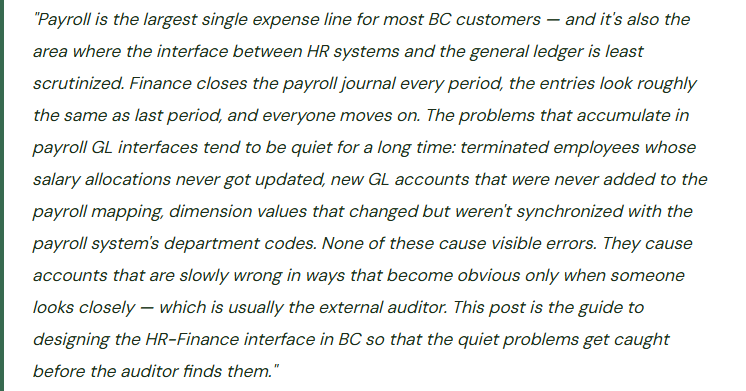
What BC’s HR Module Actually Covers — And What It Doesn’t
It’s important to set expectations correctly: BC’s built-in HR module is a personnel record and absence management tool, not a full human capital management platform. It stores employee demographic information, employment history, qualifications, and absence tracking — the data Finance needs for cost allocation and the operational data HR needs for basic people management. BC does not calculate payroll. For payroll calculation and payroll tax compliance, organizations use a separate system — whether that’s a dedicated payroll platform (ADP, Paychex, Ceridian, Sage Payroll) or a Microsoft solution (typically Dynamics HR or an HR module from a BC partner).
What BC HR Includes
- Employee master record — personal data, employment dates, department, job title
- Employment history and position tracking
- Qualification and training records
- Absence registration and absence codes (leave types)
- Employee posting groups — connecting employees to GL accounts for expense and payable posting
- Employee expense reports (reimbursement tracking separate from payroll)
- Union membership and union agreements (localization-dependent)
- Relative and beneficiary data storage
What BC HR Does NOT Include
- Payroll calculation — wages, tax withholding, deductions, net pay
- Payroll tax filing or compliance (W-2, P60, T4 generation)
- Benefits enrollment and benefits administration
- Performance management and performance reviews
- Full-scale talent acquisition or applicant tracking
- Learning management or mandatory training completion tracking
- Compensation planning or salary benchmarking
- Time and attendance integration (requires partner extension or third-party)
The design implication is straightforward: BC is the financial system of record; the payroll platform is the payroll system of record. The interface between them — how payroll costs move from the payroll system into the BC general ledger — is what Finance must design, control, and reconcile every period.
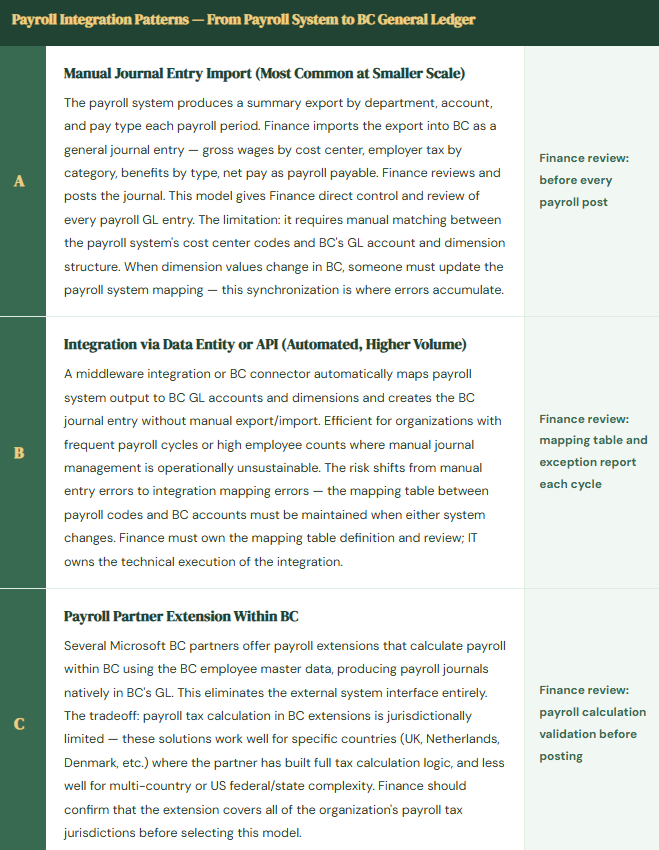
The Payroll-to-GL Integration Architecture — Three Common Models
The Payroll Journal GL Flow — What Should Post Each Payroll Cycle
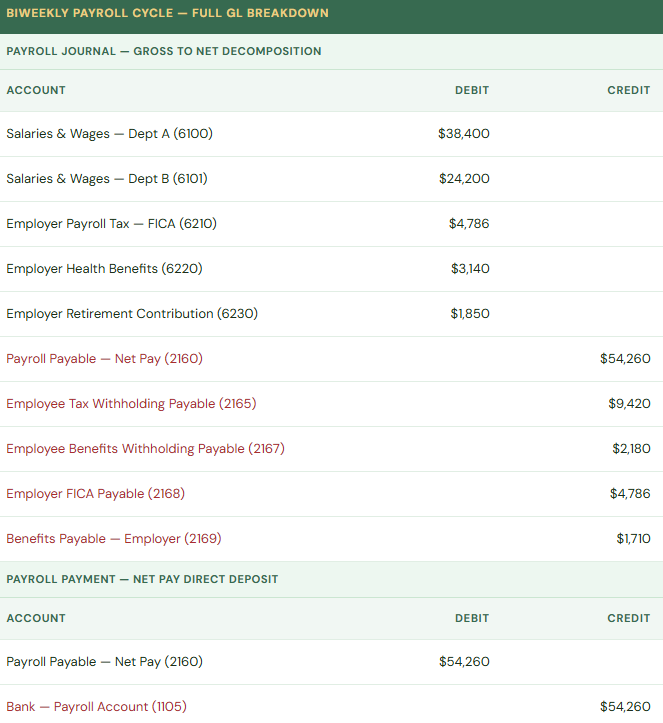
The payroll journal splits the total compensation cost across three layers: the expense (debit to salary and employer-paid benefit accounts), the liability for what is owed to employees (net pay payable), and the liability for what is owed to tax authorities and benefit providers (withholding and employer contribution payables). Finance must verify that each payroll posting leaves these liability accounts with the correct balance for subsequent remittance payments to the IRS/HMRC, benefits providers, and retirement plan. A payroll journal that lumps everything into one “payroll payable” account produces an undifferentiated liability that Finance cannot reconcile against the specific remittances.
Employee Expenses in BC — The Reimbursement Workflow
BC includes a native employee expense management capability distinct from payroll — employees submit expense reports for reimbursement of business costs they paid personally (meals, travel, supplies). This is separate from payroll and separate from any corporate card program that runs through AP. The BC employee expense workflow is simple but functional for smaller organizations that don’t justify a dedicated expense management platform.
- Employee Creates Expense Report in BC
- Employee navigates to Employee Expense in BC, creates a new expense document, enters expense lines by type (Meals, Travel, Accommodation, etc.), attaches receipts, and submits for approval. Each expense type maps to an expense account through the employee’s posting group configuration. BC’s native expense management is functional for low-to-moderate expense volume; organizations with high expense volumes, mobile submission requirements, or complex policy enforcement typically use a third-party expense app (Continia Expense, Expense Management by iWise, or Dynamics 365 Expense) that integrates with BC.
- Approval Workflow
- BC’s approval workflow routes the expense report to the employee’s manager (configured on the employee record) for review and approval. If the approval workflow is not enabled — which requires BC’s workflow engine to be configured — expense reports default to Finance posting without approval gating. Enabling the approval workflow is a go-live configuration step that is frequently missed: the expense report form exists and works, but without the approval workflow, it posts directly to the GL without any manager review step.
- Finance Posts the Approved Expense Report
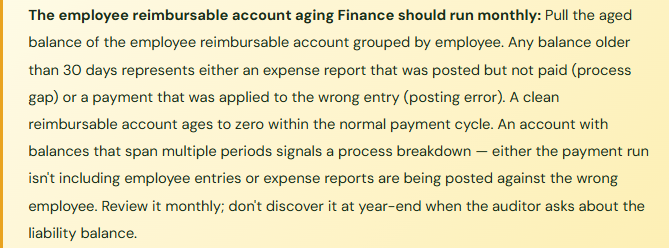
- Finance reviews the approved expense report, verifies the GL coding matches the expense type, confirms receipts are attached, and posts. The posting creates the expense account debit (the cost to the income statement) and a credit to the employee’s reimbursable account — a designated accounts payable account for employee reimbursements. The employee’s reimbursable balance is then paid through the BC payment journal as part of the normal payment run or separately, depending on the organization’s reimbursement cycle.
- Employee Reimbursement Payment
- Employee reimbursements are settled through the BC payment journal — Finance selects the open employee payable entries and generates payments through the normal bank payment process. The payment clears the employee reimbursable account and posts to the bank. Employees set up in the vendor ledger for reimbursement receive ACH or check payments through the standard AP payment run; employees set up as employees (not vendors) in BC require a separate payment journal step outside the AP payment batch.
Five Controls Finance Needs at the HR-Finance Interface
⚠️ Payroll GL Mapping Not Updated When Departments or Dimensions Change — Costs Post to Wrong Accounts
The organization restructures two departments in January. The old department codes are retired; new dimension values are created in BC. Finance updates the chart of accounts and dimension configuration. The payroll system — which exports by department code — still uses the old department codes in its export file. Finance imports the January payroll journal. The old department codes don’t match any BC dimension values, so the payroll amounts either post to a default error account or post without dimensions, depending on how the import was configured. For three payroll cycles, payroll costs have no department dimension — the management P&L by department is missing the largest cost line for those employees. Finance discovers it when the departmental P&L looks implausibly low for two departments in the quarterly review.
Fix: Payroll system mapping is a change management dependency — it must be updated whenever BC dimensions, cost centers, or GL accounts change. Build the payroll mapping synchronization into the Finance change control process for any dimension or account change: when a new dimension value is created or an old one retired in BC, the payroll system mapping table must be reviewed and updated before the next payroll cycle. Finance owns the mapping table; IT maintains the integration mechanics. Verify the mapping update by running a test payroll import file through the new mapping in a BC sandbox before the live cycle.
⚠️ Payroll Accrual Not Posted at Month-End When Payroll Straddles Period Boundaries
The organization pays biweekly. Most payroll cycles land cleanly within a month. But twice a year, a payroll cycle spans the month-end boundary — the pay period covers work performed in two different months. In BC, the payroll journal posts on the payment date — all of the wages for the two-week period hit the month when the payment is made. For October: the payroll cycle covers September 21 to October 4, paid October 7. The full two weeks of wages post to October. September shows no payroll expense for its last 11 days of work. October shows an extra week of payroll expense that belongs in September. October income statement is overstated; September is understated. The auditor asks why October payroll expense is 15% above the monthly average.
Fix: Payroll accruals for straddle periods are a Finance responsibility, not a payroll system function. At each month-end, Finance should identify whether the next payroll cycle includes days that fall in the current period, calculate the approximate wages and employer costs for those days based on the payroll estimate, and post an accrual to the current period (Dr Wages / Cr Wages Payable — Accrual) with an automatic reversal in the following period. This is a straightforward accrual; the complexity is in remembering to do it only when the payroll cycle straddles the period boundary. Put it on the period-close checklist with a flag for the months when it applies.
⚠️ Employee Expense Approval Workflow Not Configured — All Expense Reports Post Without Manager Review
The BC HR and expense setup was configured at go-live. Expense report forms work. Employees submit expenses. Finance receives them and posts them. The approval workflow — the step that routes each expense report to the submitter’s manager for review before it reaches Finance — was scoped as a “nice to have” and skipped during the go-live crunch. For eighteen months, every expense report posted without manager approval. Some were legitimate business expenses correctly coded. Some were personal expenses that a manager review would have caught. Some were coded to incorrect cost centers that a manager would have known to correct. An internal audit review of expense posting for the period found that approximately 8% of submitted expense reports contained items that should have been questioned, modified, or rejected in an approval step that was never in place.
Fix: The expense approval workflow is not optional — it is the primary control that prevents personal expenses from being reimbursed as business expenses. Configure it at go-live or implement it immediately if it was skipped. The BC workflow engine requires: an approval user setup that defines who approves whose expenses, an approval workflow for the expense report document type, and a workflow response that routes to the approver when an expense report is submitted. Test it with a sample submission before declaring it active. Once configured, Finance should periodically verify that approval timestamps exist on all posted expense reports — a posted report with no approval timestamp indicates the workflow wasn’t triggered.
⚠️Terminated Employee Records Not Updated — Payroll Costs Post to Active Employees Who Have Left
An employee terminates in June. HR updates the payroll system; the last paycheck runs. But nobody updates the employee record in BC — the employment end date is blank, the department dimension is still active, and the employee remains in the BC HR module as an active employee. Four months later, a payroll journal includes a final vacation payout for the same employee that the payroll system generates for a retroactive payment. Finance imports the journal; the employee’s BC record still appears active, so the import maps correctly and the entry posts. The GL shows a payroll expense for a terminated employee in October. The auditor flags it in the payroll testing sample. Finance traces it back to the missing termination date and the open BC employee record.
Fix: Employee termination must trigger a BC HR update as part of the offboarding process — not a separate task that Finance discovers later. The HR-Finance interface should include a defined handoff: when an employee terminates, the payroll system is updated and the BC employee record is updated with an employment end date on the same day or the next business day. Finance should run a monthly comparison of the BC active employee list against the payroll system’s active employee list. Any employee active in one system but not the other is a synchronization exception that requires investigation before the next payroll cycle.
Do This / Don’t Do This
✓ Do This
- Design the payroll-to-GL mapping table with Finance-owned GL accounts and dimensions
- Include payroll mapping synchronization in the change control process for dimension and account changes
- Post payroll accruals when payroll cycles straddle period boundaries — include it on the close checklist
- Configure the expense approval workflow at go-live — not as a phase two item
- Run the employee reimbursable account aging monthly — clean it before it spans multiple periods
- Run a monthly active employee comparison between BC and the payroll system
- Update BC employee records on the day of termination — same process as payroll system update
- Reconcile the payroll journal to the payroll register before posting each cycle
- Separate net pay payable, tax withholding payable, and employer benefit payables into distinct liability accounts
✗ Don’t Do This
- Use a single payroll payable account for all payroll liabilities — remittance reconciliation becomes impossible
- Skip the expense approval workflow configuration — every expense report will post without manager review
- Update BC dimension values without checking the payroll system mapping first
- Miss payroll period-boundary accruals — the month-end income statement will be wrong when it straddling occurs
- Leave terminated employee records active in BC — retroactive payroll transactions will map to them
- Let the employee reimbursable account balance age without monthly review
- Assume the payroll system and BC are synchronized — verify with a monthly active employee comparison
- Post payroll journals without reconciling to the payroll register — errors post silently
Up Next:
Payroll and HR connect the people side of the organization to Finance. The next post addresses the point where new BC implementations most commonly carry forward a problem from the old system into the new one: Data Migration and Opening Balance Setup in Business Central — what Finance must own in the migration, the reconciliation requirements before go-live is declared complete, opening balance entry for GL accounts and subledgers, and the mistakes in opening balance setup that propagate forward into every financial statement for the life of the system.
— Bobbi
D365 Functional Architect · Recovering Controller
Thank you for reading!
If this post helped you solve a real problem, share it with a Finance colleague who is in the middle of an ERP implementation or a post-go-live optimization. If you have a topic that I haven’t covered, please reach out. There is always one more post worth writing.
Interested in learning more? Here are some of my latest posts:
Leave a Reply