
Picture this: you walk in Monday morning, coffee in hand, and half of Friday’s to-do list is already done. Sales order lines matched to the right items. Vendor invoices read, coded, and queued for approval. Last week’s expense receipts sorted and categorized, duplicates flagged.
Nobody stayed late to do that. An AI agent did it while you were asleep.
If you work anywhere near Dynamics 365 Business Central, this isn’t hypothetical. It’s rolling out now, in 2026 release wave 1. Let’s talk about who, or what, just joined your team.
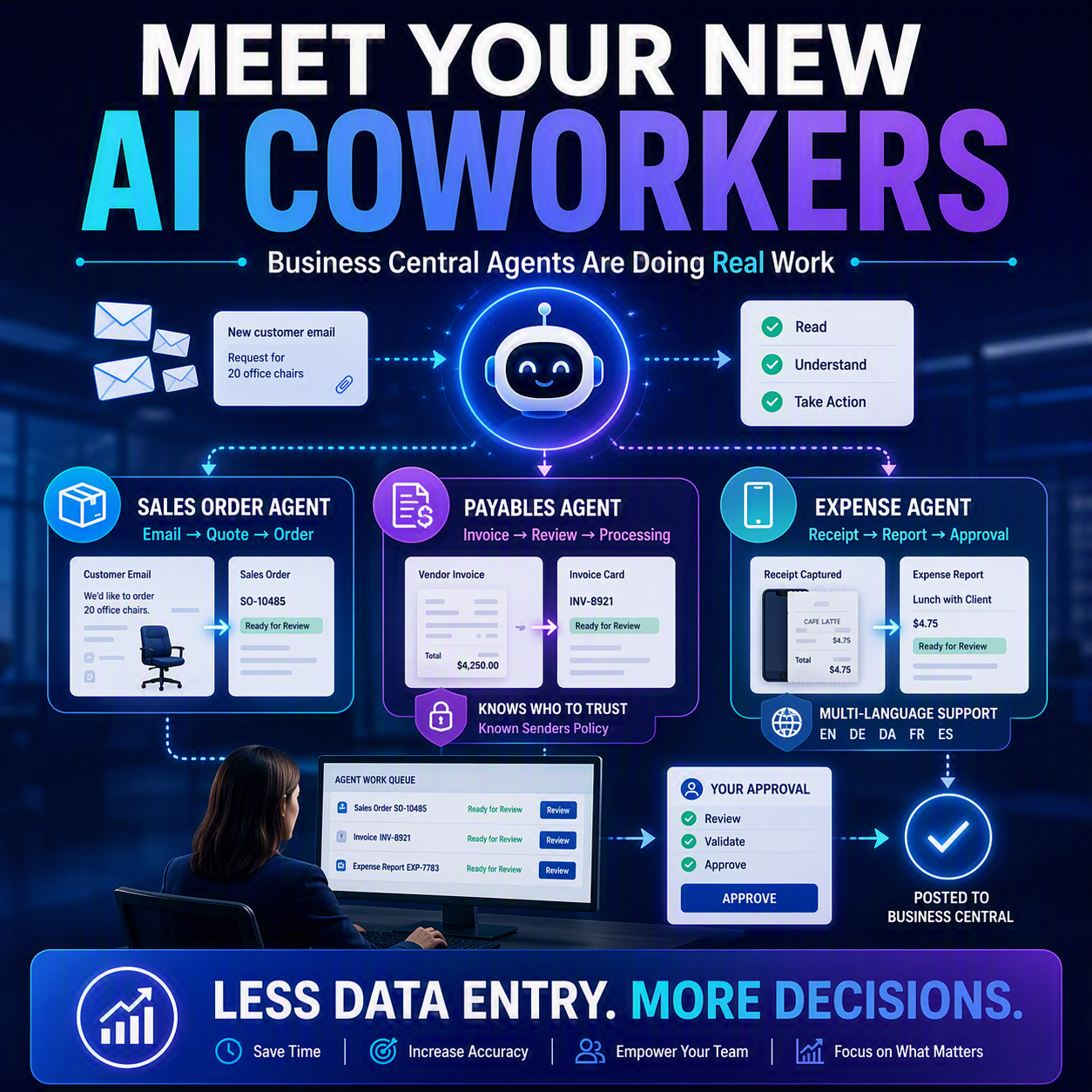
The idea in one minute: Business Central now has AI agents that do real transactional work, not just answer questions. The Sales Order Agent reads incoming sales emails and turns them into quotes and orders, matching items along the way. The Payables Agent reads vendor invoices and processes them, and can now learn to trust regular senders instead of flagging every one for your approval. The Expense Agent captures receipts, now from your phone and in more languages, and builds expense reports automatically. None of these are chatbots you prompt. They’re coworkers doing the transaction, with you reviewing the result before it’s final.
Sales Order Agent: your inbox-to-order clerk 📦
The Sales Order Agent monitors a mailbox, reads customer emails and attachments, and builds sales quotes and orders from them, so you’re not re-typing what the customer already told you. The latest update makes it noticeably smarter: item matching now works in layers, starting with an exact item number or barcode match, then reading product attributes like color or size out of the email, and finally a broader search if nothing else lines up. A new relevance filter also keeps the agent from wasting time on emails that aren’t real sales inquiries, like discount requests or spam. You can now run multiple agent instances in one company too, so different sales teams or product lines can each have their own mailbox.
Payables Agent gets choosier about who it trusts 💡
The Payables Agent reads vendor invoices from email, extracts the data, and prepares them for posting. It’s the kind of AP (accounts payable) grunt work that eats a chunk of someone’s week. The catch with any automation touching money is trust: you don’t want it posting a fraudulent invoice unsupervised. That’s what the new Known Senders feature addresses. You set a review policy (always review, never review, or “only if untrusted,” Microsoft’s recommended default), and the agent builds a list of vendors it already knows are legitimate. Approve an invoice from a new sender once, and that sender can graduate onto the trusted list. Unknown senders still get a human look; known, repeat vendors stop clogging your queue. That’s less busywork without losing the checkpoint.

Expense Agent: now in your pocket, in more languages 📱
The Expense Agent captures receipts by email, camera, or upload, extracts the merchant, amount, date, and category, and groups everything into expense reports for approval, flagging likely duplicates along the way. Two updates make it more usable day to day. First, mobile app integration: employees can snap a receipt photo or share one straight from their phone, and the agent takes it from there. No more shoebox of paper receipts waiting for month-end. Second, multi-language support: the agent now works in German, Danish, French, and Spanish alongside English, so multinational teams can submit and approve expenses in their own language.

So, is this replacing your team? ⏳
No. It’s easy to hear “AI agent processes invoices automatically” and picture a robot cutting checks unsupervised. That’s not what’s happening. Every one of these agents is built around a review step: you approve the sales order before it ships, review the payables invoice unless you’ve told the system to trust that vendor, and sign off on the expense report before it posts. The agents do the tedious first pass: reading, matching, categorizing. You still make the call. Think of it less like replacing your AP clerk and more like giving them a fast, literal assistant who never tires of typing.
✅ Nobody’s cutting headcount here. What’s changing is the work itself: less data entry, more judgment calls, right where your experience actually pays off.
Thank you for reading! Next up in this series: with agents doing real work in your system, who’s watching them? Post #2, “Take Control of Your AI Agents,” walks through how to actually manage, monitor, and rein in these new coworkers. Stay tuned. ☕
Sources
- Business Central 2026 release wave 1 planned features
- Run multiple Sales Order Agents per company with smarter item matching, relevance filtering, and streamlined setup
- Speed up processing with Known Senders in Payables Agent
- Manage expenses in Business Central using Expense Agent
- Capture expenses with Expense Agent on your mobile app
- Use Expense Agent in German, Danish, French, and Spanish
- 2026 release wave 1 plans for Microsoft Dynamics 365, Microsoft Power Platform, and Copilot Studio offerings
Thank you for reading!
Interested in learning more? Check out some of my latest posts:





Leave a Reply