

How the Data Management Framework works, the difference between data entities and direct table access and why Finance must care, how Finance uses data entities for period-end imports, recurring journal loads, and integration feeds, and the data quality controls that keep automated loads from silently posting incorrect records nobody asked for.
What the Data Management Framework Is—and What It Replaces
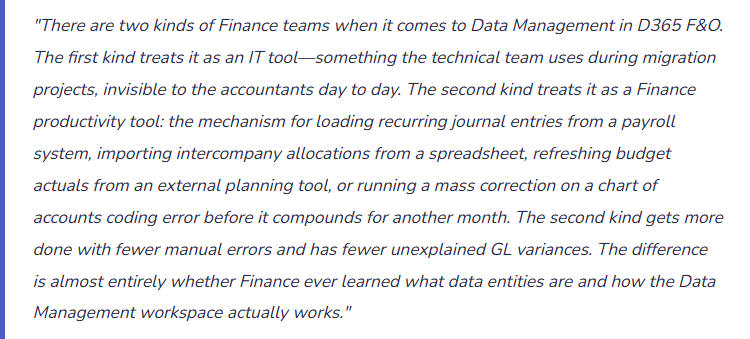
The Data Management Framework (DMF) is D365 F&O’s structured, auditable interface for moving data into and out of the system. It is the supported alternative to the approaches Finance falls back on when they don’t know the DMF exists: manual entry row by row, Excel add-in uploads with inconsistent validation, or asking IT to “just fix it in the database.”
The DMF lives in System administration → Data management (or search “Data management”). From this workspace Finance creates import jobs, export jobs, and data projects—saved configurations that can be reused, scheduled, and reviewed in audit. Every import run through the DMF produces an execution log: what was submitted, what passed, what failed, and exactly why. That audit trail is something manual entry and direct database updates cannot provide.
Six Finance Use Cases Where Data Entities Change the Workload
📝 Recurring Journal Loads
Monthly allocations, rent accruals, depreciation entries from external asset systems, intercompany charge distributions, and overhead spreads can all load via the General Journal data entity from an Excel or CSV template. Replaces manual line-by-line entry for high-volume recurring transactions with a validated, auditable import run.
📈 Budget Register Entry Imports
Budget data from Adaptive Insights, Anaplan, Vena, or Excel-based models imports into D365 Budget Register Entries via the Budget Register Entry data entity. The import validates against the D365 chart of accounts and dimension structure before committing—catching mapping errors that a manual entry process would post without complaint.
🏭 Bank Transaction Imports
Bank statement data imported through the Bank Statement data entity feeds the reconciliation process. Automated daily import enables same-day matching rather than a month-end reconciliation backlog. The import includes transaction date, amount, reference, and bank transaction code that D365 uses for auto-matching rules.
📦 Opening Balance and Migration Loads
At go-live or when migrating between entities, opening trial balance data, customer and vendor open balances, fixed asset records, and inventory positions all load through data entities. The migration load is the highest-risk data management activity—incorrect opening balances affect every subsequent period. The DMF’s staging table review is the control that catches migration errors before they post to the live ledger.
🔗 Integration Feeds from External Systems
Payroll journals from ADP or Paychex, sales data from a POS or e-commerce platform, project costs from a PSA tool, and commission calculations from a CRM all flow into D365 via data entity import jobs—typically automated via Logic Apps, Azure Data Factory, or Power Automate on a defined schedule. Finance defines the expected data format; IT builds the automation; the DMF handles validation and posting.
🔧 Mass Corrections and Reclassifications
When a configuration error posts a week of transactions to the wrong department dimension, the correction options are: reverse each transaction individually (time-consuming), post offsetting journals line by line (tedious), or prepare a correction journal file and import it via the General Journal data entity (efficient and auditable). For corrections involving hundreds of lines, the data entity import is the only practical path.
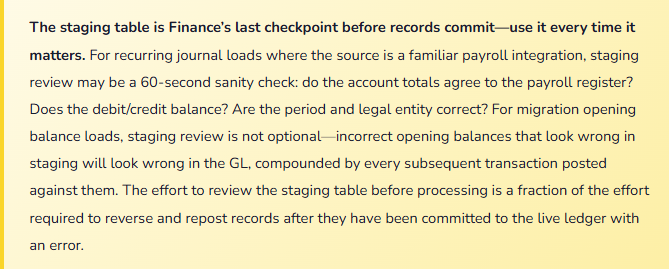
The Import Job—What Happens Between File Upload and Posted Record
Key Finance Data Entities—The Seven Every Finance Team Should Know by Name
| Data Entity | Finance Use Case | Fields to Validate in the Source File Before Import |
|---|---|---|
| General journal lines | Recurring journal loads, period-end allocations, correction entries, payroll integration feeds. | Journal name (must match an existing active journal), ledger account (active), debit/credit amounts (must balance at header level), financial dimensions (valid active values), accounting date (period must be open). |
| Budget register entry | Budget upload from external planning tools, budget revisions, supplemental mid-year loads. | Budget model code (must exist and be open), ledger account, dimension values, period start/end dates, budget type (original, revision, transfer). |
| Customer payment journal | Mass payment application—loading lockbox or bulk remittance data directly into the AR payment journal. | Customer account (must exist), payment amount, invoice reference for application (must match an open invoice), bank account, payment date. |
| Vendor invoice header and lines | High-volume vendor invoice loading from OCR or invoice processing platforms. Recurring utility or service invoices arriving in batch files from providers. | Vendor account, invoice number (duplicate check against posted invoices), invoice date, line amounts, PO reference if applicable, tax group, financial dimensions. |
| Fixed asset | Migration of fixed asset register at go-live, bulk addition of newly acquired assets, mass updates to depreciation profiles. | Asset ID (unique), asset group (determines posting profiles), acquisition date, acquisition cost, depreciation profile, asset book (must match configured books). |
| Ledger account alias | Setting up frequently used account-dimension combinations in bulk to support simplified journal entry for Finance users. | Alias name (unique), ledger account, dimension values—all must be valid active values in the configured chart of accounts. |
| Financial dimension values | Adding new cost centers, departments, or projects in bulk when a restructuring introduces many new organizational codes simultaneously. | Dimension value (unique within the dimension), description, active status, parent hierarchy assignments if dimension hierarchies are in use. |
Data Quality Controls—What Finance Builds Around the DMF
The DMF enforces D365 business rules during processing—but only what the entity validation covers. It does not catch source data errors, transformation logic errors, or period mismatch issues that arrive in a correctly formatted file. Finance must build three controls around every import process that the DMF cannot provide on its own.
Pre-import reconciliation: Reconcile the source file totals before uploading. For a payroll journal, the file’s debit total should equal the gross payroll register. For a budget load, the file total should equal the planning tool’s approved budget export. For a vendor invoice batch, the file invoice count and total should equal the invoice platform’s batch report. Pre-import reconciliation catches source data errors and transformation issues before they reach D365—where they are harder to find and more disruptive to correct.
Post-import reconciliation: After a successful import, confirm the D365-side posting matches the source. For a journal import, confirm the journal total in D365 matches the file total. For a budget import, run the budget register inquiry and confirm period totals match the planning tool export. Any discrepancy—even a small one—means either failed records (check the execution log) or a mapping transformation that changed a value during import (fix the mapping before the next run).
Segregation between data preparation and import approval: The person who prepares the import file should not be the same person who runs the import job and approves the result in D365. This is the data-load equivalent of the journal entry SOD requirement from Post 33. For automated integration feeds, the control is a monitoring protocol: Finance reviews the automated import log at every run cycle—daily for bank statements, each pay period for payroll, each budget period for planning tool feeds—and reconciles totals against the source system before considering the import complete.
Five Mistakes That Turn Data Loads into Finance Emergencies
⚠️ Import Completes but Nobody Checks the Log—Failed Records Are Never Resubmitted
Finance runs the monthly intercompany allocation journal import. The DMF reports “Import completed.” Finance closes the workspace and moves on. What “completed” actually means: 847 of 850 records were processed successfully. Three records failed validation because the cost center dimension value on those lines was deactivated the prior week. The three failed lines represent $42,000 of intercompany charges that were not posted. The period closes. The $42,000 is missing from the allocation. Nobody notices until the subsidiary’s management report doesn’t reconcile to the corporate allocation schedule four weeks later.
Fix: Every import job execution requires a log review immediately after the run completes—not when convenient, not the next morning. The review confirms one thing: records submitted equals records successfully processed. Any gap requires identification of the failed records, correction of the failure cause, and resubmission before the import is considered complete. Build the log review into the import procedure as a documented required step with a sign-off. “I ran the import, checked the log, counts reconcile” is the standard, not the exception.
⚠️ Budget Import Has Wrong Period Codes—An Entire Annual Budget Loads Three Months Off
Finance exports the annual budget from the external planning tool and runs the D365 budget register entry import. The export file uses the planning tool’s period notation (P1 through P12), mapped in the import template to D365 fiscal period codes. The mapping was correct last year. This year the organization changed its fiscal year start from January to October—D365 was reconfigured but the import template mapping was not updated. D365 fiscal period 1 is now October. The import maps P1 to the old January period. The entire annual budget loads correctly by amount but three months off in period. Q1 of the fiscal year shows zero budget. Variance reports for the first quarter are meaningless. Correcting the period mismatch requires reversing all budget register entries and reloading—a significant rework that delays the first budget review cycle by two weeks.
Fix: Import template field mappings must be reviewed whenever the D365 configuration changes—fiscal year setup, period structure, chart of accounts, financial dimension structure. A template that worked correctly last year may produce incorrect results this year if any referenced configuration changed. For budget imports specifically, run a five-minute post-import validation before approving the budget: compare D365 budget register period totals to the planning tool export period totals by account. Five minutes of period-level reconciliation after the import would have caught this error before any reporting period closed against a wrong budget baseline.
⚠️ Integration Feed Runs Silently—Nobody Monitors It Until Three Weeks of Journals Are Missing
A Power Automate flow runs every Monday morning, pulling the prior week’s payroll journal from the payroll provider’s API and importing it into D365 via the General Journal data entity. The flow runs automatically; Finance doesn’t actively monitor it. Six weeks into go-live the payroll provider updates their API—the response format changes slightly. The Power Automate flow begins failing silently: the DMF import job receives a malformed file, logs an error, and stops. Nobody reviews the import log because “it runs automatically.” Three weeks of payroll journals don’t post to D365. The GL shows three weeks of payroll expense missing. The team discovers the failure at period close. Two weeks of the prior period are now a comparative period that will require restatement.
Fix: Every automated integration feed requires active monitoring—not passive trust that automation means reliability. The monitoring protocol has two components: the automated process sends a confirmation notification on each successful run (email, Teams alert, or a log entry Finance reviews daily), and Finance runs a period-level reconciliation of D365 actuals against the source system at every import cycle. Payroll: D365 payroll expense versus the payroll provider register, each pay period. Bank transactions: D365 statement balance versus the bank’s online balance, daily. If the amounts don’t agree within a defined tolerance, investigate immediately. Automated imports are a productivity gain only when the monitoring is as reliable as the automation itself.
⚠️ Migration Opening Balances Loaded Without Staging Review—Errors Post to the Live Ledger on Day One
Go-live migration includes loading the opening trial balance, open customer invoices, open vendor invoices, and the fixed asset register. The migration team is under time pressure—go-live is Monday, data loads Sunday afternoon. The staging review step is skipped because “we validated the file.” Monday morning, users begin transacting. By Wednesday, Finance notices several AR customer balances differ materially from the legacy system. The migration file had transposed digits on two large customer balances: a $182,000 receivable loaded as $128,000 and a $241,000 receivable loaded as $214,000. The errors are live in the GL. Correcting them requires adjustment entries that create audit trail complexity for the transition period reconciliation.
Fix: Migration and opening balance loads must include a staging review as a required gate before processing—not an optional step when time permits. The staging review for an opening trial balance takes approximately one hour: export the staged records, sum debits and credits, compare to the legacy trial balance by account, flag any account where the staged balance differs from the legacy balance by more than the defined tolerance. Schedule the go-live data load at least 24 hours before go-live to allow time for staging review, correction, and reload if errors are found. A go-live timeline that doesn’t include staging review time is a go-live timeline that accepts opening balance errors as an acceptable outcome.
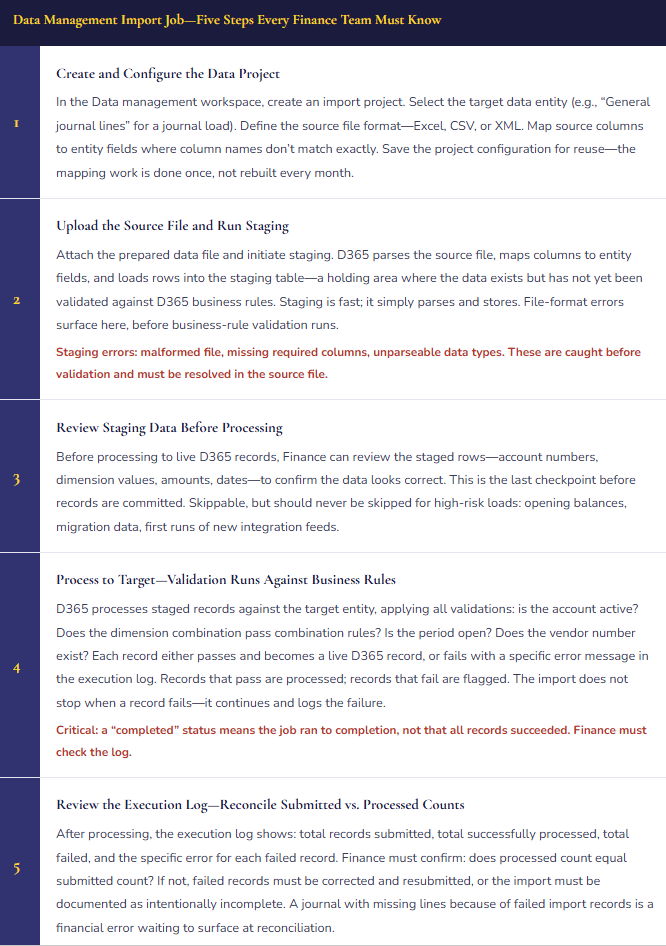
⚠️ IT Performs a Direct Table Update to “Fix” Data—Related Records Are Corrupted Across the Database
A vendor payment was posted to the wrong vendor account (V-0042 instead of V-0041). Someone suggests asking IT to “just update the vendor account field in the database” rather than reversing the payment and reposting it. IT performs a direct SQL update on the VendTrans table, changing the vendor account. The change appears correct in the vendor transaction inquiry. But several related tables—the vendor ledger account summary, the payment journal reference, the vendor aging data—were not updated because the SQL update only changed the one table. Supplier V-0042’s ledger still shows the payment as applied. Supplier V-0041’s aging doesn’t reflect the payment. The bank reconciliation matches the payment to the wrong vendor’s ledger entry. Fixing the corruption requires tracing every related table that the original insert touched—a project-level IT investigation that consumes multiple days.
Fix: Direct database table updates are not a supported or appropriate correction technique for D365 transactional financial data—ever. The correct path for a payment posted to the wrong vendor is to reverse the posted payment journal (creating a reversing entry that clears the posting from V-0042’s ledger) and repost to V-0041. The reversal-and-repost path is more steps than a SQL update but it maintains the integrity of every related table, produces a complete audit trail, and is supported by Microsoft if something goes wrong. Establish a policy: no direct table modifications for transactional financial data. When someone proposes a “quick database fix,” the answer is always the application correction path.
Do This / Don’t Do This
Do This
- Use data entities for all Finance data loads—they enforce business rules, validate combinations, and produce an auditable execution log
- Review the execution log after every import run—confirm records submitted equals records successfully processed
- Reconcile source file totals to D365 posting totals both before and after every import
- Use the staging table review for high-risk loads: opening balances, migration data, and first runs of new integration feeds
- Save import project configurations so recurring loads reuse the same validated field mappings
- Monitor automated integration feeds actively—daily log review and period-level reconciliation against the source system
- Review import template field mappings after any D365 configuration change—fiscal year, chart of accounts, dimension structure
- Insist on the D365 application correction path whenever a direct database fix is proposed
Don’t Do This
- Assume “Import completed” means all records succeeded—check the execution log every single run
- Skip the staging review step for migration and opening balance loads because of time pressure
- Allow direct database table updates on transactional financial data—related tables will not be updated and corruption will follow
- Let automated integration feeds run unmonitored—a silent failure compounds until period close surfaces it
- Reuse last year’s import template without reviewing field mappings after any configuration change
- Allow the same person to prepare the import file and approve the import run without a second reviewer
- Treat the DMF as an IT-only tool—Finance owns the data quality outcomes of every import that affects the GL
Up Next:
Data management closes the systems foundations arc. The next post turns to one of the most technically complex Finance processes in multi-entity D365 environments: Consolidations and Eliminations in D365 F&O—how the consolidation framework aggregates multiple legal entity trial balances, the elimination rules that strip intercompany transactions from the consolidated view, currency translation for foreign subsidiaries, and the reconciliation controls that make the consolidated financial statements auditable rather than simply unexplainable.
— Bobbi
D365 Functional Architect · Recovering Controller
Thank you for reading!
Recent Posts:
- Human in the Loop, With Tips: D365 Finance & Operations – Make the System Work Like You Do
- The Human Skills That Get More Valuable as AI Takes Over the Busywork
- The Skills That Matter More as Agents Take the Busywork
- Setting the Right Guardrails
- Keeping an Audit Trail on Automation
If this post helped you solve a real problem, please share it with a colleague who is in the middle of an ERP implementation or a post-go-live optimization. If you have a topic that I haven’t covered, please reach out. There is always one more topic worth exploring.
Leave a Reply