

How BC’s permission set model works, how Finance designs permission sets for segregation-of-duties compliance, the difference between permission sets and user groups, record-level security via security filters, and the quarterly access review Finance must own—not IT.
How BC’s Permission Model Works—the Essentials
BC uses a permission set model. A permission set is a named collection of permissions that defines what a user can do—read, insert, modify, delete, or execute—on specific BC objects (tables, pages, reports, codeunits). Each user is assigned one or more permission sets, and their effective access is the union of all permissions granted by all their assigned sets.
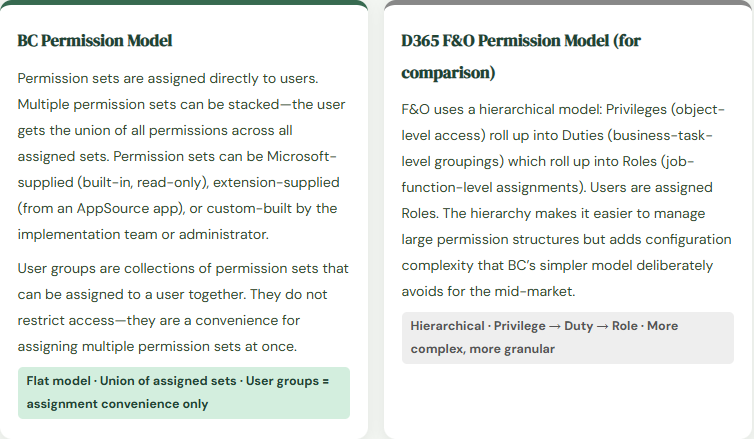
The most important thing to understand about the permission model: permissions are additive, never subtractive. If a user has two permission sets, and Set A allows posting journals and Set B does not mention journals at all, the user can still post journals because Set A granted the permission and Set B did not remove it. There is no “deny” permission in BC. If you need to restrict access, you must ensure the restrictive permission set does not include the permission—not add a denying set.
Built-In Permission Sets Finance Must Know
| Permission Set | What It Grants | Finance Use |
|---|---|---|
| SUPER | Unrestricted access to everything in the company—all tables, all pages, all reports, all system setup. Equivalent to system administrator. | Appropriate only for BC administrators and implementation consultants during setup. Never appropriate for operational Finance users. Remove from all Finance users before the auditor arrives. |
| D365 BUS FULL ACCESS | Full business user access to all business modules—broadly similar to SUPER for business processes but excluding system configuration pages. | Too broad for segregation-of-duties purposes. Grants AP, AR, GL, purchasing, and sales access to the same user. Use only as a starting point when building custom permission sets, not as a final assignment. |
| D365 FINANCE | Access to Finance module functionality: GL, AP, AR, fixed assets, budgets, cost accounting. Excludes warehouse, manufacturing, and CRM. | A better starting point for Finance users than SUPER, but still grants conflicting access for SOD purposes—a user with D365 FINANCE can both create vendors and post vendor payments. |
| D365 GL ACCOUNTS – EDIT | Ability to view and modify chart of accounts entries. | Restrict to Finance management and the Controller. An AP clerk who can modify the chart of accounts can reroute posting groups to different accounts. |
| D365 BASIC | Read-only access to most BC pages without the ability to create, modify, or delete records. | Appropriate for read-only report users—department managers who need to review financial reports but should not be able to post transactions. |
| SECURITY | Access to user management, permission set management, and security settings. | Never assign to Finance operations users. A Finance user who can modify permission sets can grant themselves additional access without IT involvement. |
Designing Permission Sets for Finance SOD
Segregation of duties in Finance means that no single user should be able to complete an entire financial cycle without a second person involved at a key control point. In BC, SOD is implemented by designing permission sets that grant the access required for a specific role without granting the conflicting access that would allow that role to complete the full cycle unilaterally.
The SOD conflicts Finance must identify and eliminate during permission set design:
- AP Conflict: Create Vendor + Approve Payment
- A user who can create vendor master records and initiate or approve vendor payments can create a fictitious vendor and pay them. Classic fraud vector. The user who creates and maintains vendors must not have payment initiation or approval access.
- Resolution
- Vendor master maintenance permission set: insert/modify on Vendor table. Payment permission set: access to Payment Journal page and post action. Assign these to different users. The Controller or AP Manager who approves the payment must not have vendor create access.
- AR Conflict: Create Customer Invoice + Apply Cash
- A user who can create customer invoices and apply cash receipts can create a fraudulent invoice, receive the cash, and apply it to the invoice—leaving no visible AR balance that would trigger a collection inquiry.
- Resolution
- Billing permission set: access to Sales Invoice pages, post action. Cash application permission set: access to Cash Receipt Journal and Customer Ledger Entry application. Different users. Supervisory review of both queues eliminates the collision point.
- GL Conflict: Create Journal + Post Journal
- A user who can create general journal entries and post them has complete unilateral control over the GL. Any entry they create posts without a second reviewer. Journal entry fraud, intentional misclassification, and unintentional posting errors all go undetected.
- Resolution
- Journal creator permission set: access to General Journal page, insert/modify, no post action. Journal approver permission set: access to post action, no insert/modify. Combined with BC’s journal approval workflow (Post 1 and Post 6 of this series) for a two-person control on every GL posting.
- Purchasing Conflict: Create PO + Receive Goods + Post Invoice
- A three-step process where control breaks down if all three steps are accessible to one user. Full purchasing cycle control in one person eliminates the three-way match purpose entirely.
- Resolution
- Purchasing agent: create purchase orders. Warehouse/receiving: post receipts. AP clerk: match and post invoices. Finance manager: approve invoices above threshold. Four distinct roles, each with access only to their step in the cycle.
Security Filters—Record-Level Access Control
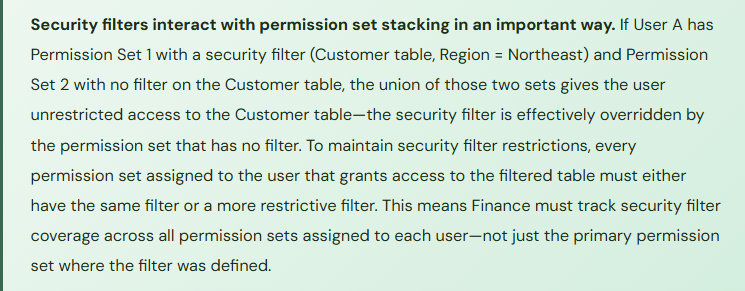
BC’s permission sets control which pages and actions a user can access. Security filters go one level deeper: they control which records within an accessible page a user can see. A user with access to the Customer Ledger Entries page and a security filter limiting their view to customers in Region = “Northeast” can only see and act on entries for customers in that region—other customers’ ledger entries are invisible to them.
Security filters are defined within a permission set, on the table permission line. The filter is a TableFilter expression using the same syntax as BC report and list view filters. They are most useful in Finance for:
Dimension-based access control: Restricting a department manager’s view of budget and journal data to their own department’s dimension value. A department head who should see only their cost center’s data can be restricted at the record level rather than relying on them not to look at other departments’ data.
Legal entity separation in a multi-company setup: In a multi-company BC environment where users log in to a single BC instance but should only access their assigned company’s data, the company-switching setup already provides isolation. Security filters add a secondary control for users who have been granted access to multiple companies and should be restricted within each.
Vendor and customer segment restriction: Restricting AP clerks to vendor accounts within their assigned vendor group, preventing a clerk assigned to domestic vendors from accessing or modifying international vendor records.
The Quarterly Access Review—Finance’s Control, Not IT’s
The quarterly access review is one of the most consistently cited audit findings in mid-market ERP implementations: it either doesn’t happen, happens annually instead of quarterly, is performed by IT without Finance involvement, or results in a report that nobody acts on. Finance must own the quarterly access review because Finance understands which access combinations create SOD conflicts and which access is appropriate for each role—IT can run the report, but only Finance can evaluate whether the results are acceptable.
The quarterly access review has four components:
- Current user list validation—confirm that every active BC user is a current employee with a business need for BC access. Terminated employees, contractors whose engagements ended, and employees who changed roles but retained their old access all surface in this step.
- Permission set appropriateness review—for each active user, confirm that their assigned permission sets match their current role, not their role at the time they were set up. Role changes without corresponding permission set updates accumulate access over time.
- SOD conflict analysis—using the SOD conflict matrix Finance built during implementation, identify any active user whose current permission set combination creates a conflict. Document the conflict, identify the business justification if one exists, and escalate to Finance management for acceptance or remediation.
- Privileged access review—specifically confirm that no operational Finance users are assigned SUPER, SECURITY, or other administrative permission sets. This review should be performed at every quarterly cycle without exception.
Five Security Mistakes Finance Pays For
⚠️ Everyone Gets SUPER at Go-Live and Nobody Removes It
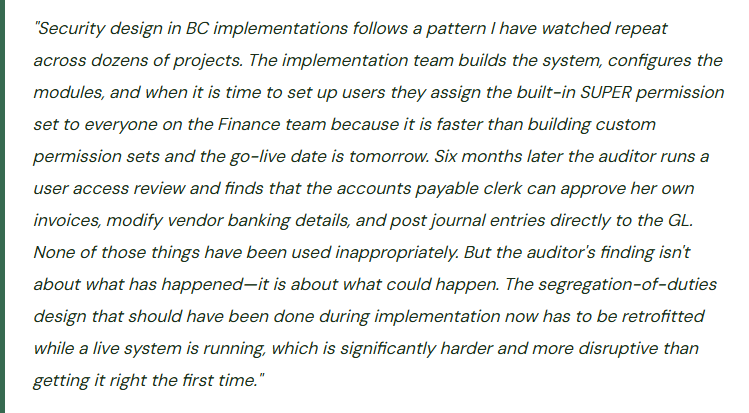
The fastest way to get through a BC go-live is to give every user SUPER access. No permission set design required, no errors because a user can’t access a page they need, no support tickets during the first week. The implementation team does it constantly because it eliminates a class of go-live problems. The problem is that SUPER access is virtually never removed after go-live. Three years later the AP clerk who has been with the company since go-live has unrestricted access to every BC table including vendor master maintenance, payment approval, GL journal posting, and the permission set management page itself. The auditor’s user access review produces a finding. Finance has to retrofit SOD controls on a live system while the team continues operating—which means managing permission set changes without disrupting access to pages people use daily, communicating changes in advance, and handling the inevitable support tickets when permissions are tightened.
Fix: Permission set design must be completed during implementation, before go-live, as a Finance-owned deliverable. The implementation partner provides a starting set of recommended permission sets by role; Finance reviews them against the SOD requirements and approves or modifies. Users go live with their role-appropriate permission sets, not SUPER. Temporary SUPER access for troubleshooting during go-live can be granted and tracked—with a documented expiration date and a removal process that IT executes on day 30. Permission set design is not a post-go-live activity; it is a go-live gate.
⚠️ User Groups Are Treated as Security Groups—SOD Analysis Is Done Wrong
The implementation team uses BC user groups extensively—a Finance User Group, an AP User Group, an AR User Group. The SOD analysis reviews the permission sets assigned to each user group and concludes that the groups don’t have conflicts. What the analysis misses: three users are assigned to both the AP User Group and the AR User Group because they do “a bit of both.” The union of the AP and AR permission sets assigned through those two groups gives those three users the ability to create customer invoices, apply customer cash receipts, create vendor invoices, and initiate vendor payments—a four-way SOD conflict that the group-level analysis never surfaced because the conflict exists at the user level, not the group level.
Fix: SOD analysis must be performed at the individual user level—the union of every permission set assigned to each specific user—not at the user group level. User groups are an assignment-convenience tool; they are not security boundaries. A user assigned to two user groups effectively has all the permissions of both groups combined. The SOD matrix must be evaluated against each user’s effective permissions, which means running the Effective Permissions page (User Setup → Effective Permissions in BC) for each user and reviewing the result against the SOD conflict list. Document the analysis and retain it for the auditor.
⚠️ Permission Sets Built Too Broadly—Every Finance User Can Access Every Finance Module
To avoid the complexity of building role-specific permission sets, the implementation team builds a single “Finance User” permission set that grants access to all Finance module pages: GL, AP, AR, fixed assets, cost accounting, budgets. The SOD analysis concludes that access to a page does not mean a user will use it inappropriately. The auditor’s view is different: access to a page means the user has the technical capability to perform actions on that page, whether they actually do or not. The control framework is based on access, not behavior. A Finance permission set that grants the AP clerk access to customer cash receipt journals, customer invoice creation, and GL journal posting creates documented SOD conflicts that generate audit findings regardless of whether those conflicts have been exploited.
Fix: Finance permission sets must be role-specific, not function-area-specific. An AP clerk permission set grants access to purchase invoice entry, vendor ledger inquiry, and payment journal creation. It does not grant access to customer ledger, GL journal posting, or vendor master modification. The additional effort to build role-specific permission sets during implementation is the cost of a control that would otherwise be retrofitted post-audit at significantly greater disruption and expense. Use the BC permission set copy function to start from a broad set and remove access rather than building from scratch.
⚠️ Terminated Employee Access Not Removed Same Day—Post-Termination Transactions Appear in the GL
A Finance employee is terminated on a Tuesday. HR notifies IT on Thursday. IT disables the Active Directory account on Friday. The BC account is still active because BC user management is separate from Active Directory (BC uses its own user management unless Azure AD integration is configured). Over three days, the terminated employee’s BC credentials remain active. Whether or not the former employee actually accessed BC during those three days, the three-day window is a control failure. In one instance I worked, a terminated controller’s credentials were used to post a journal entry six hours after their termination—the journal was legitimate work in progress, but the incident required an investigation and an HR/legal discussion that consumed two weeks of management time.
Fix: The BC user termination process must be triggered on the same day as the employment termination decision, not when IT processes the HR notification. Finance should have direct authority to disable BC users—either through a designated Finance administrator with user management access or through a same-day IT escalation path. If BC is integrated with Azure Active Directory (which it should be for all SaaS BC implementations), disabling the Azure AD account simultaneously disables BC access. Verify that Azure AD integration is active and that the BC user license state is correctly tied to Azure AD status. Include BC access in the same-day offboarding checklist alongside building access, email, and other system access.
⚠️ No Quarterly Access Review—Role Creep Accumulates Until the Annual Audit Surfaces It
The implementation defined role-appropriate permission sets. Users went live with correct access. Six months later: the AR coordinator was cross-trained on AP coverage and given AP access temporarily. The temporary access was never removed. A manager was promoted and their old analyst access was never revoked when the manager-level access was added. A consultant who helped with month-end close three months ago still has an active BC license. The annual audit access review produces 11 SOD conflicts and 4 orphaned user accounts that were never disabled. Finance management has to explain to the auditor why these access issues persisted for six to twelve months without detection. The explanation is that nobody was reviewing access between audits.
Fix: The quarterly access review must be calendared as a recurring Finance close activity, not an ad-hoc task. Schedule it for the second week following each quarter-end close, when period-end activity is complete and Finance has capacity for the review. The review takes two to four hours for a typical mid-market BC implementation: run the User Effective Permissions report for each active user, compare to the SOD matrix, confirm that every active user has a current employment record and a business reason for their access level. Document the review results and the remediation taken for any finding. Retain the documentation for the annual audit—a documented quarterly review with a clean finding is evidence that the control is operating; an undocumented annual review that surfaces 11 conflicts is evidence that the control was not operating.
Do This / Don’t Do This
Do This
- Design role-specific permission sets during implementation as a Finance-owned deliverable before go-live
- Perform SOD analysis at the individual user level—the union of all permission sets assigned to each user
- Integrate BC with Azure Active Directory so that disabling the AD account simultaneously disables BC access
- Disable BC user accounts on the same day as employment termination—not when IT processes the HR notification
- Run the quarterly access review on a calendared schedule, document the results, and retain for the annual audit
- Apply security filters consistently across all permission sets for a user when record-level restriction is required
- Review privileged access (SUPER, SECURITY) at every quarterly review cycle without exception
- Build a SOD conflict matrix during implementation that defines which permission combinations are prohibited
Don’t Do This
- Assign SUPER to operational Finance users at go-live for convenience and plan to tighten permissions “later”—later never comes
- Perform SOD analysis at the user group level—users assigned to multiple groups inherit all permissions from all groups
- Build a single broad “Finance User” permission set that grants access to all Finance modules regardless of role
- Rely on behavior rather than access for SOD compliance—the auditor evaluates access, not behavior
- Treat the access review as an annual audit exercise rather than a quarterly Finance control
- Assume Azure AD integration automatically manages BC user states without verifying the integration is correctly configured
- Give temporary additional access without documenting the expiration date and a removal plan
Up Next:
Security design closes the system foundations arc. The next post opens the customization conversation that every BC client eventually has: Extensions, Customization, and AppSource in Business Central—BC’s extension model, how Finance evaluates AppSource apps versus custom extensions, the upgrade risk of customizations in a SaaS environment, ISV solution governance, and the Finance controls Finance must own over configuration and code changes.
— Bobbi
D365 Functional Architect · Recovering Controller
Thank you for reading!
If this post helped you solve a real problem, share it with a Finance colleague who is in the middle of an ERP implementation or a post-go-live optimization. If you have a topic that I haven’t covered, please reach out. There is always one more post worth writing.
Interested in learning more about D365? Here are some of my latest posts:
Leave a Reply