
Quick scenario. Your controller finds out the new Procurement Agent can draft a change to a purchase order and route it back for someone to approve. Her first question isn’t “is the AI smart enough.” It’s “who, exactly, is allowed to click accept.” That’s a fair question, and it’s the same question she’s been asking about human employees for years. Good news: Dynamics 365 already has an answer, and you don’t have to build a new one just because a robot is now in the room.
The idea in one minute
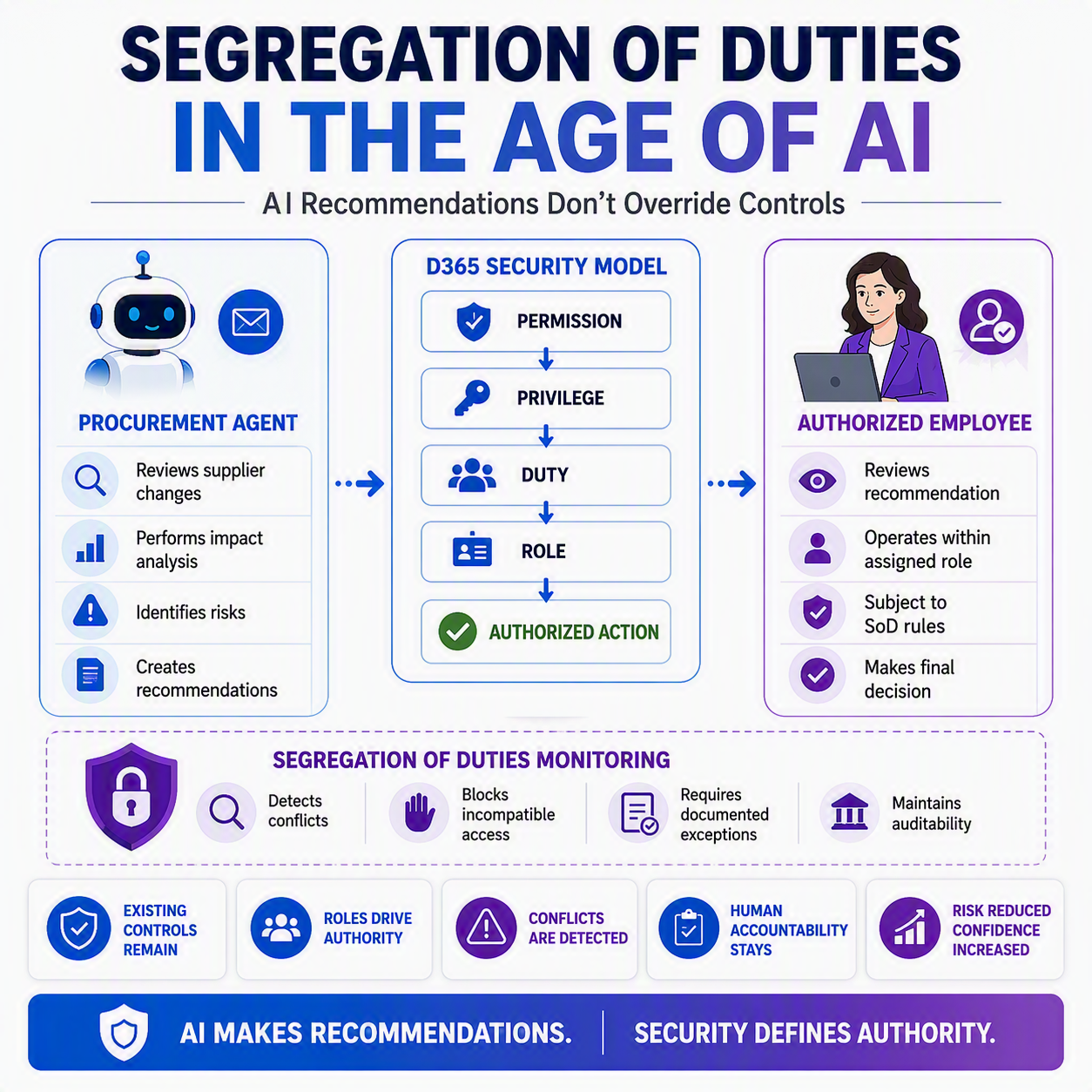
D365 Finance and Operations controls what people can do through a four-layer security model: permissions, privileges, duties, and roles. Segregation of duties (SoD) rules sit on top of that model, flagging when two duties that shouldn’t be combined end up on the same role or the same person. When an AI agent like the Procurement Agent surfaces a recommendation, the person who accepts it still has to work through this exact same security structure. The agent doesn’t get a side door. ✅
How D365 actually builds a role
If you’ve worked in D365 for a while, “segregation of duties” probably already means something to you from your accounting training. What might be newer is how the system implements it under the hood, and that structure matters more once AI enters the picture.
Start at the bottom. A permission is access to one specific thing: a menu item, a field, a button, a report. Permissions are too granular to assign to a person, so the system groups them into privileges, which represent a discrete task, like “generate deposit slips” or “cancel payments.”
Privileges then bundle up into duties. A duty corresponds to a chunk of an actual business process, not a single click. Microsoft’s own example is a “maintain bank transactions” duty that contains both the deposit slip privilege and the payment cancellation privilege. That grouping matters, because SoD rules are written at the duty level, not the permission level. It’s business logic, not IT plumbing.
Finally, duties roll up into roles, the job-function profiles you assign to a person: accounts payable clerk, purchasing agent, controller. A role can, and usually does, pull in duties from several different areas, which is exactly where SoD risk shows up.
Where the guardrails live
Here’s the part that should feel familiar even if the mechanics are new to you. In D365, you build an SoD rule by picking two duties and declaring them incompatible, along with a severity level, a written description of the risk, and any mitigation you’ve put in place (say, a monthly manager review) if you ever need to override it. Think “approve vendor payments” paired with “process vendor payments.” Two duties, one rule, documented on the Segregation of duties rules page.
Once that rule exists, D365 checks it automatically. Try to load both incompatible duties onto the same role, and the system blocks it. Try to assign a user to two roles that combine into a conflict, and you get an error, not a quiet failure. Someone with the right authority has to explicitly allow the exception and record why. Anything that slips through can also turn up later on the Roles violating segregation of duties report, so nothing just sits there unnoticed. 💡

So where does the AI fit in
This is the piece that should actually calm you down. When the Procurement Agent flags a supplier’s proposed price or delivery change, that recommendation still lands in front of a purchaser who reviews it and decides whether to accept, follow up with the supplier, or cancel the order. The agent drafts. It doesn’t act on its own authority, and it definitely doesn’t hand that purchaser new permissions they didn’t already have.
Whoever clicks accept is still working through their own assigned role, subject to the same SoD rules already sitting in your system. If accepting that recommendation would combine two duties you’ve flagged as incompatible, D365 stops it, exactly like it would if the same person had typed the change in by hand. The agent changed how the recommendation showed up. It didn’t touch who’s allowed to approve it.
That’s the reassuring part of this whole series. You didn’t build your controls around a particular data entry screen. You built them around who is allowed to do what. That foundation holds up no matter what surfaces the suggestion, a coworker, a report, or an agent reading your inbox.
Thank you for reading!
Last time, in “Trust But Verify: What the Procurement Agent Flags for You,” we looked at what the Procurement Agent actually surfaces and why a human still has to weigh in. Next up in the series: “Keeping an Audit Trail on Automation,” where we’ll dig into what D365 records when an agent makes a suggestion and a person acts on it.
Sources
- Security architecture – Finance & Operations | Dynamics 365 | Microsoft Learn
- Role-based security – Finance & Operations | Dynamics 365 | Microsoft Learn
- Set up segregation of duties – Finance & Operations | Dynamics 365 | Microsoft Learn
- Identify and resolve conflicts in segregation of duties – Finance & Operations | Dynamics 365 | Microsoft Learn
- Roles violating segregation of duties – Finance & Operations | Dynamics 365 | Microsoft Learn
- Procurement Agent overview – Supply Chain Management | Dynamics 365 | Microsoft Learn
- Dynamics 365 Finance and Operations security and segregation of duties | Rand Group
Interested in learning more? Check out my latest posts:





Leave a Reply