
Picture this. A vendor emails to say a shipment is running two weeks late. In the old world, that email sits in someone’s inbox until a purchaser opens it, tracks down the purchase order, and figures out whether anyone downstream needs to know. Maybe that happens today. Maybe it happens Thursday, after the production line already ran short.
That gap, the one between “a change happened” and “a human noticed it mattered,” is what the Procurement Agent in Dynamics 365 Supply Chain Management is built to close. In my last post, “Why AI Agents Still Need You,” I talked about why human oversight doesn’t disappear just because an agent enters the picture. This time, I want to get specific: how does the Procurement Agent decide what’s worth your attention, and how do you know it’s making that call correctly?
The idea in one minute
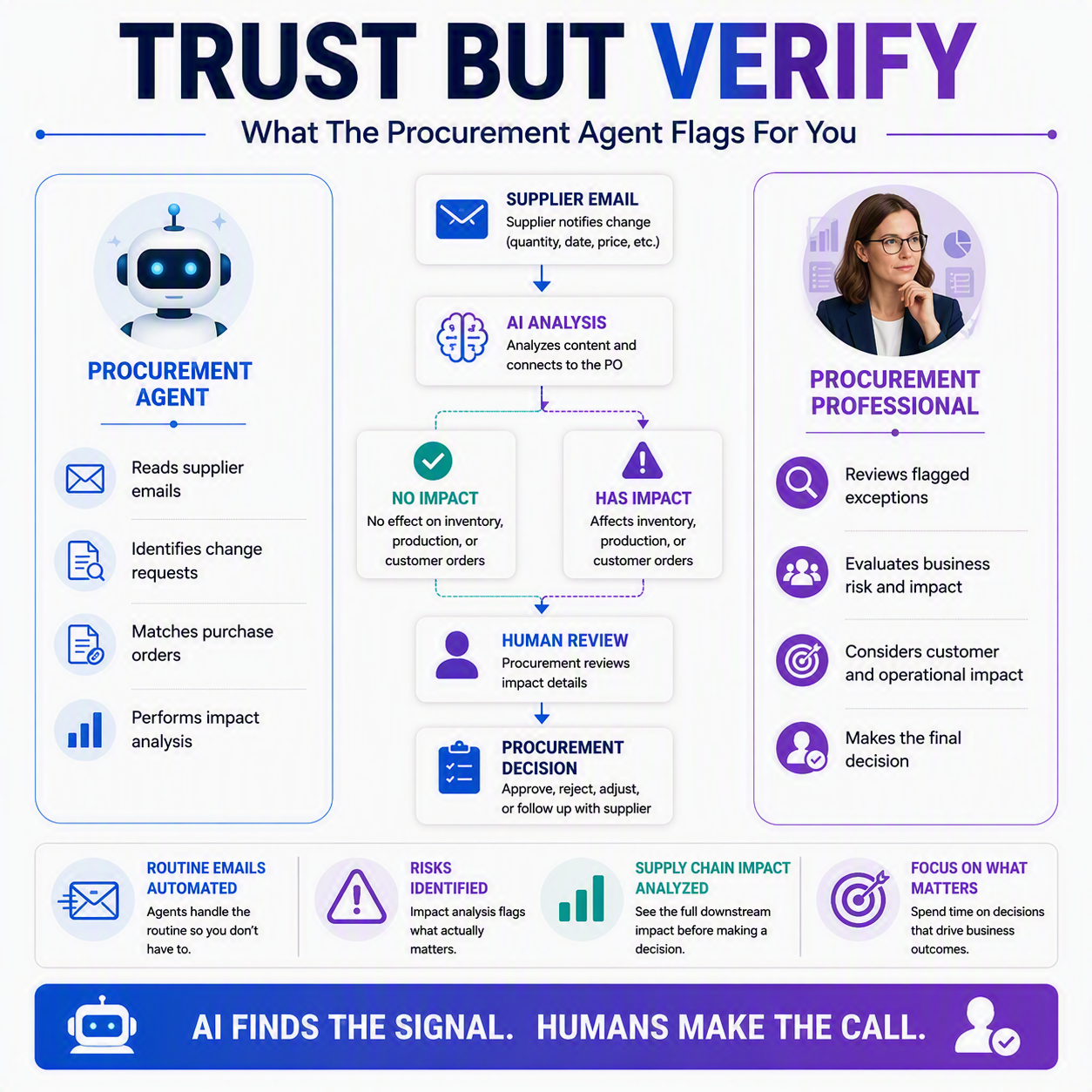
The Procurement Agent has two jobs, and you can turn them on separately or together. One job is reading vendor emails and figuring out what they’re about. The other is running the math on any requested change to see if it actually breaks something downstream. When a change is harmless, the agent says so. When it isn’t, it tells you exactly what’s at risk, sales orders, inventory, production, before you accept anything. You stay the decision maker. The agent just makes sure you’re deciding on the changes that actually deserve your time.
First, it reads your inbox 📧
The supplier communications piece of the agent monitors and classifies emails coming in from vendors. It sorts each one into a bucket: is this a plain confirmation, or is this a change request? Think price changes, quantity adjustments, delayed delivery dates, cancellations, that kind of thing.
For anything flagged as a change request, the agent identifies which fields changed and matches that information back to the actual purchase order in your system. You don’t have to hunt down the PO yourself. It’s already sitting there, side by side with what the vendor is now asking for.
Then, it does the math
This is where it gets genuinely useful for finance and operations folks. Once a change request is on the table, impact analysis traces that change through your supply chain. It checks what the purchase order feeds: sales orders, production orders, transfer orders, forecasts, safety stock. Then it looks at whether the change would push inventory below your safety stock minimum, or worse, into negative territory, and on what date.
Based on that, the agent classifies the change as either “No impact,” meaning it can safely be accepted, or “Has impact,” meaning something downstream needs a second look before anyone clicks accept. That’s the whole point. Not every late shipment is a crisis. A two-week delay on a part with three months of stock sitting in the warehouse? Probably fine. That same delay on a part feeding tomorrow’s production run? That’s a different conversation.

Where you actually see all this
You’re not digging through logs to find any of this. If the change came in through email, results land in the Emails from vendors workspace, right alongside the message that triggered it. If it came through vendor collaboration instead, you’ll find it in the Purchase order preparation workspace, under orders marked “Accepted with changes.” Either way, a View details option opens the full impact analysis.

✅ You don’t have to wait for an email
You’re not stuck waiting for a vendor to email you before you can check impact. Purchasers and planners can run impact simulation manually on a specific purchase order, testing a proposed change or checking an at-risk order before anything is confirmed. If you’ve got a hunch a supplier is running late, you can check before the email even arrives.
Know your dials 💡
Both pieces, the email monitoring and the impact analysis, can be enabled together or on their own. Maybe you want the agent reading and classifying emails but you’re not ready to lean on automated impact scoring yet. Maybe it’s the reverse. Either way is fine. These are two separate switches, not one bundled feature, and knowing that matters when you’re deciding how much to hand over.
The point isn’t to let the agent run unsupervised. It’s to stop spending your morning reading confirmation emails that didn’t need a human at all, so you have time left for the one that does.
Thank you for reading!
Next up in this series, we’re getting into a topic that finance and audit folks especially care about: “Segregation of Duties in the Age of AI,” and what it actually means to keep controls intact when an agent is doing some of the clicking.
Sources
- Procurement Agent overview
- Review and apply the impact analysis of changes (Procurement Agent)
- Procurement Agent supplier communications overview
- Supplier communications agent overview
- Impact analysis overview
- How impact analysis works
Interested in learning more? Below are some of my latest posts:





Leave a Reply